Product Overview
The Thermaltronics M6MF375 is a micro fine soldering tip designed for precision soldering applications. It is part of the M Series tips, specifically the 600 Series, which are optimized for temperature-sensitive soldering. This tip is interchangeable and compatible with various soldering systems, including Thermaltronics TMT-9000S, Metcal MX-500, MX-5000, and MX-5200.

Image: The Thermaltronics M6MF375 Micro Fine Soldering Tip, a slender, metallic tip with a gold-plated connector at one end and a fine point at the other, designed for precise soldering tasks.
Specifications
| Feature | Detail |
|---|---|
| Model Number | M6MF375 |
| Tip Style | Micro Fine |
| Tip Width | 0.01" (0.25mm) |
| Tip Length | 0.53" (13.40mm) |
| Temperature Series | 600 Series |
| Compatible Systems | Thermaltronics TMT-9000S-1, TMT-9000S-2, Metcal MX-500, MX-5000, MX-5200 |
| Material | Composite |
| Item Weight | 0.32 ounces |
| Product Dimensions | 0.47 x 6.85 x 1.38 inches |

Image: A technical diagram illustrating the precise dimensions of the M6MF375 soldering tip, showing a tip length of 13.40mm (0.53") and a tip width of 0.25mm (0.01").
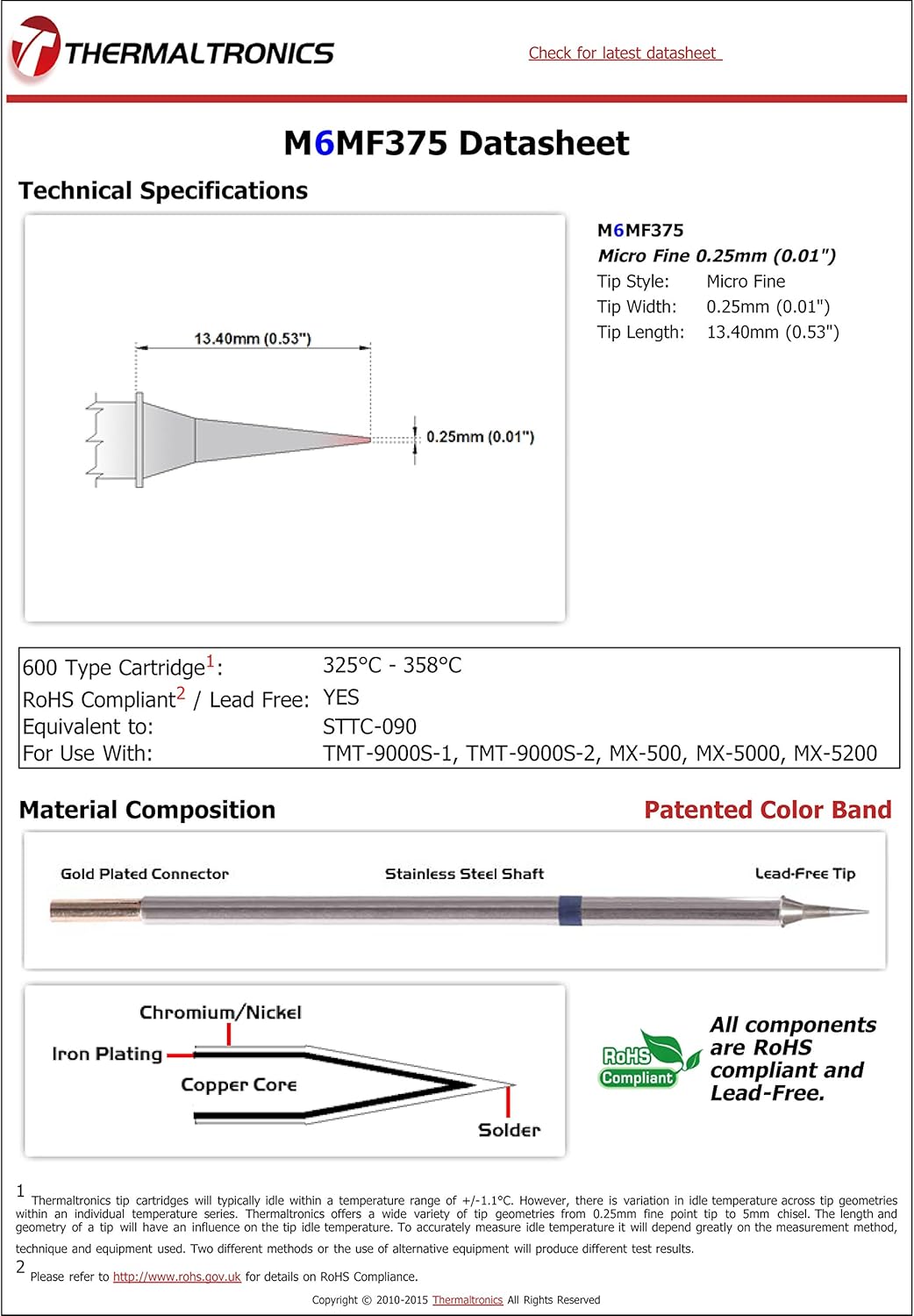
Image: The official datasheet for the Thermaltronics M6MF375, detailing technical specifications, material composition, and compliance information, including RoHS and Lead-Free status.
Setup and Installation
The Thermaltronics M6MF375 soldering tip is designed for easy installation and removal from compatible soldering hand-pieces. Ensure your soldering station is powered off and cooled down before handling tips.
- Power Off: Turn off your soldering station and unplug it from the power source. Allow the hand-piece and existing tip to cool completely to prevent burns.
- Remove Old Tip (if applicable): Carefully grasp the old tip (if one is installed) and pull it straight out from the hand-piece. Use heat-resistant gloves if the tip is still warm.
- Insert New Tip: Align the M6MF375 tip with the receptacle in the hand-piece. Gently push the tip straight in until it is fully seated. Do not force the tip.
- Verify Seating: Ensure the tip is firmly seated and makes proper contact with the heating element inside the hand-piece. A loose connection can lead to poor performance or damage.
- Power On: Plug in and power on your soldering station. Allow the tip to reach its operating temperature before use.

Image: A Thermaltronics soldering station setup, including the main unit, hand-piece, and various soldering tips, illustrating the environment where the M6MF375 tip would be installed and used.
Operating Instructions
The M6MF375 micro fine tip is ideal for soldering small components, fine pitch ICs, and intricate circuit board repairs. Its precise tip allows for accurate heat delivery to very small pads.
- Tip Tinning: Before first use and periodically during operation, tin the tip by applying a small amount of solder to the working end. This protects the tip from oxidation and ensures efficient heat transfer.
- Temperature Setting: For 600 Series tips, the recommended operating temperature range is typically 325°C - 358°C. Adjust your soldering station's temperature according to the solder type and component requirements.
- Soldering Technique: Apply the tinned tip to the joint, ensuring contact with both the component lead and the PCB pad. Feed solder into the joint, allowing it to flow evenly. Remove the solder wire, then the tip, ensuring a clean, shiny joint.
- Cleaning: Regularly clean the tip using a damp sponge or brass wool to remove excess solder and flux residue. A clean tip ensures optimal performance and longevity.

Image: A close-up view of a soldering operation on a circuit board, demonstrating the precision required for working with micro components, for which the M6MF375 tip is ideally suited.
Maintenance
Proper maintenance extends the life of your soldering tip and ensures consistent performance.
- Regular Cleaning: Always clean the tip before and after each soldering session. Use a damp cellulose sponge or brass wool. Avoid abrasive materials that can damage the tip plating.
- Re-tinning: If the tip becomes oxidized (dark or black), re-tin it immediately. If simple tinning doesn't work, use a tip tinner compound.
- Storage: When not in use, ensure the tip is tinned before storing. Store tips in a dry, clean environment to prevent oxidation.
- Inspection: Periodically inspect the tip for wear, pitting, or damage. Replace the tip if it shows significant signs of degradation, as this can affect soldering quality.
Troubleshooting
| Problem | Possible Cause | Solution |
|---|---|---|
| Tip not heating up | Loose connection in hand-piece; Faulty hand-piece or station; Incorrect tip insertion. | Re-insert tip firmly; Check hand-piece connection; Test with another tip/hand-piece if available. |
| Solder not wetting the tip | Oxidized tip; Insufficient temperature; Contaminated tip. | Clean and re-tin tip; Increase temperature (within safe limits); Use tip tinner. |
| Poor solder joints | Insufficient heat transfer; Dirty tip; Incorrect soldering technique. | Ensure tip is clean and tinned; Verify proper temperature; Review soldering technique. |
Warranty and Support
Thermaltronics products are manufactured to strict international standards (ISO 9000 & ISO 14000) and meet CE, NRTL, or GS safety requirements. The company maintains strict quality control procedures, and product warranties are among the best in the industry.
For specific warranty details or technical support, please visit the official Thermaltronics store or contact their customer service directly.
