
Denso 550-0103
Denso 550-0103 TPMS Sensor User Manual
Model: 550-0103
1. Product Overview
The Denso 550-0103 is a 315-MHz Tire Pressure Monitoring System (TPMS) sensor designed for Toyota and Lexus vehicles with factory alloy wheel options. This sensor is a direct fit replacement part, ensuring compatibility and reliable performance for monitoring tire pressure.
It is important to note that this sensor must be programmed before use to ensure proper communication with your vehicle's TPMS system. The product is designed for clamp-in mounting and features a valve stem type sensor.

Image 1: Denso 550-0103 TPMS Sensor, front view, showing the main body and valve stem.
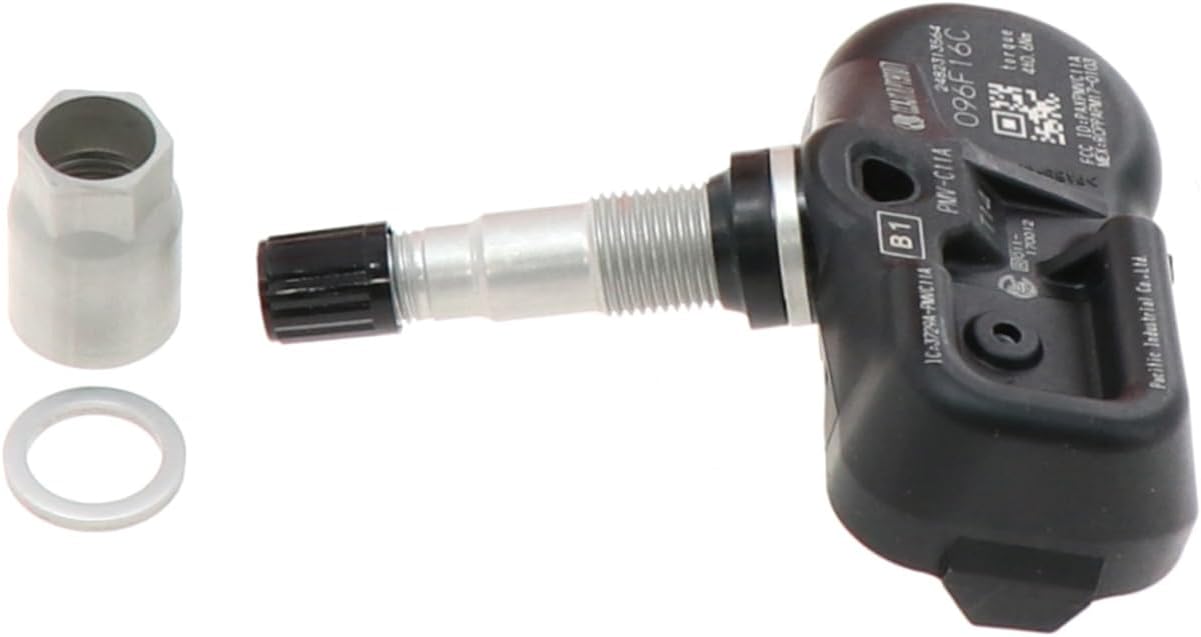
Image 2: Denso 550-0103 TPMS Sensor, side view, highlighting the valve stem and sensor body.

Image 3: Packaging for the Denso 550-0103 TPMS Sensor, showing the model number and brand.
2. Installation Guide
Proper installation of the Denso 550-0103 TPMS sensor is crucial for its functionality. This sensor is designed for clamp-in mounting.
2.1 Pre-Installation Notes
- Ensure the sensor is compatible with your vehicle's make, model, and year.
- It is highly recommended to refer to the official Installation Manual (PDF) provided by Denso for detailed, step-by-step instructions.
- Note the sensor's ID numbers before installation, as these will be required for programming. Stamping on the product showing in pictures are production/assembly line ID numbers, unrelated to the actual part-number of the product and should be ignored.
2.2 Installation Steps (Summary)
While a professional installation is recommended, the general steps involve:
- Safely remove the tire from the vehicle.
- Deflate the tire and break the bead from the rim.
- Carefully remove the old TPMS sensor from the wheel.
- Install the new Denso 550-0103 sensor, ensuring it is securely clamped in place. Torque to the required value (e.g., 4 N-m as printed on some sensors).
- Re-mount the tire onto the rim and inflate to the recommended pressure.
- Crucially, the new sensor must be programmed to your vehicle's TPMS system. This typically requires a specialized TPMS tool.
For detailed visual guidance, please consult the official installation manual.
3. Operation
Once correctly installed and programmed, the Denso 550-0103 TPMS sensor continuously monitors the air pressure and temperature within your vehicle's tires. It transmits this data wirelessly to the vehicle's onboard computer (ECU).
3.1 Tire Pressure Monitoring
The primary function of the TPMS sensor is to alert the driver to significantly under-inflated tires, which can help prevent serious accidents, improve fuel economy, and extend tire life. If a tire's pressure falls below a predetermined threshold, the TPMS warning light on your dashboard will illuminate.
3.2 Programming and Relearning
After installation, the vehicle's ECU needs to learn the new sensor IDs. This process, often called "relearning" or "programming," varies by vehicle manufacturer and typically requires a TPMS diagnostic tool. Some vehicles may automatically relearn new sensors after driving for a certain period, while others require manual input of sensor IDs or a specific relearn procedure.
The Denso 550-0103 sensor does not require cloning or pre-programming prior to installation; it is ready to be programmed to your vehicle's system directly.
4. Maintenance
TPMS sensors are generally maintenance-free components, but their lifespan is limited by the internal battery. The battery is sealed within the sensor and cannot be replaced independently. When the battery depletes, the entire sensor unit must be replaced.
- Battery Life: The typical lifespan of a TPMS sensor battery is 5-10 years, depending on usage and environmental conditions.
- Valve Stem Care: The valve stem of the sensor is exposed to the elements. Ensure the valve cap is always securely fastened to prevent dirt and moisture from entering the valve.
- Tire Rotations: During tire rotations or replacements, it is good practice to inspect the TPMS sensors for any visible damage.
5. Troubleshooting
If your TPMS warning light illuminates or you suspect a sensor issue, consider the following troubleshooting steps:
5.1 TPMS Warning Light On
- Check Tire Pressure: The most common reason for the TPMS light is low tire pressure. Use a reliable tire pressure gauge to check all four tires (and spare, if applicable) and inflate them to the vehicle manufacturer's recommended pressure.
- Sensor Programming: If a new sensor was recently installed, ensure it has been correctly programmed to the vehicle's ECU. An unprogrammed or incorrectly programmed sensor will not communicate with the system.
- Sensor Malfunction: A sensor might fail due to a depleted battery or internal damage. A diagnostic tool can read sensor data and identify faulty units.
5.2 Sensor Not Detected by TPMS Tool
If a TPMS tool cannot detect the sensor, it may indicate a dead battery or a faulty sensor. The video below demonstrates a scenario where a new sensor is not detected, while an old sensor with a low battery still provides a signal.
Video Description: This video demonstrates testing a new Denso TPMS sensor and an old sensor using a MaxiTPMS TS508 tool. The new sensor fails to register any data, indicating it might be faulty or require specific activation, while the old sensor, despite having a low battery, still transmits data. This highlights the importance of testing sensors before full installation.
For further assistance, refer to the official Troubleshooting Guide (PDF).
6. Specifications
| Feature | Detail |
|---|---|
| Manufacturer | Denso |
| Brand | Denso |
| Model | Sensor |
| Item Weight | 1.76 ounces |
| Country of Origin | Japan |
| Item Model Number | 550-0103 |
| Mounting Type | Clamp-In |
| TPMS Sensor Type | Valve stem |
| Pre-Programming | No Cloning or Pre-Programming required |
7. Warranty and Support
For warranty information and technical support regarding your Denso 550-0103 TPMS sensor, please contact Denso customer service or visit their official website. Keep your purchase receipt as proof of purchase.
Additional protection plans may be available from your retailer at the time of purchase. These plans are separate from the manufacturer's warranty.
For general inquiries or to find authorized service centers, please refer to the Denso official resources.
Related documents550-0103


Ask a question about this manual
Ask about setup, troubleshooting, compatibility, parts, safety, or missing instructions. Manuals+ will review the question and use this page’s manual context to help answer it.