Introduction
Thank you for choosing the Kettler KTLR7873-750 Mini Stepper. This compact and efficient fitness device is designed to help you improve your circulation and strengthen your leg and gluteal muscles. Its space-saving design makes it ideal for home use, allowing you to integrate effective workouts into your daily routine.
This manual provides essential information for the safe and effective use of your Mini Stepper, including setup, operation, maintenance, and troubleshooting.
Safety Information
Please read all safety instructions carefully before using the Kettler Mini Stepper. Failure to follow these instructions may result in injury or damage to the product.
- Consult a physician before starting any new exercise program.
- Ensure the stepper is placed on a stable, level surface during use.
- Keep children and pets away from the stepper during operation.
- Wear appropriate athletic footwear when using the stepper.
- Inspect the stepper for any loose or damaged parts before each use. Do not use if damaged.
- Stop exercising immediately if you feel faint, dizzy, or experience pain.
Package Contents
Upon unpacking, please ensure all components are present and undamaged:
- Kettler KTLR7873-750 Mini Stepper Unit
- Integrated Training Computer
- User Manual (this document)
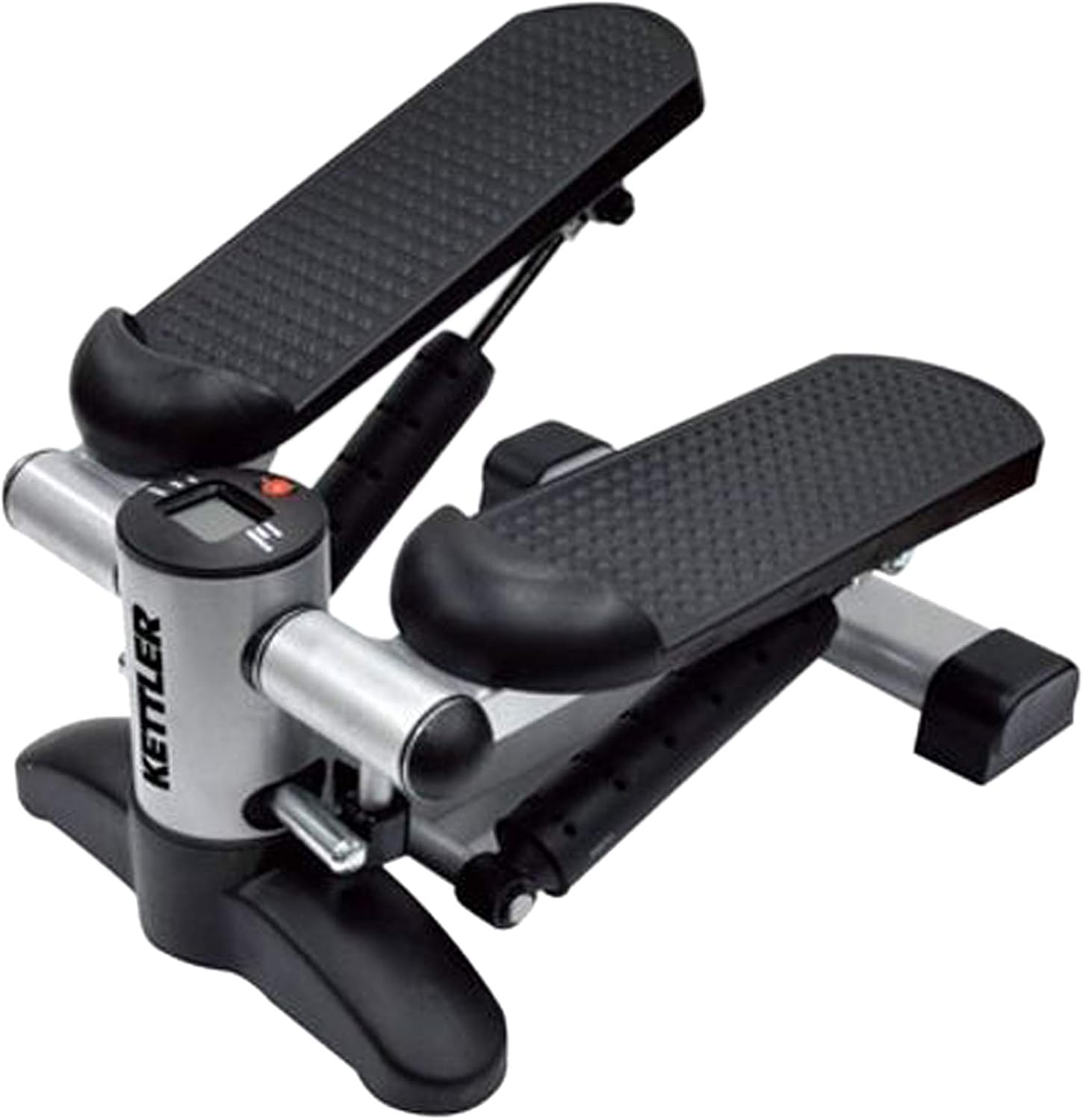
Figure 1: Kettler KTLR7873-750 Mini Stepper. This image shows the Kettler Mini Stepper from an angled front view. It features a silver-colored main frame with black, textured foot pedals. A small digital display is visible on the front, indicating the presence of a training computer. The compact design is evident, suitable for home use.
Setup
The Kettler Mini Stepper is designed for minimal assembly. Please follow these steps to prepare your stepper for use:
- Unpack: Carefully remove all components from the packaging.
- Placement: Choose a flat, stable, and non-slip surface for the stepper. Ensure there is enough clear space around the unit for safe operation.
- Stabilize: Verify that the stepper rests firmly on the ground without wobbling. Adjust if necessary.
- Check Pedals: Ensure the foot pedals move freely and smoothly. The hydraulic dampers should provide consistent resistance.
- Training Computer: The training computer is integrated. If it requires battery insertion, follow the instructions near the display unit.
Operating Instructions
Using your Kettler Mini Stepper is straightforward. Follow these guidelines for an effective workout:
Starting Your Workout
- Step On: Carefully step onto the pedals one foot at a time, ensuring your feet are centered and stable on the textured surfaces.
- Maintain Balance: Use a wall or sturdy object for support if needed, especially when first getting on.
- Begin Stepping: Start a rhythmic stepping motion, pushing down alternately with each foot. The hydraulic dampers will provide resistance.
Using the Training Computer
The integrated training computer helps you monitor your progress. It typically displays:
- Time: Duration of your workout.
- Step Counter: Total number of steps taken.
- Step Rate: Steps per minute.
- Energy: Estimated calories burned (or similar energy metric).
Refer to the small button near the display to cycle through different metrics or reset the values. Specific button functions may vary slightly, but generally, a single press cycles, and a long press resets.
Workout Tips
- Start with short sessions and gradually increase duration and intensity as your fitness improves.
- Maintain an upright posture and engage your core muscles.
- Vary your stepping speed to target different muscle groups and cardiovascular intensity.
Maintenance
Regular maintenance will ensure the longevity and optimal performance of your Kettler Mini Stepper.
- Cleaning: Wipe down the stepper with a damp cloth after each use to remove sweat and dust. Do not use abrasive cleaners.
- Lubrication: The hydraulic dampers are generally maintenance-free. If you notice any squeaking or stiffness, a small amount of silicone-based lubricant can be applied to pivot points, but avoid applying directly to the hydraulic cylinders unless specified by Kettler.
- Inspection: Periodically check all nuts, bolts, and moving parts to ensure they are secure. Tighten any loose fasteners.
- Storage: Store the stepper in a cool, dry place away from direct sunlight and extreme temperatures.
Troubleshooting
Here are some common issues and their potential solutions:
| Problem | Possible Cause | Solution |
|---|---|---|
| Squeaking noise during use | Lack of lubrication at pivot points; loose components. | Apply a small amount of silicone lubricant to moving joints. Check and tighten all bolts and nuts. |
| Training computer not displaying | Battery drained or incorrectly installed. | Check and replace batteries if necessary. Ensure batteries are inserted with correct polarity. |
| Uneven step resistance | One hydraulic damper may be worn or damaged. | Contact Kettler customer support for assistance or replacement parts. |
| Stepper wobbles during use | Not on a level surface; loose base components. | Move the stepper to a flat, stable surface. Check and tighten any base screws. |
Specifications
| Feature | Detail |
|---|---|
| Brand | Kettler |
| Model Number | KTLR7873-750 (7873-750) |
| Color | Silver/Black |
| Dimensions (L x W x H) | 75 x 40 x 35 cm |
| Weight | 2 kg |
| Resistance Type | Hydraulic Dampers |
| Training Computer Functions | Time, Step Counter, Step Rate, Energy (Calories) |
| Manufacturer | KETTLER |
Warranty and Support
For warranty information, technical support, or to order replacement parts, please contact Kettler customer service. Details can typically be found on the official Kettler website or on the product packaging.
Please have your model number (KTLR7873-750) and purchase date ready when contacting support.
Note: Specific warranty terms may vary by region and retailer. Please retain your proof of purchase.


