
1. Introduction
Thank you for choosing the WiMiUS Q1 4K WiFi Waterproof Action Camera. This manual provides essential information for setting up, operating, and maintaining your device. Please read it carefully before use to ensure optimal performance and longevity of your camera.

Image 1.1: WiMiUS Q1 4K WiFi Waterproof Action Camera. This image displays the camera in its retail packaging, highlighting its 4K Full HD capabilities, 40m waterproof rating, WiFi connectivity, 170-degree wide angle, and 2.0-inch LCD screen.
2. Package Contents
Please verify that all items listed below are included in your package:
- 1 x WiMiUS Q1 4K Action Camera
- 2 x 900mAh Rechargeable Batteries
- 1 x Battery Charging Dock
- Various mounting accessories (e.g., waterproof case, helmet mounts, bicycle mount, adhesive mounts, clips, bandages, tethers, USB cable, cleaning cloth)
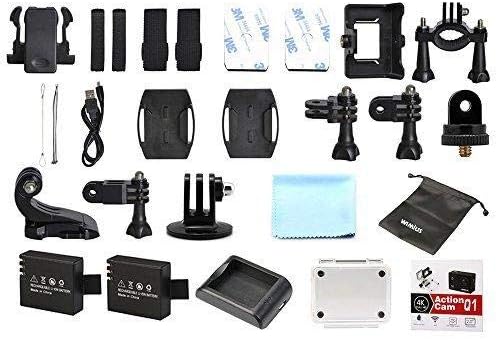
Image 2.1: WiMiUS Q1 Action Camera Accessories. This image shows the comprehensive set of accessories included with the camera, such as various mounts, straps, a charging dock, two batteries, a USB cable, and a cleaning cloth.
3. Camera Overview
Familiarize yourself with the camera's buttons and ports:

Image 3.1: WiMiUS Q1 Camera Labeled Parts. This diagram illustrates the various components of the camera, including the Power/Mode button, OK button, UP/WiFi button, Down button, Speaker, Microphone, Micro SD card slot, USB port, HDMI port, Charging Indicator, Operation Indicator, and WiFi Indicator.
- Power/Mode Button: Press and hold to power on/off. Short press to switch modes.
- OK Button: Confirm selection, start/stop recording, or take a photo.
- UP/WiFi Button: Navigate up in menus. Press and hold to activate/deactivate WiFi.
- Down Button: Navigate down in menus.
- Speaker: Audio output.
- Microphone: Audio input for recording.
- Micro SD Slot: Insert Micro SD card (up to 64GB, not included).
- USB Port: For charging and data transfer.
- HDMI Port: For connecting to an external display.
- Charging Indicator: Shows charging status.
- Operation Indicator: Shows camera's operational status.
- WiFi Indicator: Shows WiFi connection status.
4. Setup
4.1. Battery Installation
- Open the battery compartment cover on the bottom of the camera.
- Insert a fully charged 900mAh battery, ensuring the correct orientation.
- Close the battery compartment cover securely.
4.2. Micro SD Card Installation
A Micro SD card (not included) is required for storing photos and videos. The camera supports cards up to 64GB.
- Locate the Micro SD card slot on the side of the camera.
- Insert the Micro SD card with the contacts facing the camera's front until it clicks into place.
- To remove, gently push the card until it springs out.
4.3. Charging the Battery
Use the provided charging dock and USB cable to charge the batteries. A full charge takes approximately 3 hours.
- Insert the battery into the charging dock.
- Connect the charging dock to a USB power source (5V 1A) using the USB cable.
- The charging indicator on the dock will show the charging status.
4.4. Using the Waterproof Case
The waterproof case allows the camera to be used underwater up to 40 meters. Ensure the case is properly sealed before submerging.
- Place the camera inside the waterproof case.
- Close the latch firmly to ensure a watertight seal.
- Before first use, test the empty waterproof case in water to confirm no leaks.
5. Operating Instructions
5.1. Power On/Off
- Power On: Press and hold the Power/Mode button for 3 seconds.
- Power Off: Press and hold the Power/Mode button for 3 seconds.
5.2. Mode Switching
Short press the Power/Mode button to cycle through different modes: Video Recording, Photo Shooting, Playback, and Settings.
5.3. Video Recording
- Switch to Video Recording mode.
- Press the OK button to start recording. The operation indicator will flash.
- Press the OK button again to stop recording. The operation indicator will stop flashing.
Video Resolutions: 4K@30FPS, 2.7K@30FPS, 1080P@60FPS, 720P@120FPS.
Special Video Modes:
- Time Lapse: Intervals of 0.5S, 1S, 2S, 5S, 10S, 30S, 60S.
- Loop Recording: 2min, 3min, 5min segments.
- Slow Motion: 1080P@60FPS, 720P@120FPS.
5.4. Photo Shooting
- Switch to Photo Shooting mode.
- Press the OK button to take a photo.
Photo Resolutions: 16M, 14M, 12M, 8M, 5M.
Photo Modes: Single, Self-Timer (3S/5S/10S), Continuous Shot (3P/S, 5P/S, 10P/S, 20P/S).
5.5. Wi-Fi Connection
Connect your camera to a smartphone or tablet via Wi-Fi for remote control and file transfer.
- Download the official WiMiUS app from your device's app store.
- On the camera, press and hold the UP/WiFi button to activate Wi-Fi. The Wi-Fi indicator will light up.
- On your smartphone/tablet, go to Wi-Fi settings and connect to the camera's Wi-Fi network (SSID usually starts with 'WiMiUS' or similar).
- Open the WiMiUS app to control the camera remotely.
5.6. Playback
To review your recorded videos and photos:
- Switch to Playback mode using the Power/Mode button.
- Use the UP and Down buttons to navigate through your files.
- Press the OK button to view a selected file.
6. Maintenance
6.1. Cleaning
- Use a soft, lint-free cloth to clean the camera lens and LCD screen.
- For stubborn smudges, lightly dampen the cloth with water. Avoid harsh chemicals.
- Ensure the camera is dry before closing any ports or compartments.
6.2. Storage
- Store the camera in a cool, dry place away from direct sunlight and extreme temperatures.
- Remove batteries if the camera will not be used for an extended period.
7. Troubleshooting
- Camera not turning on: Ensure the battery is fully charged and correctly inserted. Try using the second battery.
- SD card error: Ensure the Micro SD card is correctly inserted and formatted (FAT32 recommended). Try a different compatible Micro SD card.
- Poor video/photo quality: Check lens for smudges. Ensure adequate lighting. Verify resolution settings.
- Wi-Fi connection issues: Ensure Wi-Fi is enabled on the camera and your mobile device. Restart both devices. Check for app updates.
- Camera freezing: Remove and reinsert the battery to reset the camera.
8. Specifications
| Model | WiMiUS Q1 |
| LCD Screen | 2.0'' LTPS |
| Lens | 170-degree A+ High Resolution Wide Angle |
| Video Resolution | 4K@30FPS, 2.7K@30FPS, 1080P@60FPS, 720P@120FPS |
| Video Format | MOV (H.264) |
| Photo Resolution | 16M/14M/12M/8M/5M |
| Storage | Micro SD Card, up to 64GB (Class 10 or higher recommended) |
| Battery | 2 x 900mAh Rechargeable Li-ion |
| Charge Time | Approximately 3 hours |
| Connectivity | USB 2.0, Wi-Fi |
| System Compatibility | Windows XP/Vista/Win7 or above, Mac OS |
| Special Features | Time Lapse, Loop Recording, Slow Motion, Waterproof (with case) |
| Optical Zoom | 10x |
| Sensor Type | CMOS |
9. Warranty and Support
For warranty information and technical support, please refer to the documentation provided with your purchase or visit the official WiMiUS website. Keep your proof of purchase for warranty claims.