Introduction
This manual provides comprehensive instructions for the setup, operation, and maintenance of your Logitech Z906 THX Certified 5.1 Speaker System. Designed for immersive audio experiences, this 500W RMS system features wall-mountable satellites and a remote control for convenient operation. Please read this manual thoroughly to ensure proper use and to maximize the performance of your speaker system.
What's in the Box
Verify that all components listed below are included in your package:
- Control console
- 6 satellite speakers
- Subwoofer
- Wall mounting brackets
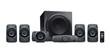
Image: The complete Logitech Z906 5.1 Speaker System, showcasing the central subwoofer, five satellite speakers, and the control console, all in a dark gray finish.
Setup
- Placement: Position the subwoofer on the floor, preferably in a corner for optimal bass response. Place the five satellite speakers around your listening area for a true 5.1 surround sound experience. The speakers are wall-mountable for flexible placement.
- Connections: Connect each satellite speaker to the subwoofer using the provided speaker cables. Ensure the correct polarity (+ to + and - to -) for each connection.
- Control Console: Connect the control console to the subwoofer. The control console serves as the central hub for managing inputs, volume, and sound effects.
- Audio Input: Connect your audio source (e.g., computer, TV, game console, DVD/Blu-ray player, vinyl player) to the control console using the appropriate audio cables (e.g., optical, coaxial, 3.5mm, RCA). The system supports multiple inputs.
- Power: Plug the subwoofer's power cable into a wall outlet.
Operating Instructions
Power On/Off
Press the Power button on the remote control or the control console to turn the system on or off.
Volume Control
- Master Volume: Adjust the overall system volume using the large dial on the control console or the Volume Up/Down buttons on the remote.
- Individual Channel Volume: Use the remote control to adjust the volume levels for specific speaker sets (e.g., front, rear, center, subwoofer) to fine-tune your audio experience.
Input Selection
Press the Input button on the remote or console to cycle through available audio inputs (e.g., Optical 1, Optical 2, Coaxial, Six-Channel Direct, 3.5mm, RCA).
Sound Effects (3D/4.1)
The system offers various sound effects modes. Use the "Effect" button on the remote to switch between modes such as 3D surround sound or 4.1 channel output, depending on your content and preference. 3D mode is often preferred for gaming, while 4.1 can enhance music listening.
Maintenance
- Cleaning: Use a soft, dry cloth to clean the surfaces of the speakers, subwoofer, and control console. Avoid using abrasive cleaners or solvents.
- Ventilation: Ensure that the subwoofer and control console have adequate ventilation to prevent overheating. Do not block any vents.
- Cable Management: Keep cables organized and untangled to prevent damage and ensure optimal signal transmission.
- Storage: If storing the system for an extended period, disconnect it from power and store it in a cool, dry place.
Troubleshooting
| Problem | Possible Cause | Solution |
|---|---|---|
| No sound from speakers. | Power not connected, incorrect input selected, volume too low, cables loose. | Check power connection. Select correct input. Increase volume. Ensure all cables are securely connected. |
| Distorted or poor sound quality. | Incorrect cable connection, audio source issue, speaker placement. | Verify cable connections and polarity. Test with a different audio source. Adjust speaker placement. |
| Remote control not working. | Batteries drained, obstruction, remote out of range. | Replace remote batteries. Remove any obstructions between remote and console. Ensure remote is within operating range. |
Specifications
| Feature | Detail |
|---|---|
| Model Name | Logitech Z906 |
| Speaker Type | Satellite, Wall Mount |
| Special Feature | Radio |
| Recommended Uses For Product | For Surround Sound Systems, For Computers, For Music Players |
| Compatible Devices | Laptop, Desktop, Television, Projector |
| Subwoofer Diameter | 8 Inches |
| Controller Type | Remote Control |
| Surround Sound Channel Configuration | 5.1 |
| Included Components | Control console, 6 satellite speakers, subwoofer, wall mounting brackets |
| Is Waterproof | FALSE |
| Warranty Type | Limited |
| Number of Items | 1 |
| Control Method | Remote |
| Speaker Size | 8 Inches |
| Power Source | Corded Electric |
| Customer Package Type | FFP |
| Audio Driver Type | Dynamic Driver |
| Subwoofer Connectivity Technology | Wired |
| Connectivity Protocol | Coaxial |
| Includes MP3 player? | No |
| Number Of Circuits | 1 |
| Number of Power Levels | 1 |
| Manufacturer | Logitech |
| ASIN | B00NMXZVD8 |
| Item model number | Z906 |
| Speaker Maximum Output Power | 500 Watts |
| Connectivity Technology | Coaxial |
| Audio Output Mode | Surround |
| Mounting Type | Wall Mount |
Warranty and Support
The Logitech Z906 THX Certified 5.1 Speaker System comes with a Limited Warranty. For detailed warranty information, product registration, and technical support, please visit the official Logitech support website or refer to the warranty card included in your product packaging.
For further assistance, you may contact Logitech Customer Support through their official channels.


