
Important Safety Instructions
Please read these instructions carefully before operating your Intex IT-222 SUF Multimedia Speaker system. Keep this manual for future reference.
- Do not expose this appliance to rain or moisture to prevent fire or shock hazards.
- Do not open the speaker cabinet. There are no user-serviceable parts inside. Refer all servicing to qualified personnel.
- Ensure proper ventilation around the unit. Do not block any ventilation openings.
- Place the unit on a stable, flat surface to prevent it from falling.
- Disconnect the power plug from the wall outlet if the unit is not used for a long period.
- Avoid placing the unit near heat sources such as radiators, heat registers, stoves, or other apparatus (including amplifiers) that produce heat.
- Protect the power cord from being walked on or pinched, particularly at plugs, convenience receptacles, and the point where they exit from the apparatus.
- Use only attachments/accessories specified by the manufacturer.
Package Contents
Verify that all items listed below are present in your package:
- 1 x Intex IT-222 SUF Main Unit (Subwoofer)
- 2 x Satellite Speakers
- 1 x Remote Control
- 1 x Audio Input Cable (RCA to 3.5mm)
- 1 x User Manual (this document)
Product Overview
The Intex IT-222 SUF is a 2.1 channel multimedia speaker system designed to deliver enhanced audio for various devices. It consists of a main subwoofer unit and two satellite speakers.
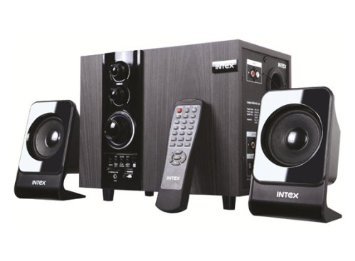
Image: The Intex IT-222 SUF 2.1 Channel Multimedia Speaker system, showing the main subwoofer unit, two satellite speakers, and the remote control.
Main Unit (Subwoofer) Controls and Ports
- Power Switch: Located at the rear, turns the unit on or off.
- Volume Knob: Adjusts the overall volume level.
- Bass Knob: Adjusts the bass level.
- Treble Knob: Adjusts the treble level.
- Mode Button: Cycles through input modes (AUX, FM, USB, SD, Bluetooth).
- Play/Pause Button: Controls playback for USB/SD/Bluetooth.
- Previous/Next Buttons: Navigates tracks for USB/SD/Bluetooth or stations for FM.
- USB Port: For connecting USB flash drives.
- SD Card Slot: For inserting SD memory cards.
- AUX Input (RCA): For connecting external audio devices via RCA cables.
- Satellite Speaker Outputs: RCA jacks for connecting the satellite speakers.
- FM Antenna: Integrated or external antenna for FM radio reception.
Remote Control Functions
The remote control provides convenient access to various functions:
- Power: Standby/On.
- Mode: Selects input source (AUX, FM, USB, SD, Bluetooth).
- Volume +/-: Adjusts master volume.
- Mute: Mutes/unmutes audio.
- Play/Pause: Controls playback.
- Previous/Next: Skips tracks/stations.
- EQ: Cycles through equalizer presets (if available).
- Numeric Keypad: Direct track/station selection.
Setup
Follow these steps to set up your speaker system:
1. Placement
- Place the main subwoofer unit on a stable surface, preferably on the floor for optimal bass response.
- Position the two satellite speakers on either side of your listening area, facing towards you, for a stereo sound experience. Ensure they are at an appropriate distance from each other.
2. Connecting the Satellite Speakers
- Locate the RCA output jacks on the rear of the main subwoofer unit.
- Connect the cables from the satellite speakers to these output jacks. Ensure a secure connection.
3. Power Connection
- Ensure the power switch on the main unit is in the "OFF" position.
- Plug the power cord into a standard AC 220V-240V, 50Hz-60Hz wall outlet.
4. Audio Input Connection
Choose one of the following methods to connect your audio source:
- AUX Input: Use the provided RCA to 3.5mm audio cable. Connect the RCA ends to the AUX input jacks on the main unit and the 3.5mm jack to your audio device (e.g., TV, computer, smartphone).
- USB/SD Card: Insert a USB flash drive or SD card into the respective port/slot on the main unit.
- Bluetooth: Refer to the "Bluetooth Pairing" section under Operating Instructions.
Operating Instructions
Power On/Off
Flip the power switch on the rear of the main unit to the "ON" position. The unit will power on. To turn off, flip the switch to "OFF". The remote control can also put the unit into standby mode.
Mode Selection
Press the "Mode" button on the main unit or the remote control to cycle through the available input sources: AUX, FM, USB, SD, and Bluetooth.
Volume Control
Adjust the master volume using the large knob on the main unit or the "Volume +/-" buttons on the remote control. Use the Bass and Treble knobs on the main unit to fine-tune the sound.
FM Radio Operation
- Switch the mode to "FM".
- Press and hold the "Play/Pause" button on the main unit or remote to initiate an automatic scan for FM stations. The system will save detected stations.
- Use the "Previous/Next" buttons to navigate through the saved stations.
USB/SD Card Playback
- Insert a USB flash drive or SD card containing MP3 audio files into the corresponding port/slot.
- Switch the mode to "USB" or "SD". The system will automatically begin playing the audio files.
- Use the "Play/Pause", "Previous", and "Next" buttons to control playback.
Bluetooth Pairing
- Switch the mode to "Bluetooth". The unit will enter pairing mode, indicated by a flashing light or audible prompt.
- On your Bluetooth-enabled device (e.g., smartphone, tablet), enable Bluetooth and search for available devices.
- Select "Intex IT-222 SUF" (or similar name) from the list of devices.
- Once paired, you will hear a confirmation sound, and you can now play audio from your device through the speakers.
Maintenance
Proper care ensures the longevity of your speaker system:
- Cleaning: Use a soft, dry cloth to clean the surfaces of the speakers. Do not use liquid cleaners or abrasive materials.
- Ventilation: Ensure that the ventilation openings on the main unit are not blocked to prevent overheating.
- Storage: If storing the unit for an extended period, disconnect it from power and store it in a cool, dry place, away from direct sunlight and extreme temperatures.
- Avoid Moisture: Keep the speakers away from water and high humidity.
Troubleshooting
If you encounter issues with your speaker system, refer to the following table for common problems and solutions:
| Problem | Possible Cause | Solution |
|---|---|---|
| No power | Power cord not connected; Power switch off; Power outlet faulty. | Check power cord connection; Ensure power switch is ON; Try a different power outlet. |
| No sound | Volume too low; Incorrect input mode; Audio cable loose/faulty; Device not playing. | Increase volume; Select correct input mode; Check audio cable connections; Ensure source device is playing. |
| Distorted sound | Volume too high; Source audio quality poor; Speaker placement. | Reduce volume; Try a different audio source; Adjust speaker placement. |
| Bluetooth not connecting | Speaker not in pairing mode; Device Bluetooth off; Device too far. | Ensure speaker is in Bluetooth mode; Turn on device Bluetooth; Move device closer (within 10m). |
| FM reception poor | Weak signal; Antenna not positioned correctly. | Adjust the position of the FM antenna; Try auto-scanning again. |
Technical Specifications
- Model Name: IT-222 SUF
- Speaker Type: 2.1 Channel Multimedia Speaker System
- Output Power: 20W (Main Unit) + 10W x 2 (Satellite Units) = 40W Total
- Frequency Response (Main Unit): 20Hz - 200Hz
- Frequency Response (Satellite Speakers): 160Hz - 20Khz
- FM Frequency Range: 88Mhz to 108Mhz
- Separation: >= 40dB
- S/N Ratio: >=60dB
- Bass Adjustment: +/- 15dB
- Impedance (Main Unit): 6 Ohm
- Impedance (Satellite Units): 4 Ohm
- Speaker Unit Size (Main Unit): 10.16cm (4 inches)
- Speaker Unit Size (Satellite Units): 7.62cm x 2 (3 inches x 2)
- Power Supply: AC 220V - 240V, 50Hz - 60Hz
- Net Weight: Approximately 2.86 Kg
- Control Method: Remote Control
- Wireless Communication Technology: Bluetooth
- Connectivity Technology: Wired (AUX, Satellite)
- Compatible Devices: Desktop, Laptop, Smartphone, Tablet, Television
- Special Feature: Radio (FM)
Warranty and Support
Intex products are designed for reliability and performance. For warranty information, service, or technical support, please refer to the warranty card included with your product or visit the official Intex website. You may also contact Intex customer service directly for assistance.
Please retain your purchase receipt as proof of purchase for warranty claims.