
1. Introduction
This manual provides essential information for the installation, operation, and maintenance of your Sapphire AMD FirePro W5100 graphics card. The AMD FirePro W5100 is a professional workstation graphics card designed for CAD and engineering applications, including software like Creo and SolidWorks.
2. Package Contents
Verify that all components are present in the package:
- Sapphire AMD FirePro W5100 Graphics Card
- Quick Installation Guide
- Driver CD (or link to driver download)
- DisplayPort to DVI Adapters (quantity may vary)
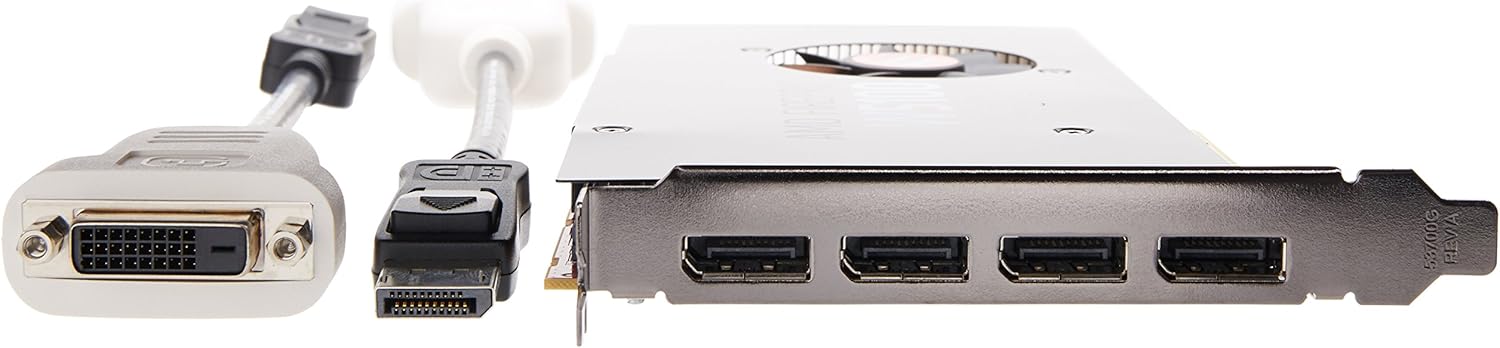
Image 2.1: Contents of the Sapphire AMD FirePro W5100 package, including the graphics card, documentation, driver CD, and DisplayPort to DVI adapters.
3. Setup and Installation
Follow these steps to install the graphics card into your computer system:
- Prepare Your System: Power off your computer and disconnect all cables. Open the computer case.
- Locate PCI-Express Slot: Identify an available PCI-Express x16 slot on your motherboard.
- Install the Card: Carefully insert the Sapphire AMD FirePro W5100 graphics card into the PCI-Express slot until it is firmly seated. Secure the card with the retaining clip or screw.
- Connect Display Cables: The card features four DisplayPort 1.2 outputs. Connect your monitors using DisplayPort cables. If your monitor uses DVI, use the provided DisplayPort to DVI adapters. For optimal performance and stability, direct DisplayPort connections are recommended, especially for 4K displays.

Image 3.1: The rear panel of the graphics card, illustrating the four DisplayPort outputs and the included DisplayPort to DVI adapters for connecting various display types.
- Close Case and Reconnect: Close your computer case and reconnect all cables.
- Install Drivers: Power on your computer. Once the operating system loads, install the latest drivers from the official AMD website or the provided driver CD. It is crucial to install the correct drivers for full functionality and performance.
4. Operating the Graphics Card
The Sapphire AMD FirePro W5100 is designed for professional use, offering advanced features for demanding applications.
- Multi-Display Support: Utilize AMD Eyefinity technology to configure multiple displays for an expanded workspace. The card supports up to four displays simultaneously via its DisplayPort 1.2 outputs.
- High Resolution: The card supports 4K display resolutions up to 4096x2160, providing crisp and detailed visuals for professional tasks.
- Professional Applications: Optimized for CAD, DCC (Digital Content Creation), and engineering software, ensuring stable and efficient performance in applications like AutoCAD, Civil 3D, Microstation, and SolidWorks.

Image 4.1: An angled view of the Sapphire AMD FirePro W5100 graphics card, highlighting its cooling fan and overall design.
5. Maintenance
Proper maintenance ensures the longevity and optimal performance of your graphics card.
- Driver Updates: Regularly check the official AMD website for the latest graphics drivers. Keeping drivers updated can improve performance, stability, and compatibility with new software.
- Dust Removal: Periodically clean dust from the graphics card's fan and heatsink using compressed air. Ensure the computer is powered off and unplugged before cleaning.
- Airflow: Ensure adequate airflow within your computer case to prevent overheating. Keep the area around the computer clear of obstructions.

Image 5.1: A top-down view of the Sapphire AMD FirePro W5100 graphics card, showing the central cooling fan and heatsink fins.
6. Troubleshooting
If you encounter issues with your graphics card, refer to the following common troubleshooting steps:
- No Display/Black Screen:
- Ensure the graphics card is fully seated in the PCI-Express slot.
- Verify that display cables are securely connected to both the graphics card and the monitor.
- If using adapters (e.g., DisplayPort to DVI), ensure they are functioning correctly and consider using direct DisplayPort cables if possible.
- Test with a single monitor to isolate the issue.
- Driver Issues/Instability:
- Uninstall existing graphics drivers completely before installing new ones.
- Download the latest drivers directly from the official AMD website for your specific operating system.
- If issues persist after driver updates, consider rolling back to a previous stable driver version.
- Performance Problems:
- Ensure your system meets the minimum requirements for the applications you are running.
- Check for adequate cooling within your computer case. Overheating can lead to performance throttling.
- Verify that the graphics card is receiving sufficient power (though this model is typically bus-powered).
7. Specifications
Key technical specifications for the Sapphire AMD FirePro W5100 graphics card:
| Feature | Specification |
|---|---|
| Graphics Processor | AMD FirePro W5100 |
| Memory Size | 4GB GDDR5 |
| Memory Interface | 128-bit |
| Memory Bandwidth | 96 GB/s |
| Memory Speed | 1000 MHz |
| Stream Processors | 768 (12 CUs) |
| Peak Single Precision | 1430 GFLOPS |
| Peak Double Precision | 89.2 GFLOPS |
| Display Outputs | 4x DisplayPort 1.2 |
| Max Resolution | 4096x2160 (4K) |
| Multi-Display Technology | AMD Eyefinity |
| Interface | PCI-Express 3.0 x16 |
| Item Weight | 1.15 pounds (approx. 0.52 kg) |
| Product Dimensions (LxWxH) | 11.5 x 3 x 9.5 inches (approx. 29.2 x 7.6 x 24.1 cm) |

Image 7.1: The Sapphire AMD FirePro W5100 graphics card, illustrating its physical size and dimensions.
8. Warranty Information
Warranty coverage for the Sapphire AMD FirePro W5100 graphics card is provided by the manufacturer, Sapphire Technology. Specific warranty terms, conditions, and duration may vary by region and retailer. Please refer to the warranty documentation included with your product or visit the official Sapphire Technology website for detailed information regarding warranty claims and service.
9. Technical Support
For technical assistance, driver downloads, and further support, please visit the official support websites:
- Sapphire Technology Support: www.sapphiretech.com/support (Please note: This is a placeholder URL, actual URL may vary.)
- AMD Support: www.amd.com/support (For general driver and software support)
When contacting support, have your product model number (100-505737) and serial number ready.