
1. Introduction
This manual provides instructions for the SOL REPUBLIC Punk Wireless Portable Bluetooth Speaker, model SOL-P1510BK. This device is designed for portable audio playback, featuring Bluetooth connectivity, water and sand resistance, and an integrated mounting option. Please read this manual thoroughly before using your speaker to ensure proper operation and longevity.

Image 1.1: Top-down view of the SOL REPUBLIC Punk speaker, showcasing its compact, square design with a perforated speaker grille and the SOL REPUBLIC logo.
2. What's in the Box
- SOL REPUBLIC Punk Wireless Portable Bluetooth Speaker
- Charging Cable (USB)
- Auxiliary Audio Cable (3.5mm)
3. Product Overview
3.1 Controls and Ports

Image 3.1: Top view of the SOL REPUBLIC Punk speaker, showing the power button, volume controls (+/-), and Bluetooth pairing button.
- Power Button: Located on the top surface, used to turn the speaker on or off.
- Volume Buttons (+/-): Located on the top surface, used to adjust audio volume.
- Bluetooth Button: Located on the top surface, used to initiate Bluetooth pairing.
- Charging Port: Located under a protective flap, for connecting the USB charging cable.
- Aux-In Port: Located under a protective flap, for connecting devices via a 3.5mm audio cable.
- Aux-Out Port: Located under a protective flap, for connecting the speaker to another audio system.
3.2 Mounting Thread
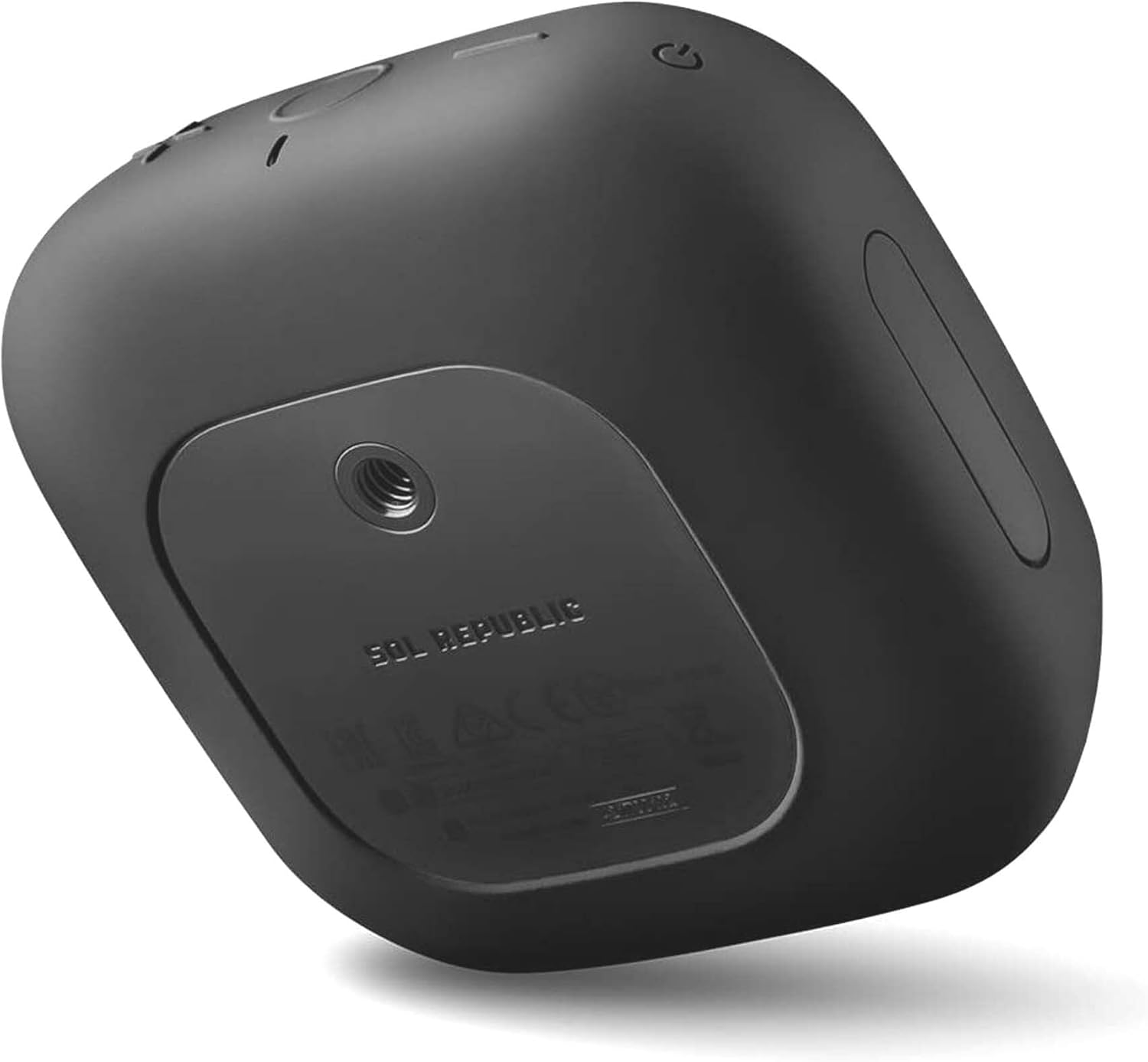
Image 3.2: Bottom view of the SOL REPUBLIC Punk speaker, highlighting the 1/4-inch threaded mount for accessories like bike or camera mounts.
The speaker features a standard 1/4-inch threaded mount on its base, allowing attachment to compatible camera or bike mounts (sold separately).
4. Setup
4.1 Charging the Speaker
- Locate the charging port under the protective flap on the side of the speaker.
- Connect the small end of the USB charging cable to the speaker's charging port.
- Connect the large end of the USB charging cable to a USB power adapter (not included) or a computer's USB port.
- The charging indicator light will illuminate. Allow approximately 2-3 hours for a full charge.
- Once fully charged, disconnect the charging cable and close the protective flap to maintain water resistance.
4.2 Powering On/Off
- To Power On: Press and hold the Power Button until you hear an audible confirmation and the indicator light illuminates.
- To Power Off: Press and hold the Power Button until you hear an audible confirmation and the indicator light turns off.
4.3 Bluetooth Pairing
- Ensure the speaker is powered on and within 60 feet of your Bluetooth-enabled device.
- Press the Bluetooth Button on the speaker. The Bluetooth indicator light will flash, indicating it is in pairing mode.
- On your device (smartphone, tablet, laptop), navigate to the Bluetooth settings.
- Select "SOL REPUBLIC Punk" from the list of available devices.
- Once paired, the Bluetooth indicator light on the speaker will become solid, and you will hear an audible confirmation.
- The speaker will automatically attempt to reconnect to the last paired device when powered on.
4.4 Auxiliary Audio Connection

Image 4.1: The SOL REPUBLIC Punk speaker with its protective flap open, showing the Aux-In and Aux-Out ports connected with 3.5mm audio cables.
- Open the protective flap to access the Aux-In port.
- Connect one end of the 3.5mm auxiliary audio cable to the Aux-In port on the speaker.
- Connect the other end of the 3.5mm auxiliary audio cable to the headphone jack or audio output of your non-Bluetooth device.
- The speaker will automatically switch to auxiliary input mode.
5. Operating the Speaker
5.1 Audio Playback
- Once connected via Bluetooth or auxiliary cable, begin playing audio from your source device.
- Adjust the volume using the Volume Buttons (+/-) on the speaker or directly from your source device.
5.2 Using as a Bluetooth Hub (Aux-Out)
The SOL REPUBLIC Punk speaker can act as a Bluetooth receiver for older audio systems. This allows you to stream audio wirelessly to the Punk speaker, which then outputs the audio to another device via its Aux-Out port.
- Pair your Bluetooth device with the SOL REPUBLIC Punk speaker as described in Section 4.3.
- Connect one end of a 3.5mm auxiliary audio cable to the Aux-Out port on the speaker.
- Connect the other end of the 3.5mm auxiliary audio cable to the audio input of your stereo system or other audio device.
- Ensure the connected audio system is set to the correct input source.
5.3 Portability and Mounting

Image 5.1: The compact SOL REPUBLIC Punk speaker being easily slipped into a jacket pocket, demonstrating its ultra-portable design.
The speaker's compact size allows for easy portability. Utilize the 1/4-inch threaded mount on the bottom to attach it to compatible bike mounts, camera tripods, or other accessories for hands-free listening during activities.
6. Maintenance
6.1 Cleaning
- Wipe the speaker with a soft, damp cloth.
- Do not use abrasive cleaners, solvents, or harsh chemicals.
- Ensure all protective flaps are securely closed before cleaning with moisture.
6.2 Water and Sand Resistance

Image 6.1: The SOL REPUBLIC Punk speaker positioned on dark, wet rocks, illustrating its water and sand resistant design suitable for outdoor environments.
- The SOL REPUBLIC Punk speaker is designed to be water and sand resistant. This means it can withstand splashes, light rain, and exposure to sand.
- It is not designed to be submerged in water. Avoid prolonged exposure to heavy rain or submersion.
- Always ensure the protective flap covering the charging and auxiliary ports is securely closed to maintain water and sand resistance.
- If exposed to saltwater or sand, rinse gently with fresh water and allow to air dry completely before use or charging.
6.3 Storage
Store the speaker in a cool, dry place away from extreme temperatures and direct sunlight when not in use for extended periods.
7. Troubleshooting
- No Power: Ensure the speaker is fully charged. Connect it to a power source using the provided USB cable.
- Cannot Pair via Bluetooth:
- Ensure the speaker is in pairing mode (flashing Bluetooth indicator light).
- Make sure Bluetooth is enabled on your source device.
- Move the speaker closer to your device (within 60 feet).
- Turn off and on both the speaker and your device, then attempt pairing again.
- If previously paired, try 'forgetting' or 'unpairing' the speaker from your device's Bluetooth list and then re-pairing.
- No Sound:
- Check the volume levels on both the speaker and your source device.
- Ensure the correct input source is selected if using an auxiliary connection.
- Verify that the audio cable is securely connected if using Aux-In/Out.
- Battery Life Shorter Than Expected:
- Battery life can vary based on volume level and distance from the Bluetooth source. High volume and greater distance consume more power.
- Ensure the speaker is fully charged before use.
- If the issue persists, contact customer support.
- "Battery Half Full" Voice Prompt: This is a normal notification indicating the battery status. There is no option to disable this voice prompt.
8. Specifications
| Feature | Specification |
|---|---|
| Model Name | P1510 / SOL-P1510BK |
| Speaker Type | Portable Speaker |
| Special Feature | Waterproof (Water & Sand Resistant) |
| Compatible Devices | Smartphone, Tablet, Laptop |
| Color | Black |
| Item Weight | 11.2 ounces (0.7 Pounds) |
| Impedance | 8 Ohm |
| Maximum Bluetooth Range | 60 Feet |
| Battery Life | Up to 8 hours (varies with usage) |
| Power Source | Battery Powered (1 Lithium Ion battery required) |
| Connectivity Technology | Bluetooth, 3.5mm Aux-In, 3.5mm Aux-Out |
| Product Dimensions | 5.2 x 5.09 x 2.29 inches |
| Mounting Type | 1/4-inch Threaded Mount (Tabletop Mount) |
| UPC | 817210019810 |
9. Warranty and Support
For warranty information, technical support, or further assistance with your SOL REPUBLIC Punk Wireless Portable Bluetooth Speaker, please visit the official SOL REPUBLIC website or contact their customer service department. Keep your proof of purchase for warranty claims.


