
Introduction
The EMB Professional EBX9Series is a versatile digital crossover designed for precise audio frequency management in various sound system applications, including home, DJ performances, clubs, studios, stages, and entertainment venues. This unit allows for detailed control over audio signals, ensuring optimal sound distribution to different speaker components.
It features stereo half-frequency and single-channel third-frequency electronic crossover capabilities, along with TRS or XLR balanced input and output differentials. Users can select between stereo operation or a summed left and right channel for ultra-low sound synthesis. The EBX9Series includes a 40Hz high-pass filter on both channels and phase reverse switches on all outputs for enhanced flexibility.
Key Features
- Stereo half-frequency and single-channel third-frequency electronic crossover.
- TRS or XLR balanced input and output differential connections.
- Option for stereo operation or summed left and right channel subwoofer synthesis.
- Two-channel selection switches with x10 range.
- Integrated 40Hz high-pass filter on both channels.
- Phase reverse switches on all outputs.
- Independently adjustable output spectrum with 24dB/Oct Linkwitz-Riley filters.
- Stereo/Mono status indication via LED lights.
Product Overview

Figure 1: Front view of the EBX9Series Digital Crossover, showcasing its sleek black chassis and control knobs for each channel and the subwoofer section.
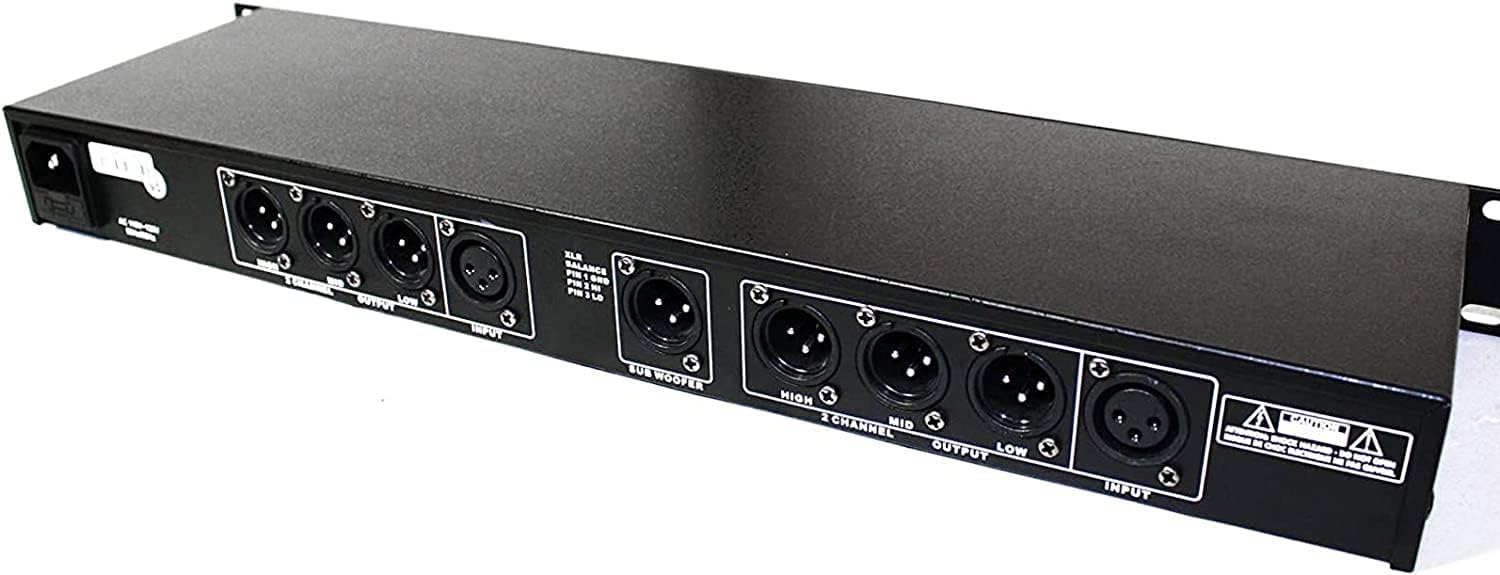
Figure 2: Rear panel of the EBX9Series, displaying the balanced XLR input and output connectors for Channel 1, Channel 2, and the Subwoofer output.

Figure 3: Detailed view of the XLR input and output jacks on the rear of the unit, showing pin configurations for balanced connections (Pin 1 GND, Pin 2 HI, Pin 3 LO).

Figure 4: Angled front perspective, highlighting the clearly labeled control knobs for frequency adjustment, gain, and phase inversion across both channels and the subwoofer section.

Figure 5: Front view, showing the power switch on the right side of the unit, along with the EBX99 model designation.

Figure 6: Direct front view of the EBX9Series, providing a clear look at all front panel controls and indicators.

Figure 7: Close-up of the Channel 1 controls, including knobs for LM Freq, MH Freq, 30Hz Cut, Low, Mid, High, and Phase Invert switch.

Figure 8: Another detailed view of the rear panel's XLR connections, emphasizing the balanced input and output sections for precise signal routing.
Setup Guide
- Unpacking and Inspection: Carefully remove the EBX9Series from its packaging. Inspect the unit for any signs of damage during transit. Retain the packaging for future transport or storage.
- Placement: Place the unit on a stable, flat surface or mount it in a standard 19-inch rack. Ensure adequate ventilation around the unit to prevent overheating.
- Power Connection: Connect the provided power cable to the AC inlet on the rear of the unit and then to a suitable power outlet. Ensure the power switch on the front panel is in the OFF position before connecting.
- Audio Input Connection:
- Connect your audio source (e.g., mixer, preamplifier) to the INPUT XLR or TRS jacks on the rear panel. The EBX9Series supports balanced connections for optimal signal integrity.
- For stereo operation, connect both Channel 1 and Channel 2 inputs.
- Audio Output Connection:
- Connect the LOW, MID, and HIGH XLR or TRS outputs from the EBX9Series to the corresponding inputs on your power amplifiers or active speakers.
- Connect the SUBWOOFER output to your subwoofer amplifier or active subwoofer.
- Ensure all connections are secure to prevent signal loss or noise.
- Initial Power On: After all connections are made, switch the power button on the front panel to the ON position. The unit's indicator lights should illuminate.
Operating Instructions
The EBX9Series provides precise control over audio frequencies. Familiarize yourself with the front panel controls before making adjustments.
Front Panel Controls:
- Channel 1 & Channel 2 Controls: Each channel features independent controls for Low, Mid, and High frequency bands.
- LM Freq / MH Freq: Adjusts the crossover points between low-mid and mid-high frequencies.
- Low / Mid / High Gain: Controls the output level for each frequency band.
- 30Hz Cut: Activates a 40Hz high-pass filter to remove unwanted sub-bass frequencies.
- Phase Invert: Reverses the phase of the output signal for the respective band. Use this to correct phase cancellations between speakers.
- Subwoofer Section:
- Gain Sub: Adjusts the output level of the subwoofer channel.
- Cut Freq: Sets the crossover frequency for the subwoofer output.
- Phase Invert: Reverses the phase of the subwoofer output.
- Mode Selection: The unit supports both stereo and mono (summed L+R) operation. Refer to the LED indicators for the selected mode.
- X10 Range Switch: For certain frequency controls, a x10 range switch may be present to extend the adjustment range.
General Operation Tips:
- Start with all gain controls at their minimum setting and gradually increase them to avoid sudden loud sounds.
- Adjust crossover frequencies based on the specifications of your loudspeakers and subwoofers.
- Use the phase invert switches to ensure proper phase alignment between your main speakers and subwoofer, and between different frequency bands.
- Listen critically and make small adjustments to achieve the desired sound balance and clarity.
Maintenance
- Cleaning: Use a soft, dry cloth to clean the exterior of the unit. Do not use liquid cleaners or aerosols, as they may damage the finish or internal components.
- Ventilation: Ensure that the ventilation slots are not obstructed. Proper airflow is crucial for preventing overheating and ensuring long-term reliability.
- Storage: If storing the unit for an extended period, disconnect it from power and store it in a cool, dry place, preferably in its original packaging.
- Environmental Conditions: Avoid exposing the unit to extreme temperatures, humidity, dust, or direct sunlight.
Troubleshooting
| Problem | Possible Cause | Solution |
|---|---|---|
| No power | Power cable disconnected; Power outlet faulty; Unit power switch off. | Check power cable connection; Try a different outlet; Ensure power switch is ON. |
| No sound output | Incorrect input/output connections; Gain controls set too low; Amplifier/speaker issues. | Verify all audio cable connections; Increase gain controls gradually; Check connected amplifiers and speakers. |
| Distorted sound | Input signal too high (clipping); Output gain too high; Incorrect impedance matching. | Reduce input signal level from source; Lower output gain controls; Ensure proper impedance matching with connected equipment. |
| Hum or noise | Ground loop; Unbalanced cables used with balanced inputs/outputs; Faulty cables. | Check for ground loops (e.g., use a ground lift if necessary); Use balanced XLR/TRS cables; Replace suspect cables. |
Technical Specifications
| Model Number | EBX9Series |
| Item Weight | 6.49 pounds |
| Package Dimensions | 21.25 x 11.25 x 2.5 inches |
| Input/Output Type | TRS or XLR Balanced Differential |
| Crossover Filters | 24dB/Oct Linkwitz-Riley |
| High-Pass Filter | 40Hz (on both channels) |
| Phase Control | Phase reverse switch on all outputs |
| Operation Modes | Stereo or Summed Left/Right Channel Subwoofer Synthesis |
Warranty and Support
EMB Professional products are designed for reliability and performance. For specific warranty information, please refer to the warranty card included with your product or visit the official EMB Professional website. Keep your proof of purchase for any warranty claims.
For technical support, troubleshooting assistance beyond this manual, or service inquiries, please contact EMB Professional customer service. Contact details can typically be found on the manufacturer's website or on the product packaging.
Note: Specifications are subject to change without notice.