
GoPro CHDHA-301
GoPro Hero Base Instruction Manual
Brand: GoPro | Model: CHDHA-301
Introduction
The GoPro Hero Base is a high-definition action camera designed for capturing stunning video and photos in various environments. It features a durable, integrated waterproof housing, making it suitable for use up to 131 feet (40 meters) underwater. With its ultra-wide angle lens and versatile capture modes, the Hero Base allows users to document their adventures with ease and clarity.

Figure 1: Front view of the GoPro Hero Base camera in its integrated housing.
Setup
- Charge the Battery: The GoPro Hero Base comes with a built-in Lithium Polymer battery. Connect the camera to a USB power source using the provided cable to fully charge it before first use.
- Insert MicroSD Card: The camera supports microSD cards up to 32GB (Class 10 or UHS-1 required, sold separately). Open the back door of the housing and insert the microSD card into the designated slot. Ensure it clicks into place.
- Power On/Off: Press and hold the Power/Mode button (located on the front) to turn the camera on or off.
- Select Mode: Press the Power/Mode button repeatedly to cycle through video, photo, and time-lapse modes. The current mode will be displayed on the camera's small screen.
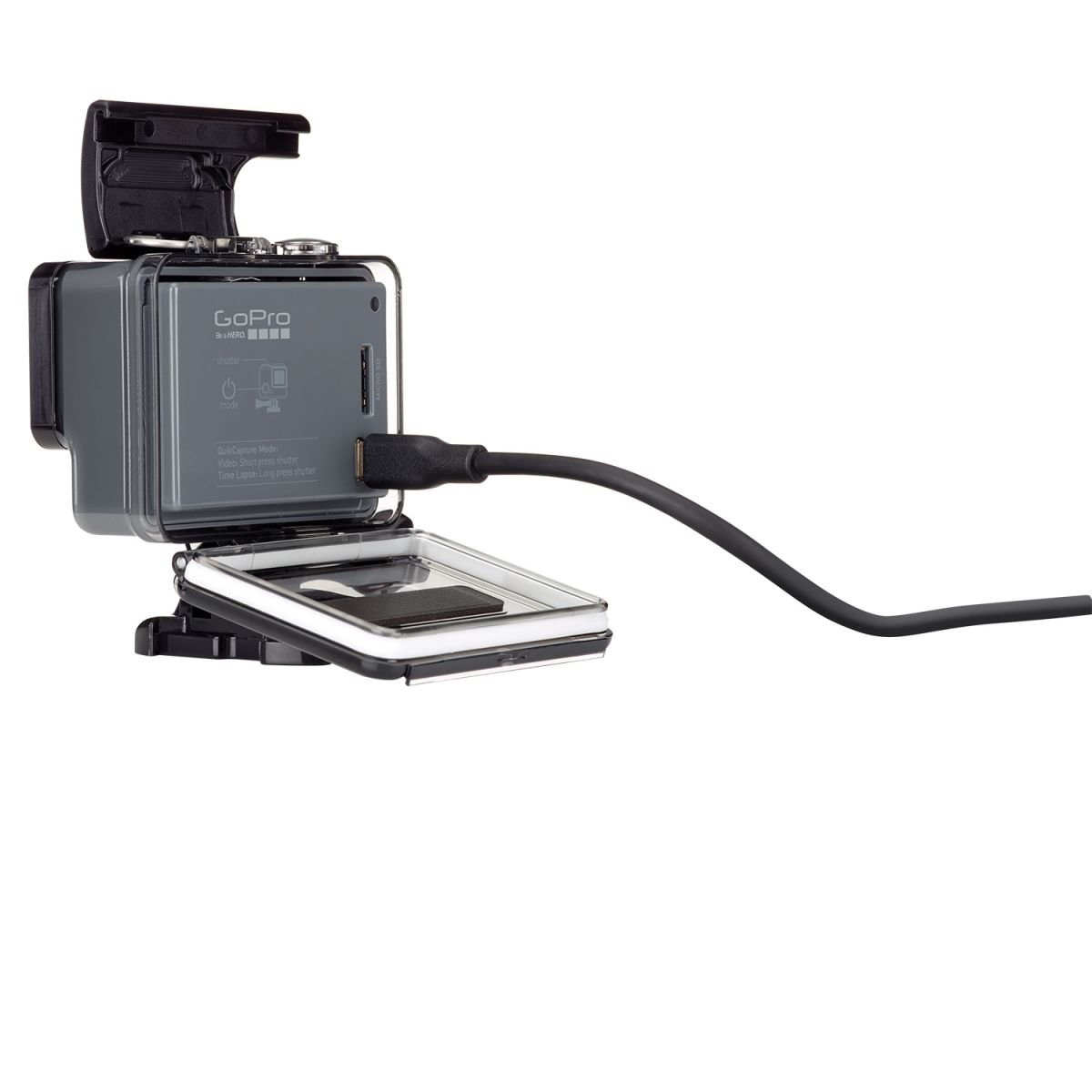
Figure 2: Rear view of the GoPro Hero Base with the back door open, illustrating the charging port and memory card slot.
Operating Instructions
Video Recording
The GoPro Hero Base records stunning video quality at 1080p30 (30 frames per second) and 720p60 (60 frames per second). To start recording, ensure the camera is in video mode, then press the Shutter/Select button (located on top). Press it again to stop recording.
Photo Capture
Capture 5MP still photos. The camera supports various photo modes:
- Single Photo: Capture a single 5MP photo.
- Time Lapse: Automatically captures photos at half-second intervals. Ideal for capturing sequences over time or when the camera is mounted out of reach.
- Burst Photo: Capture up to 5 frames per second for fast-action sequences.
Special Features
- Integrated Waterproof Housing: The camera is designed to be durable and waterproof up to 131 feet (40 meters), making it suitable for extreme environments and conditions.
- Built-in Microphone: Records audio with the built-in mono microphone.
- SuperView: A video mode that captures an immersive wide-angle field of view.
- Auto Low Light: Automatically adjusts frame rates for optimal low-light performance.
- Quick Capture: Allows you to power on the camera and begin recording video or time-lapse photos with a single press of the Shutter/Select button.
Mounting and Accessories
The GoPro Hero Base is compatible with all GoPro mounts and accessories (60+ options available). This allows for versatile mounting options on helmets, bikes, boards, and more, providing unique perspectives for your footage.
Video 1: An official GoPro video showcasing the versatility and features of the GoPro Hero camera, including its use in various action scenarios.
Video 2: An official GoPro video demonstrating the camera's durability and waterproof capabilities during a "Supercar Wakeboard" event.
Maintenance
- Cleaning the Lens: Use a soft, lint-free cloth to clean the camera lens. For stubborn smudges, a lens cleaning solution designed for optics can be used. Avoid abrasive materials.
- Housing Care: After using the camera in water, rinse the housing with fresh water to remove any salt, chlorine, or debris. Ensure the seals are clean and free of foreign particles to maintain waterproof integrity.
- Storage: Store the camera in a cool, dry place when not in use.
Troubleshooting
For common issues and frequently asked questions, please refer to the comprehensive User Guide (PDF) available online. This document provides detailed solutions for various operational and technical concerns.
- Camera Not Turning On: Ensure the battery is fully charged.
- Recording Issues: Verify that a compatible microSD card (Class 10 or UHS-1) is properly inserted and has sufficient free space.
- Audio Muffled: If using the skeleton back cover, removing the O-ring can improve audio clarity, though this compromises waterproofing.
If problems persist, consult the official GoPro Hero User Manual (PDF) for detailed troubleshooting steps.
Specifications
| Product Dimensions | 4.02 x 4.09 x 9.72 inches |
| Item Weight | 2.57 ounces |
| Item Model Number | CHDHA-301 |
| Batteries | 1 Lithium Polymer batteries required (included) |
| Video Capture Resolution | 1080p30 / 720p60 fps |
| Photo Sensor Technology | CMOS |
| Flash Memory Type | Micro SD (up to 32GB) |
| Connectivity Technology | Wi-Fi |
| Waterproof Depth | 131 feet (40 meters) |
Warranty and Support
For detailed warranty information and additional support, please visit the official GoPro website or refer to the documentation included with your product. Protection plans are also available for extended coverage.
- Official User Manual (PDF): Download Here
- GoPro Store: Explore more products and accessories at the GoPro Amazon Store.
- Protection Plans: Consider purchasing a 2-Year or 3-Year Protection Plan for your device.
Related documentsCHDHA-301


Ask a question about this manual
Ask about setup, troubleshooting, compatibility, parts, safety, or missing instructions. Manuals+ will review the question and use this page’s manual context to help answer it.