
Lenovo 90AY000CUS
Lenovo Erazer X315 Gaming Computer User Manual
Model: 90AY000CUS
1. Product Overview
The Lenovo Erazer X315 90AY000CUS is a high-performance gaming computer designed for an immersive gaming experience. It features robust hardware components to handle demanding applications and games.
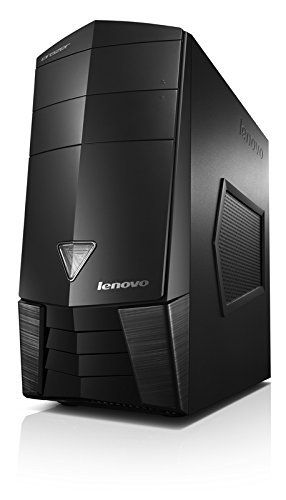
Figure 1: Front view of the Lenovo Erazer X315 Gaming Computer tower. The tower is black with angular design elements and the Lenovo logo on the front panel.
Key Features:
- Processor: AMD A8-7600 (3.10GHz 4MB)
- Operating System: Windows 8.1 64-bit
- Memory: 8.0GB PC3-12800 DDR3 1600 MHz RAM
- Graphics Card: AMD R9 255 2GB
- Storage: 2TB 7200 RPM Hard Drive + 8GB SSHD
2. Setup
2.1 Unpacking
Carefully remove the computer and all accessories from the packaging. Retain the original packaging for future transport or service needs.
2.2 Connecting Peripherals
- Monitor: Connect your monitor to the graphics card's display output (HDMI, DisplayPort, DVI, or VGA) on the rear of the computer.
- Keyboard and Mouse: Connect your USB keyboard and mouse to any available USB ports.
- Network: For wired internet, connect an Ethernet cable from your router/modem to the LAN port on the rear of the computer.
- Audio: Connect speakers or headphones to the audio output jacks.
2.3 Power Connection
Connect the power cord to the power supply unit (PSU) input on the rear of the computer, then plug the other end into a grounded electrical outlet. Ensure the power switch on the PSU is in the 'OFF' position before connecting, then switch it to 'ON' after all connections are secure.
3. Operating Instructions
3.1 First Boot
Press the power button located on the front of the computer. The system will initiate the Windows 8.1 operating system setup process. Follow the on-screen prompts to complete the initial setup, including language selection, user account creation, and network configuration.
3.2 Shutting Down
To properly shut down the computer, navigate to the Start screen, click the power icon, and select "Shut down." Avoid powering off the system directly from the power button unless absolutely necessary to prevent data loss or system corruption.
3.3 System Updates
Regularly check for and install operating system and driver updates to ensure optimal performance and security. Access Windows Update through the Control Panel or PC Settings.
4. Maintenance
4.1 Cleaning
Keep the computer's exterior clean using a soft, dry cloth. For internal components, periodically use compressed air to clear dust from fans and vents. Ensure the computer is powered off and unplugged before cleaning.
4.2 Software Maintenance
- Antivirus: Install and regularly update antivirus software.
- Disk Cleanup: Use Windows Disk Cleanup utility to remove temporary files.
- Defragmentation: Periodically defragment the hard drive (not necessary for the SSHD portion).
4.3 Data Backup
Regularly back up important data to an external drive or cloud storage to prevent data loss in case of system failure.
5. Troubleshooting
| Problem | Possible Cause | Solution |
|---|---|---|
| Computer does not power on. | Power cable loose; PSU switch off; power outlet issue. | Check power cable connections; ensure PSU switch is ON; try a different outlet. |
| No display on monitor. | Monitor cable loose; incorrect input selected on monitor; graphics card issue. | Verify monitor cable connection; check monitor input settings; reseat graphics card if comfortable. |
| System is slow or unresponsive. | Too many programs running; insufficient RAM; malware. | Close unnecessary applications; check Task Manager for resource usage; run antivirus scan. |
If issues persist, consult the Lenovo support website or contact technical support.
6. Specifications
- Model: Lenovo Erazer X315 90AY000CUS
- Processor: AMD A8-7600 (3.10GHz, 4MB Cache)
- Operating System: Windows 8.1 64-bit
- RAM: 8GB DDR3 PC3-12800 1600 MHz
- Graphics Card: AMD R9 255 with 2GB Dedicated Memory
- Storage: 2TB 7200 RPM HDD + 8GB SSHD
- Dimensions (LxWxH): 21.5 x 11.4 x 20.5 inches
- Weight: Approximately 24 pounds
- Color: Black
- First Available: September 12, 2014
7. Warranty and Support
For warranty information, please refer to the documentation included with your purchase or visit the official Lenovo support website. Lenovo provides technical support and resources for product assistance.
Lenovo Support Website: www.lenovo.com/support
Please have your product model (90AY000CUS) and serial number ready when contacting support.
Related Documents - 90AY000CUS
 |
Lenovo Essential Notebooks: Personal Systems Reference Guide (October 2013) Detailed specifications and features for Lenovo Essential Notebooks, including models B570e2, B575e, B580, and B590. Covers processors, memory, storage, display, graphics, connectivity, and operating systems. |
 |
Пайдалану бойынша нұсқаулыққа қосымша: ДК Lenovo Legion T5 30AGB10 Техникалық сипаттамалар, орнату нұсқаулары және Lenovo Legion T5 30AGB10 жөніндегі ақпарат. |
 |
Lenovo IdeaPad S10-3t User Guide: Setup, Operation, and Troubleshooting Comprehensive user guide for the Lenovo IdeaPad S10-3t notebook computer. Learn about setup, basic operations, troubleshooting, system features, and maintenance for your Lenovo IdeaPad. |
 |
Lenovo ThinkSystem SR665 V3 Server Product Guide Explore the Lenovo ThinkSystem SR665 V3 Server, a 2U, 2-socket server featuring AMD EPYC 9004 processors for high performance, scalability, and flexibility in enterprise workloads. |
 |
Lenovo IdeaPad Slim 5 16AHP10 Product Specifications and Features Detailed specifications for the Lenovo IdeaPad Slim 5 16AHP10 laptop, including performance, display, connectivity, security, and operating requirements. Features AMD Ryzen processors, various display options, and extensive connectivity. |
 |
Lenovo IdeaPad Flex 5 14ALC7 Specifications and Features Detailed specifications and features for the Lenovo IdeaPad Flex 5 14ALC7 laptop, including processor, memory, storage, display, connectivity, security, and environmental information. |