
Makita DHP481Z
Makita DHP481Z 18 V LXT Li-ion Brushless Combi Hammer Drill User Manual
Model: DHP481Z
Product Overview
The Makita DHP481Z is an 18V LXT Li-ion Brushless Combi Hammer Drill designed for professional use. It features a robust brushless DC motor for high power and efficiency, along with Makita's eXtreme Protection Technology (XPT) for enhanced durability in harsh conditions. This tool offers versatile drilling, driving, and hammer drilling capabilities with 21 clutch settings and a high torque output.

Figure 1: The Makita DHP481Z Combi Hammer Drill, showing its compact design and included side handle and depth rod.
Key Features
- Brushless DC Motor: Provides high power-to-weight ratio, reduced heat buildup, and extended tool life.
- eXtreme Protection Technology (XPT): Offers maximum resistance against dust, debris, and liquids for optimal performance in challenging environments.
- Battery Fuel Gauge: Conveniently indicates the approximate remaining battery power.
- Battery Protection System: Safeguards against over-discharge, overheating, and circuit overload, enhancing battery life and performance.
- 21 Clutch Settings: Delivers up to 1,090 inch-pounds of torque for precise fastening and drilling.
- All-Metal Gears: Ensures efficient power transmission and increased durability.
- Ultra-Compact Design: Measures only 8-1/8 inches long for improved maneuverability in tight spaces.
- Dual LED Job Lights: Illuminates the work area with an afterglow feature for enhanced visibility.
- Ergonomic Soft Rubber Grip: Designed for vibration absorption and comfortable operation, featuring a re-contoured rear grip and ribbed texture for improved hold.
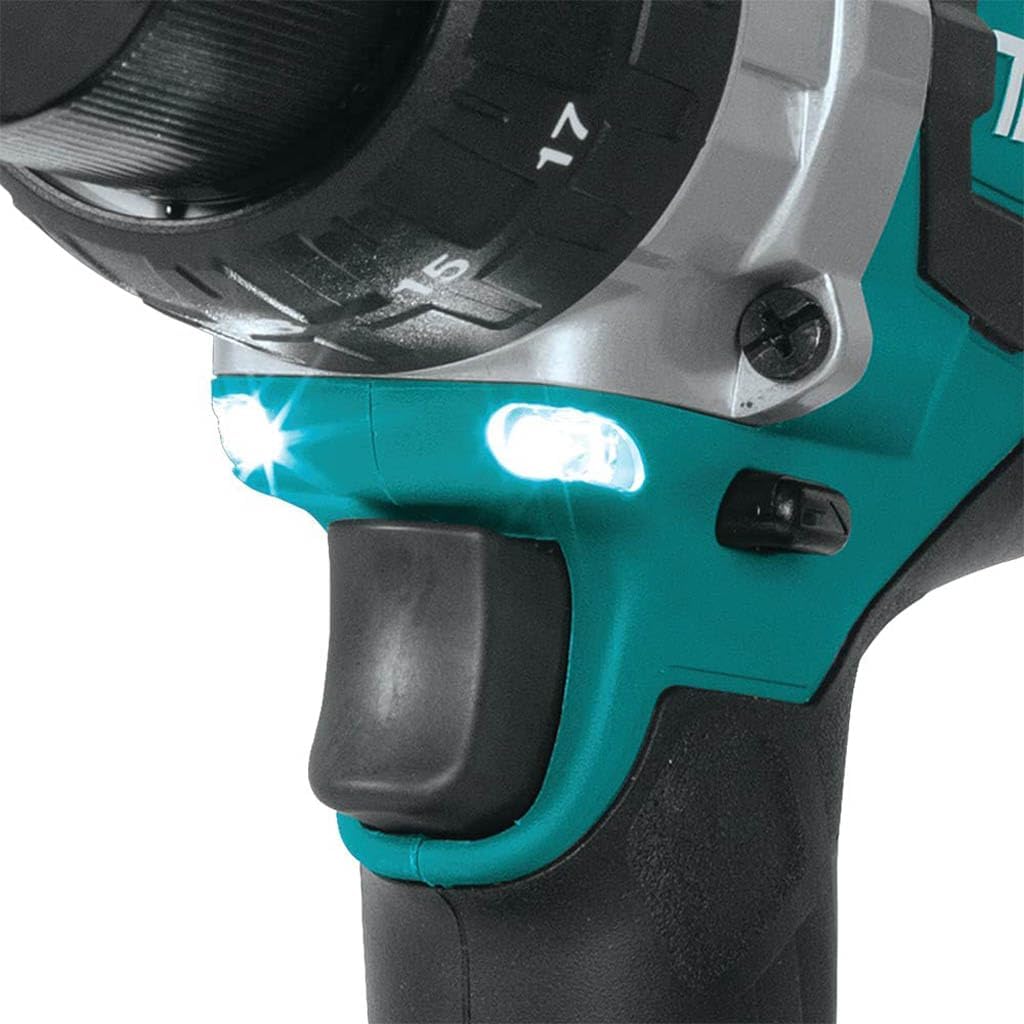
Figure 2: Close-up view of the dual LED job lights located above the trigger on the Makita DHP481Z.
Setup
1. Battery Installation
- Ensure the tool is switched off.
- Align the battery pack with the battery housing on the tool.
- Slide the battery into the housing until it clicks securely into place. Do not force the battery.
- To remove, press the release button on the battery and slide it out.
Note: Batteries and charger are sold separately. Use only genuine Makita 18V LXT Li-ion batteries and chargers.
2. Attaching Side Handle and Stopper Pole
- Loosen the side handle grip by rotating it counter-clockwise.
- Slide the handle collar over the front of the drill, positioning it securely around the gear housing.
- Insert the stopper pole into the hole on the side handle, ensuring the desired drilling depth is set.
- Tighten the side handle grip by rotating it clockwise until it is firmly secured.

Figure 3: The Makita DHP481Z with the side handle and stopper pole correctly installed, ready for use.
3. Installing Bits
- Rotate the chuck counter-clockwise to open the jaws.
- Insert the drill bit or driver bit fully into the chuck.
- Rotate the chuck clockwise to tighten the jaws firmly around the bit. Ensure the bit is centered and secure.
- For hammer drilling, ensure you are using appropriate hammer drill bits.
Operating Instructions
1. Powering On/Off and Speed Control
- To Power On: Squeeze the trigger switch. The speed increases with increased pressure on the trigger.
- To Power Off: Release the trigger switch.
- Variable Speed: The tool features a variable speed trigger. Apply light pressure for low speed and increased pressure for higher speed.
- Speed Selector Switch: Located on top of the tool, this switch allows selection between two mechanical speed ranges (Low: 0-550 RPM, High: 0-2,100 RPM). Select the appropriate speed for the task.
2. Adjusting Clutch Settings and Operating Mode
- Clutch Ring: Rotate the clutch ring to select one of the 21 torque settings for driving screws, or select the drill symbol for drilling operations.
- Mode Selector Ring: Rotate the mode selector ring to choose between drilling, driving, or hammer drilling modes.
- Hammer Drilling: For drilling into masonry or concrete, select the hammer drill mode and ensure the appropriate bit is installed.
3. Using LED Job Lights
- The dual LED job lights illuminate automatically when the trigger is squeezed.
- They feature an afterglow function, remaining lit for a short period after the trigger is released to further illuminate the work area.

Figure 4: A user demonstrating the Makita DHP481Z in action, drilling into a wooden surface.
Maintenance
1. Cleaning
- Always disconnect the battery before cleaning.
- Wipe the tool with a clean, damp cloth. Do not use harsh chemicals or abrasive cleaners.
- Keep the ventilation openings clear of dust and debris to prevent overheating. Use compressed air if necessary.
2. Battery Care
- Charge batteries fully before first use and after each use.
- Store batteries in a cool, dry place away from direct sunlight and extreme temperatures.
- Do not store batteries in a discharged state for extended periods.
3. Storage
- Store the tool and accessories in a secure, dry place, out of reach of children.
- Remove the battery from the tool before storing for long periods.
Troubleshooting
| Problem | Possible Cause | Solution |
|---|---|---|
| Tool does not start | Battery not inserted correctly Battery discharged Tool or battery overheating | Re-insert battery firmly Charge battery Allow tool/battery to cool down |
| Reduced power/performance | Battery low Incorrect clutch setting Overload protection activated | Charge battery Adjust clutch setting or select drill mode Reduce load, allow tool to recover |
| Bit slips in chuck | Chuck not tightened sufficiently Bit shank dirty or damaged | Re-tighten chuck firmly Clean bit shank, replace if damaged |
| LED lights not working | Battery low Faulty LED | Charge battery Contact Makita service center |
Specifications
| Specification | Value |
|---|---|
| Model Number | DHP481Z |
| Voltage | 18V Li-Ion |
| No Load Speed (Low) | 0 - 550 RPM |
| No Load Speed (High) | 0 - 2,100 RPM |
| Blows Per Minute (Low) | 0 - 8,250 BPM |
| Blows Per Minute (High) | 0 - 31,500 BPM |
| Max Torque | 1,090 inch-pounds |
| Clutch Settings | 21 |
| Capacities (Concrete) | 5/8 inch (16 mm) |
| Capacities (Steel) | 1/2 inch (13 mm) |
| Capacities (Wood) | 3 inch (76 mm) |
| Dimensions (L x W x H) | 8.07 x 3.11 x 10.47 cm (approx.) |
| Item Weight | 1.13 kg (tool only) |
| Material | Alloy Steel, Wood (components) |
Warranty and Support
Makita products are manufactured under strict quality control and inspection standards. This product is covered by Makita's standard warranty, which typically covers defects in materials and workmanship for a specified period from the date of purchase. Please refer to the warranty card included with your product or visit the official Makita website for detailed warranty terms and conditions specific to your region.
For technical support, service, or to locate an authorized service center, please visit the official Makita website or contact Makita customer service directly. Ensure you have your product model number (DHP481Z) and serial number ready when seeking support.
Official Makita Website: www.makita.ca
Related documentsDHP481Z


Ask a question about this manual
Ask about setup, troubleshooting, compatibility, parts, safety, or missing instructions. Manuals+ will review the question and use this page’s manual context to help answer it.