Introduction
This manual provides essential information for the installation, operation, maintenance, and troubleshooting of the OEM Jaguar Trip Computer/ECU, model DAC 2884. This unit is designed for Jaguar XJ6 and VDP models manufactured between 1980 and 1987. It serves as a vital component for monitoring and displaying various vehicle performance metrics.
Setup and Installation
The DAC 2884 Trip Computer/ECU is an original equipment manufacturer (OEM) part designed for specific Jaguar models. Proper installation is crucial for its correct function and vehicle safety. Due to the complexity of automotive electrical systems, professional installation by a qualified automotive technician is highly recommended.
General Installation Guidelines:
- Safety First: Always disconnect the vehicle's battery before beginning any electrical work to prevent short circuits or damage to electronic components.
- Location: The unit is typically located in the dashboard or center console area. Refer to your vehicle's specific service manual for the exact mounting location and removal procedures for existing components.
- Wiring: Ensure all electrical connections are clean, secure, and correctly matched to the vehicle's wiring harness. Incorrect wiring can lead to malfunction or damage.
- Mounting: Securely mount the unit using appropriate fasteners to prevent vibration damage.
- Post-Installation Check: After installation, reconnect the battery and perform a functional test of the unit and related vehicle systems.
Operating Instructions
The DAC 2884 Trip Computer provides various data displays and functions accessible via its front panel buttons. Familiarize yourself with the button layout and their respective functions.
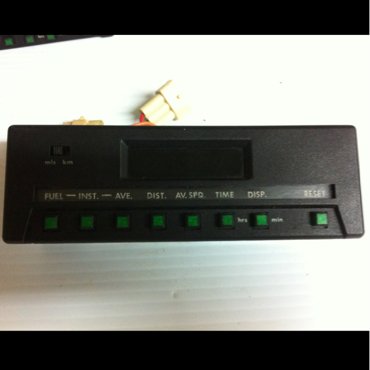
Image: Front panel of the Jaguar DAC 2884 Trip Computer. The unit is black with a rectangular display area and a row of green buttons below it. Labels visible include 'FUEL', 'INST.', 'AVE.', 'DIST.', 'AV. SPD', 'TIME', 'DISP.', and 'RESET'. A 'miles/km' switch is also visible on the left.
Button Functions:
- FUEL: Displays fuel-related information, such as instantaneous fuel consumption, average fuel economy, or estimated range. Pressing repeatedly may cycle through different fuel metrics.
- INST. (Instantaneous): Shows real-time data, such as instantaneous speed or current fuel consumption.
- AVE. (Average): Displays average values for metrics like average speed or average fuel economy since the last reset.
- DIST. (Distance): Shows the total distance traveled since the last trip reset.
- AV. SPD (Average Speed): Displays the average speed of the vehicle since the last reset.
- TIME: Shows elapsed time, typically the duration of the current trip since the last reset.
- DISP. (Display): Cycles through various display modes or available data screens on the unit's display.
- RESET: Resets all trip-related data (distance, average speed, average fuel, time) to zero. Typically, this button needs to be held down for a few seconds to activate the reset function.
- miles/km Switch: A small switch, usually located on the left side of the unit, allows toggling between imperial (miles) and metric (kilometers) units for distance and speed displays.
Refer to your vehicle's specific owner's manual for detailed instructions on interpreting the displayed data and advanced functions.
Maintenance
The DAC 2884 Trip Computer/ECU is designed for durability and requires minimal maintenance. Adhering to these guidelines will help ensure its longevity and proper function:
- Cleaning: Use a soft, dry cloth to clean the display and buttons. For stubborn marks, a slightly damp cloth with mild soap can be used, followed by drying. Avoid abrasive cleaners, solvents, or harsh chemicals, as these can damage the display or plastic components.
- Connections: Periodically check the electrical connections to ensure they are secure and free from corrosion. If corrosion is present, disconnect the battery and carefully clean the terminals.
- Environmental Factors: While designed for automotive environments, avoid exposing the unit to extreme temperatures or excessive moisture beyond normal vehicle operating conditions.
Troubleshooting
If you experience issues with your DAC 2884 Trip Computer/ECU, consider the following common troubleshooting steps. For complex issues, professional diagnosis is recommended.
- Unit Not Powering On:
- Check the vehicle's fuse box for a blown fuse related to the trip computer or instrument cluster.
- Verify that all electrical connections to the unit are secure and properly seated.
- Ensure the vehicle's battery is charged and providing adequate power.
- Incorrect or Erratic Readings:
- This could indicate an issue with the sensors providing data to the ECU (e.g., speed sensor, fuel level sensor).
- Check for loose or corroded wiring connections to the unit or relevant sensors.
- A professional diagnostic scan may be required to identify sensor faults.
- Display Issues (Blank, Flickering, Missing Segments):
- Ensure the unit is receiving consistent power.
- Internal component failure is possible, which may require repair or replacement by a specialist.
- Buttons Not Responding:
- Check for any physical obstructions or debris around the buttons.
- If the issue persists, it may indicate internal button mechanism failure.
If these steps do not resolve the issue, it is advisable to consult a certified Jaguar service center or an experienced automotive electrical specialist.
Specifications
| Specification | Detail |
|---|---|
| Model Number | DAC 2884 |
| Manufacturer | Jaguar |
| Compatible Vehicles | Jaguar XJ6, VDP (1980-1987 models) |
| Part Type | Trip Computer / Electronic Control Unit (ECU) |
| First Available Date | September 11, 2014 |
Warranty Information
Specific warranty details for this OEM Jaguar DAC 2884 Trip Computer/ECU are not provided within this manual. For information regarding warranty coverage, terms, and conditions, please refer to the original purchase documentation or contact the seller directly. If purchased as a new OEM part from a Jaguar dealership, standard Jaguar parts warranty terms may apply.
Support
For technical support, installation assistance, or advanced diagnostics related to your Jaguar DAC 2884 Trip Computer/ECU, it is recommended to:
- Consult your vehicle's official Jaguar service manual.
- Contact a certified Jaguar dealership or service center.
- Seek assistance from a reputable independent automotive electrical specialist.
When seeking support, have your vehicle's VIN (Vehicle Identification Number) and the part's model number (DAC 2884) readily available.


