
1. Introduction
Thank you for purchasing the F&D F690 Multimedia Speaker System. This system is designed to provide high-quality audio playback from various sources, including USB drives, SD cards, FM radio, and auxiliary input. Please read this manual carefully before operating the device to ensure proper use and to maximize its performance.
2. Safety Information
- Power Source: Ensure the power supply voltage matches the requirements specified on the speaker unit. Use only the provided power cable.
- Ventilation: Do not block any ventilation openings. Maintain adequate space around the unit for proper airflow.
- Water and Moisture: Do not expose the unit to rain, moisture, or dripping/splashing liquids. Do not place objects filled with liquids, such as vases, on the unit.
- Heat: Keep the unit away from heat sources such as radiators, heat registers, stoves, or other apparatus (including amplifiers) that produce heat.
- Cleaning: Unplug the unit from the power outlet before cleaning. Use a dry cloth for cleaning. Do not use liquid cleaners or aerosol cleaners.
- Servicing: Do not attempt to service this product yourself. Refer all servicing to qualified service personnel.
- Placement: Place the unit on a stable, flat surface to prevent it from falling.
3. Package Contents
Please check the box for the following items:
- Subwoofer unit (1 pc)
- Satellite speakers (2 pcs)
- Remote control (1 pc)
- Audio input cable (RCA vs. 3.5mm stereo cable) (1 pc)
- Quick installation guide (1 pc)
- Warranty card (1 pc)
4. Product Overview
The F&D F690 system consists of a subwoofer and two satellite speakers, designed for a balanced audio experience. The subwoofer features a 6.5-inch bass driver, while each satellite speaker includes a 3-inch full-range driver and a 1-inch tweeter.
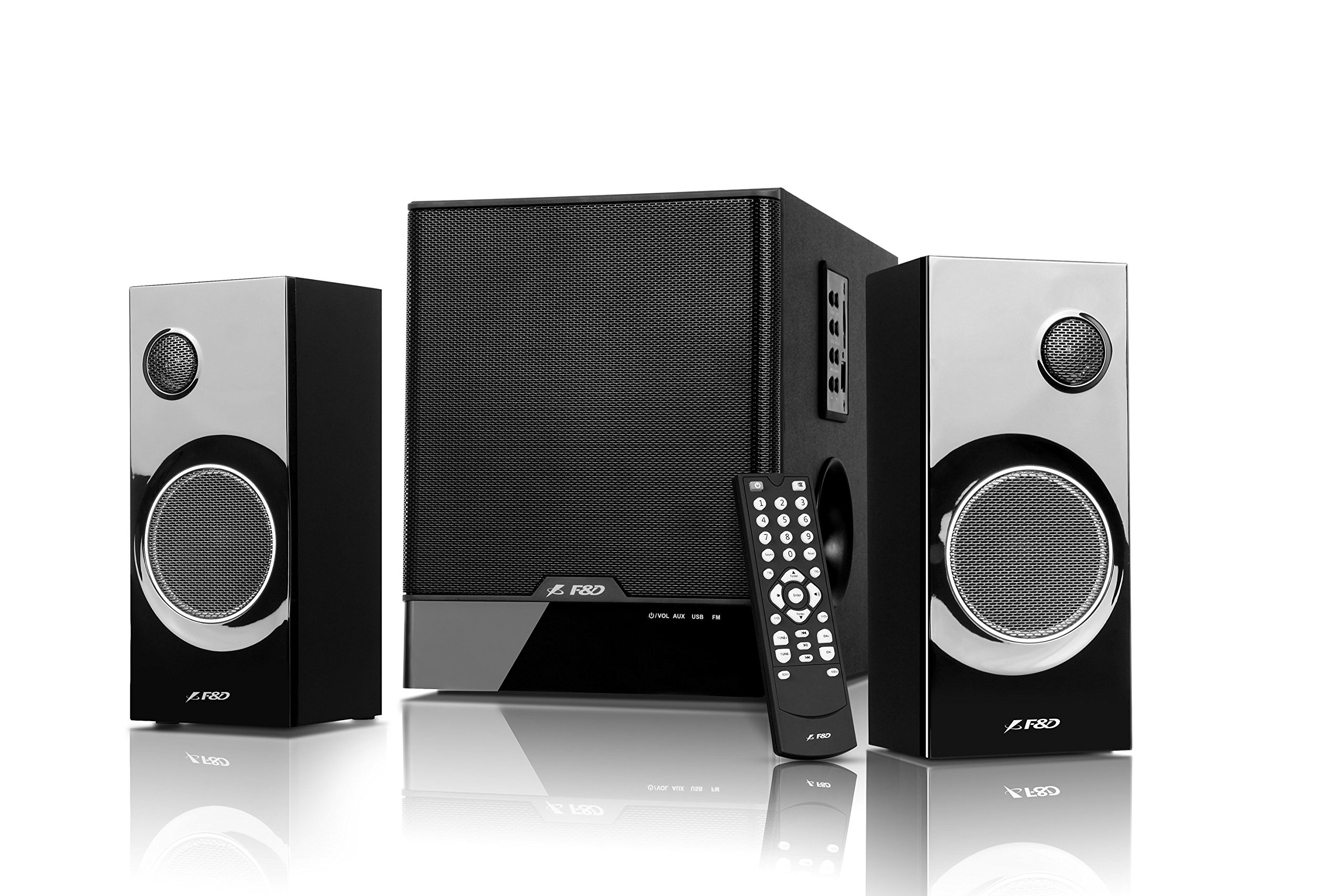
Image: The F&D F690 Multimedia Speaker System, showing the central subwoofer unit and two satellite speakers. The subwoofer has a large speaker grille, and the satellites feature smaller grilles.
4.1. Front Panel Controls (Subwoofer)
The subwoofer unit includes the following controls:
- Standby Button: Powers the unit on or off.
- Source Button: Cycles through input sources (USB, SD, FM, AUX).
- Sound Button: Adjusts sound modes or settings.
- Volume +/- Buttons: Increases or decreases the master volume.
- Play/Pause Button: Controls playback for USB/SD modes.
- Previous/Next Buttons: Navigates tracks in USB/SD modes or stations in FM mode.
4.2. Remote Control
The full-function remote control allows for convenient operation of all features from a distance, including direct numeric key input for track selection or FM station tuning.
5. Setup
5.1. Connecting Satellite Speakers
- Locate the speaker output ports on the rear of the subwoofer unit.
- Connect the cables from the satellite speakers to the corresponding output ports. Ensure a secure connection.
5.2. Connecting Audio Sources
- Auxiliary Input: Use the provided RCA to 3.5mm stereo cable to connect external devices (e.g., TV, PC, MP3 player) to the AUX input ports on the subwoofer.
- USB Drive: Insert a USB flash drive into the USB port on the subwoofer.
- SD Card: Insert an SD card into the SD card slot on the subwoofer.
5.3. Power Connection
- Connect the power cable to the AC input on the rear of the subwoofer.
- Plug the other end of the power cable into a standard AC 220-240V~50/60Hz wall outlet.
- Press the Standby button on the subwoofer or remote control to power on the unit.
6. Operating Instructions
6.1. Source Selection
Press the Source button on the subwoofer or remote control repeatedly to cycle through the available input modes: AUX, USB, SD, and FM.
6.2. USB/SD Playback
- Insert a USB drive or SD card containing MP3/WMA audio files. The system will automatically switch to USB/SD mode and begin playback.
- Use the Play/Pause button to pause or resume playback.
- Use the Previous/Next buttons to skip to the previous or next track.
- For direct track selection, use the numeric keys on the remote control.
6.3. FM Radio Operation
- Switch to FM mode using the Source button.
- The system features PLL technology for stable FM reception.
- Automatic Scan: Press and hold the Play/Pause button (or a dedicated scan button on the remote, if available) to automatically scan and store available FM stations. The system can store up to 100 stations.
- Manual Tuning: Use the Previous/Next buttons to navigate through stored stations.
- Direct Frequency Input: Use the numeric keys on the remote control to directly enter an FM frequency.
6.4. Volume Control
Adjust the master volume using the Volume +/- buttons on the subwoofer or the remote control.
7. Maintenance
- Cleaning: Wipe the surfaces of the speakers and subwoofer with a soft, dry cloth. Do not use abrasive cleaners, waxes, or solvents.
- Dust: Regularly dust the speaker grilles to prevent accumulation that could affect sound quality.
- Storage: If storing the unit for an extended period, unplug it from the power outlet and store it in a cool, dry place.
8. Troubleshooting
| Problem | Possible Cause | Solution |
|---|---|---|
| No power | Power cable not connected; Power outlet not active | Ensure power cable is securely connected; Check power outlet with another device. |
| No sound | Incorrect source selected; Volume too low; Audio cables not connected properly | Press Source button to select correct input; Increase volume; Check all audio cable connections. |
| USB/SD not playing | Incorrect file format; USB drive/SD card corrupted; Device not inserted correctly | Ensure files are MP3/WMA format; Try another USB drive/SD card; Reinsert the device. |
| Poor FM reception | Weak signal; Interference | Adjust the position of the unit; Try auto-scanning again; Avoid placing near other electronic devices. |
| Remote control not working | Batteries depleted; Obstruction between remote and unit | Replace remote control batteries; Ensure clear line of sight to the unit's sensor. |
9. Specifications
| Feature | Detail |
|---|---|
| Output Power (RMS) | 60 W (Subwoofer: 30W, Satellites: 15W x 2) |
| Subwoofer Driver | 6.5-inch bass driver |
| Satellite Drivers | 3-inch full range driver & 1-inch tweeter |
| Frequency Response (Subwoofer) | 30Hz ~ 120Hz |
| Frequency Response (Satellite) | 200Hz ~ 20kHz |
| Connectivity | USB, SD Card, AUX (RCA to 3.5mm stereo) |
| Supported Audio Formats | MP3, WMA (via USB/SD) |
| FM Radio | Digital FM with PLL technology, 100 station storage |
| Power Supply | AC 220-240V ~ 50/60Hz |
| Subwoofer Dimensions (W×D×H) | 206 x 302 x 260 mm |
| Satellite Speaker Dimensions (W×D×H) | 93 x 91 x 213 mm |
| Net Weight | 7.6 kg |
| Material | Plastic, Wood |
| Control Method | Remote, Unit Buttons |
10. Warranty and Support
This product comes with a limited warranty. Please refer to the warranty card included in your package for detailed terms and conditions. For technical support, service, or inquiries, please contact your local F&D customer service center or authorized dealer. Keep your purchase receipt as proof of purchase for warranty claims.


