
Concept2 RowErg
Concept2 RowErg Indoor Rowing Machine - PM5 Monitor User Manual
Model: RowErg | Brand: Concept2
Introduction
The Concept2 RowErg Indoor Rowing Machine provides a comprehensive, full-body, low-impact workout. It features an advanced PM5 Performance Monitor, ergonomically designed handles, adjustable footrests, and a flywheel engineered for smooth movement with minimal noise. This manual provides essential information for setting up, operating, and maintaining your RowErg to ensure optimal performance and longevity.
Setup
The Concept2 RowErg is designed for easy assembly. All necessary tools and illustrated instructions are included. The machine can be quickly broken down into two segments for convenient storage.
Assembly Steps:
- Unpack all components from the shipping box. The main components include the front section with the flywheel and monitor, and the rear section with the monorail and seat.
- Connect the front and rear sections. The design allows for quick connection without requiring additional tools.
- Attach the PM5 Performance Monitor to its designated arm.
- Install the device holder onto the PM5 monitor.
- Ensure all connections are secure before use.
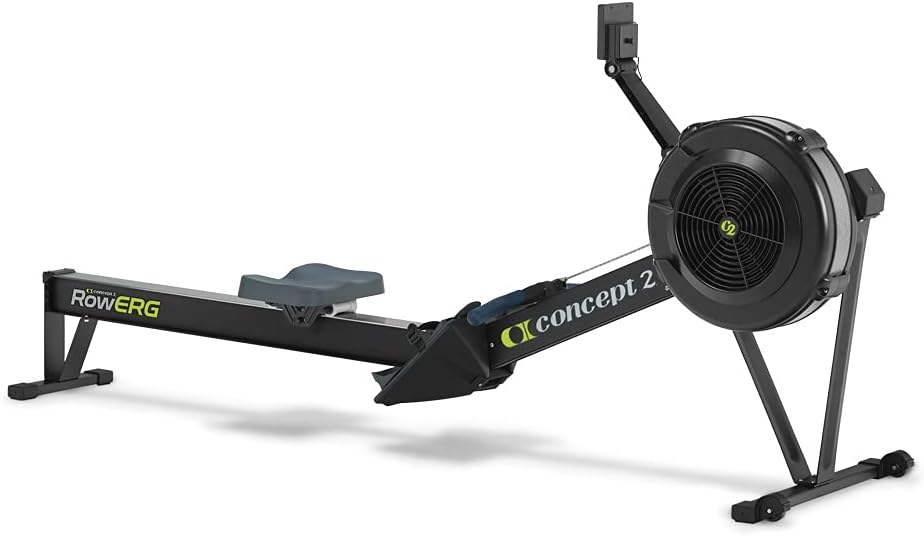
Figure 1: Fully assembled Concept2 RowErg Indoor Rowing Machine.

Figure 2: The RowErg easily separates into two pieces for storage, requiring no tools.
Video 1: Demonstration of the Concept2 RowErg's ease of assembly and smooth operation. This video highlights the simplicity of setting up the machine for use.
Operating Instructions
The Concept2 RowErg is designed for intuitive use, providing an effective full-body workout. Proper technique is crucial for maximizing benefits and preventing injury.
Getting Started:
- Adjust Footrests: The adjustable footrests accommodate various foot sizes. Secure your feet with the straps, ensuring the strap crosses the ball of your foot.
- Seat Position: The comfortable 14-inch seat height allows for a consistent back-and-forth slide. Ensure the seat moves freely along the monorail.
- Handle Grip: Grasp the ergonomic handle with an overhand grip, slightly wider than shoulder-width apart.
Using the PM5 Performance Monitor:
The PM5 monitor provides accurate, comparable data for every row. It features Bluetooth and ANT+ functionality for wireless connection to apps and heart rate monitors.
- Power On: The monitor takes two D cell batteries (included). During your workout, the monitor draws power from the spinning flywheel to extend battery life.
- Main Menu: From the main menu, you can select "Just Row" for an open workout, "Select Workout" for pre-programmed sessions, "Connect" to pair with devices, or "Memory" to review past workouts.
- Display Options: Use the "Display" button to cycle through various metrics such as pace, watts, calories, distance, and stroke rate.
- Resistance Adjustment: The air resistance is adjusted by changing the damper setting on the flywheel. Settings range from 1 to 10, with higher numbers providing more air resistance.

Figure 3: The PM5 Performance Monitor with ANT+ and Bluetooth connectivity, allowing for data tracking and app integration.

Figure 4: The integrated device holder and the ErgData app in use, demonstrating workout tracking capabilities.
Video 2: A user demonstrating the rowing motion and highlighting the smooth operation and data tracking features of the PM5 monitor.
Video 3: Detailed explanation of the PM5 monitor's functions, including workout selection, connectivity, and memory features.
Maintenance
Regular maintenance ensures the longevity and smooth operation of your Concept2 RowErg.
- Clean the Monorail: Wipe the stainless steel track with a non-abrasive cleaner after each use to ensure a consistent slide and prevent debris buildup.
- Lubricate the Chain: Apply a small amount of mineral oil or 3-in-1 oil to the chain periodically (e.g., every 50 hours of use or monthly) to keep it running smoothly and quietly. Wipe off any excess.
- Inspect Straps and Connections: Regularly check foot straps, handle connections, and all bolts to ensure they are secure and show no signs of wear or damage.
- Dust the Flywheel: Periodically remove the cover of the flywheel to clean out any dust or debris that may accumulate, which can affect performance.
Video 4: A user demonstrating the durability and ease of maintenance, specifically highlighting the chain and damper settings.
Troubleshooting
If you encounter any issues with your Concept2 RowErg, refer to the following common troubleshooting tips:
- PM5 Monitor Not Powering On: Check the two D cell batteries. Ensure they are correctly inserted and not depleted. The monitor also draws power from the flywheel during use.
- Rough Seat Slide: Clean the monorail thoroughly with a damp cloth to remove any dirt or grime. Inspect the seat rollers for any obstructions or damage.
- Chain Sticking/Noisy: Apply a small amount of chain oil as described in the Maintenance section. Ensure the chain is free of kinks or twists.
- Inaccurate Data on PM5: Ensure the PM5 firmware is up to date. Check for any interference if using wireless connections (Bluetooth/ANT+).
Specifications
| Feature | Detail |
|---|---|
| Brand | Concept2 |
| Model Name | RowErg |
| Resistance Mechanism | Air |
| Monitor | PM5 Performance Monitor (Bluetooth & ANT+ enabled) |
| Seat Height | 14 inches |
| Product Dimensions (LxWxH) | 96" x 24" x 14" |
| Recommended Use Space | 9 x 4 feet |
| Maximum User Weight | 500 Pounds |
| Item Weight | 57.3 Pounds |
| Frame Material | Aluminum front legs and steel rear legs |
| Power Requirement | 2 D cell batteries (included) |
Warranty & Support
The Concept2 RowErg comes with a Limited 2-year and 5-year warranty. For detailed warranty information and support, please refer to the official user manual PDF or contact Concept2 customer service.
An electronic version of the user manual is available for download: User Manual (PDF)
Related documentsRowErg


Ask a question about this manual
Ask about setup, troubleshooting, compatibility, parts, safety, or missing instructions. Manuals+ will review the question and use this page’s manual context to help answer it.