
Olympus V321210BU000
OM SYSTEM OLYMPUS MC-14 1.4X Teleconverter Instruction Manual
Brand: Olympus
Introduction
This manual provides detailed instructions for the proper use, setup, and maintenance of your OM SYSTEM OLYMPUS MC-14 1.4X Teleconverter. Designed to extend the focal length of compatible Olympus M.Zuiko Digital PRO lenses, this teleconverter enhances your photographic capabilities by bringing distant subjects closer without compromising image quality.
Product Overview
The OM SYSTEM OLYMPUS MC-14 1.4X Teleconverter is a high-performance accessory designed to seamlessly integrate with specific Olympus M.Zuiko Digital PRO lenses. It extends the focal length by 1.4 times, allowing for greater reach while maintaining the optical integrity and weather-sealed properties of the master lens.
- Special teleconverter for Olympus 40-150mm f/2.8 PRO lens: Specifically engineered to work with the M.Zuiko Digital ED 40-150mm f/2.8 PRO lens.
- Increases maximum focal length to 420mm equivalent: When attached to the 40-150mm f/2.8 PRO, the effective focal length becomes 56-210mm (112-420mm equivalent in 35mm format).
- Preserves dust, splash and freezeproof properties of master lens: The robust construction ensures that the weather-sealing of your PRO lens is maintained, allowing for use in challenging environments.
- Compatible with announced Olympus 300mm f4.0 PRO lens: Also fully compatible with the M.Zuiko Digital ED 300mm f/4.0 IS PRO lens, extending its reach to 420mm (840mm equivalent in 35mm format).
- Aperture Impact: When using the 1.4x teleconverter, there is a loss of 1 stop of light. For example, an f/2.8 lens will operate at a widest aperture of f/4.0.
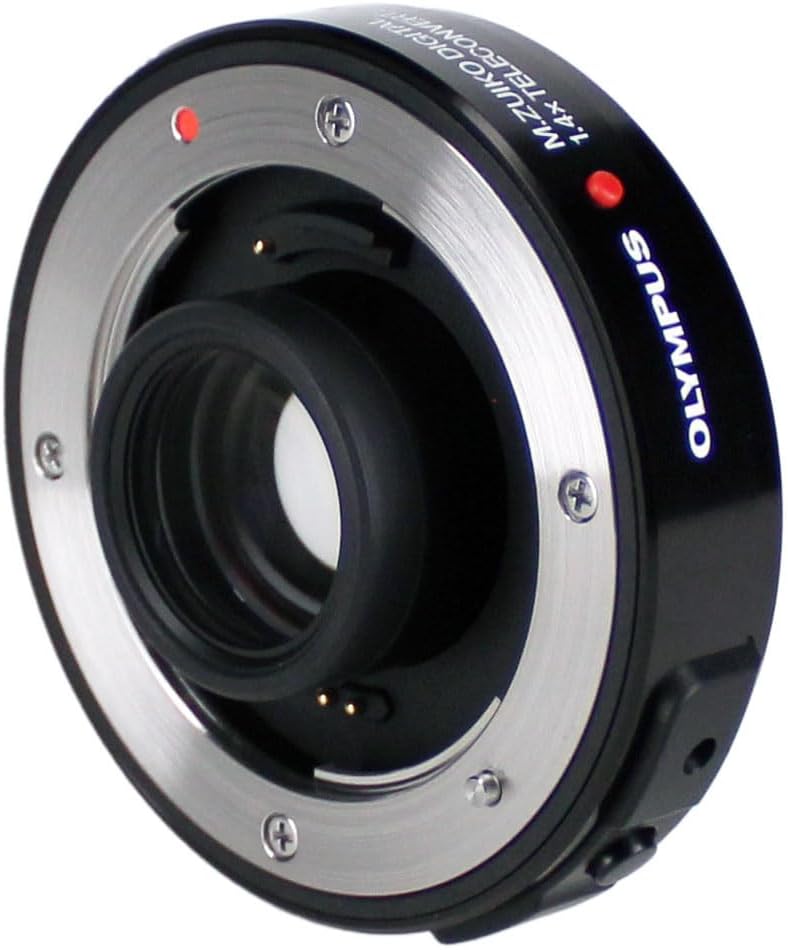
Figure 1: Front view of the OM SYSTEM OLYMPUS MC-14 1.4X Teleconverter, showing the lens mount and optical elements.
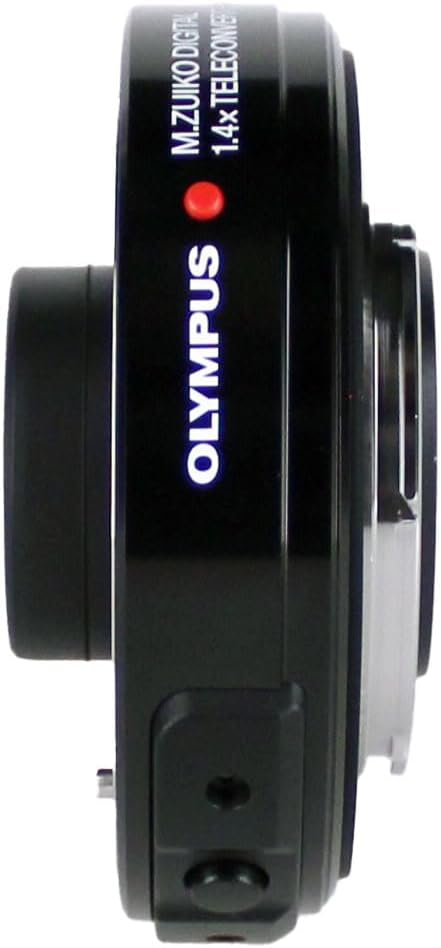
Figure 2: Side view of the OM SYSTEM OLYMPUS MC-14 1.4X Teleconverter, highlighting its compact profile.

Figure 3: Top view of the OM SYSTEM OLYMPUS MC-14 1.4X Teleconverter, showing the "M.ZUIKO DIGITAL 1.4x TELECONVERTER MC-14" inscription.

Figure 4: Rear view of the OM SYSTEM OLYMPUS MC-14 1.4X Teleconverter, showing the camera mount and electronic contacts.
Compatibility
The MC-14 1.4X Teleconverter is designed exclusively for use with the following Olympus M.Zuiko Digital PRO lenses:
- M.Zuiko Digital ED 40-150mm f/2.8 PRO
- M.Zuiko Digital ED 300mm f/4.0 IS PRO
It is not compatible with other lenses due to specific optical and mechanical requirements.
Setup and Attachment
- Prepare the Lens and Camera: Ensure both your camera body and the compatible PRO lens are clean and free of dust. Turn off the camera before attaching or detaching any lenses or accessories.
- Attach Teleconverter to Lens: Align the red dot on the MC-14 teleconverter with the red dot on the rear of your compatible PRO lens. Gently twist the teleconverter clockwise until it clicks into place, indicating a secure connection.
- Attach Lens Assembly to Camera: Align the red dot on the teleconverter (now attached to the lens) with the red dot on your camera body's lens mount. Gently twist the entire lens-teleconverter assembly clockwise until it clicks into place.
- Verify Connection: Ensure both connections are secure and there is no wobble.
Always handle the teleconverter and lenses by their barrels, avoiding contact with the glass elements or electronic contacts.
Operating Considerations
When using the MC-14 1.4X Teleconverter, be aware of the following operational changes:
- Focal Length Extension: The teleconverter multiplies the focal length of the attached lens by 1.4x. For example, a 40-150mm lens becomes a 56-210mm lens.
- Aperture Reduction: The maximum aperture of the lens will be reduced by one stop. For instance, an f/2.8 lens will have a maximum aperture of f/4.0 when the teleconverter is attached. This means less light will reach the sensor, which may require adjusting ISO or shutter speed in low-light conditions.
- Autofocus Performance: While designed to maintain excellent autofocus speed, extreme low-light conditions or very fast-moving subjects might slightly impact performance compared to the bare lens.
- Image Quality: The MC-14 is engineered to minimize degradation, but any teleconverter will inherently introduce a slight reduction in optical performance compared to the bare lens. However, the PRO series lenses and MC-14 are designed to maintain very high image quality.
Maintenance and Care
Proper care will ensure the longevity and performance of your teleconverter:
- Cleaning Lens Elements: Use a soft, lint-free microfiber cloth specifically designed for optical lenses. For stubborn smudges, use a small amount of lens cleaning fluid applied to the cloth, not directly to the lens.
- Cleaning Body: Wipe the exterior with a soft, dry cloth. Do not use harsh chemicals or abrasive materials.
- Storage: When not in use, store the teleconverter with both front and rear caps attached in a dry, cool place away from direct sunlight and extreme temperatures.
- Dust and Moisture: Although weather-sealed, avoid unnecessary exposure to dust, dirt, rain, or snow. If exposed, wipe dry immediately.
- Handling: Avoid dropping or subjecting the teleconverter to strong impacts, as this can damage the optical elements or internal mechanisms.
Troubleshooting
| Problem | Possible Cause | Solution |
|---|---|---|
| Lens not attaching securely. | Misalignment of mounting marks; obstruction on mount. | Ensure red dots are aligned. Check for any debris on the lens or teleconverter mount. Do not force. |
| Autofocus is slow or inaccurate. | Low light conditions; very fast-moving subject; dirty electronic contacts. | Increase ambient light or ISO. Clean electronic contacts on both teleconverter and lens with a clean, dry cloth. |
| Image quality appears soft. | Camera shake; dirty lens elements; inherent slight optical degradation from teleconverter. | Use a faster shutter speed or tripod. Clean lens elements. Ensure proper focus. While minimal, some softness is expected compared to the bare lens. |
| Camera does not recognize lens. | Poor connection; dirty electronic contacts. | Re-attach the teleconverter and lens, ensuring a firm click. Clean electronic contacts. Restart camera. |
Specifications
- Model Number: V321210BU000
- Magnification: 1.4x
- Light Loss: 1 EV (1 stop)
- Dimensions (Diameter x Length): Approximately 2.3 x 1 inches (58.8 x 15mm)
- Weight: Approximately 3.68 ounces (105g)
- Construction: Dustproof, Splashproof, Freezeproof (-10°C) when attached to compatible PRO lenses.
- Compatible Mountings: Micro Four Thirds (MFT)
- Compatible Lenses: M.Zuiko Digital ED 40-150mm f/2.8 PRO, M.Zuiko Digital ED 300mm f/4.0 IS PRO
What's in the Box
Your OM SYSTEM OLYMPUS MC-14 1.4X Teleconverter package should contain the following items:
- OM SYSTEM OLYMPUS MC-14 1.4X Teleconverter (LENS)
- Front Lens Cap
- Rear Lens Cap
- Soft Case (may vary by region/bundle)
Warranty and Support
For information regarding product warranty, repairs, or technical support, please refer to the warranty card included with your product or visit the official OM SYSTEM / Olympus support website. Keep your proof of purchase for warranty claims.
Related documentsV321210BU000

Ask a question about this manual
Ask about setup, troubleshooting, compatibility, parts, safety, or missing instructions. Manuals+ will review the question and use this page’s manual context to help answer it.