
Introduction
This instruction manual provides essential information for the proper installation, operation, and maintenance of your COMTEC ZERO 85M GPS Radar Detector. Please read this manual thoroughly before using the device to ensure safe and optimal performance. Keep this manual for future reference.
Key Features
- 4.0-inch Wide MVA LCD: Enjoy a clear and wide viewing angle with the high-quality MVA liquid crystal display.
- Motion Sensor Operation: Control various functions like screen switching, volume adjustment, and muting with simple hand gestures, eliminating the need to touch the screen.
- External Input Function: Connect external devices such as a backup camera or DVD player to display video on the unit's screen. Audio input is also supported. (Optional ZR-09 AV input cable kit required for external connection).
- New Traffic Regulation "Zone 30" Support: The device identifies and alerts you when entering areas with a maximum speed limit of 30 km/h, providing visual and audio warnings.

Image: This image illustrates the device's capability to detect and warn about "Zone 30" areas, showing a road sign and the corresponding alert on the unit's display.
- Multi-Satellite Reception: Supports GPS, Quasi-Zenith Satellite System (Michibiki), GLONASS, Himawari, and GAGAN, increasing the number of receivable satellites to 59. This enhances reception accuracy and speed.

Image: This diagram illustrates the multi-satellite reception capabilities, showing the device receiving signals from various satellite systems for improved positioning accuracy.
- OBD2 Connection Support: Connects to your vehicle's OBD2 port (optional OBD2-R2 adapter required) to display up to 132 vehicle information items across 6 display patterns. This also provides accurate vehicle speed information, maintaining position tracking even when GPS signals are lost in tunnels.
- 3-Interface Operation: Operate the device using the motion sensor, remote control, or the main unit's switches for improved usability.
- Integrated Sensors: Equipped with G-sensor, Gyro sensor, and Illumination sensor for enhanced functionality.
- Idling Stop & Hybrid Vehicle Support: Compatible with idling stop vehicles and supports display for Toyota Hybrid vehicles.
- Free Monthly Data Updates: GPS data and public enforcement information can be updated monthly for free.
- Extensive Warning Data: Stores over 39,000 enforcement inquiry data points and supports 18 reception bands.
- Radar Cancel Point Detection: Automatically identifies and registers locations with false radar signals (e.g., automatic doors) to mute warnings upon subsequent passes.
- Opposite Lane Radar Cancel Function: Automatically mutes radar warnings from opposite lane speed cameras or H-systems.
Setup and Installation
Proper installation is crucial for the optimal performance of your COMTEC ZERO 85M. It is recommended to have this device installed by a qualified professional.
Mounting the Main Unit
The ZERO 85M is designed as a mirror-type unit. It attaches to your existing rearview mirror. Ensure the unit is securely fastened and does not obstruct your view or interfere with vehicle operations.

Image: The COMTEC ZERO 85M unit mounted on a vehicle's rearview mirror, displaying information. Ensure the mounting position allows for clear visibility of the road and the device screen.
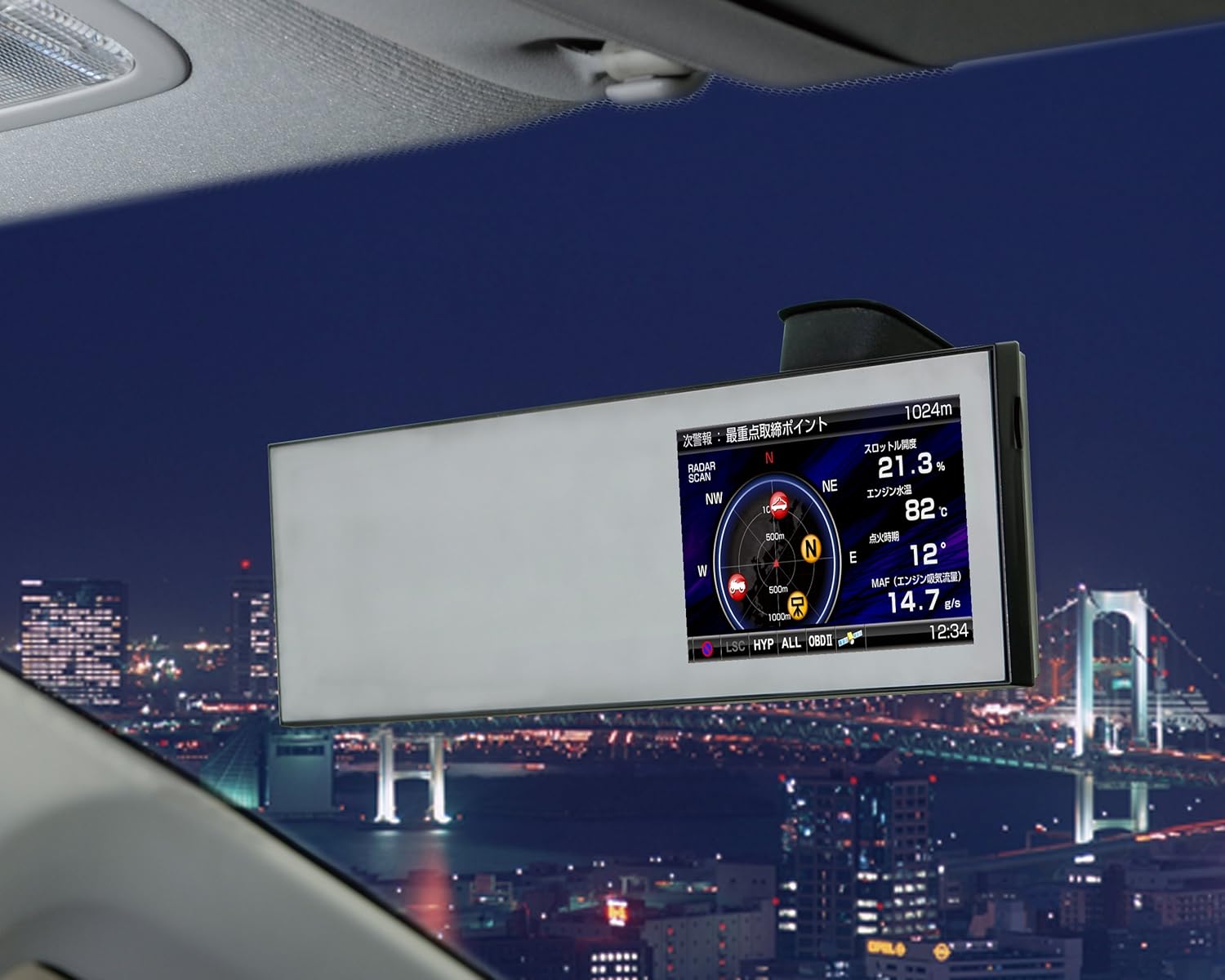
Image: Another view of the COMTEC ZERO 85M installed, highlighting its integration with the vehicle's interior.
Power Connection
Connect the provided 12V cigarette lighter plug cord (4m length) to power the unit. For a cleaner installation, the power wiring can be routed through the A-pillar and ceiling to the rearview mirror.
OBD2 Connection (Optional)
For advanced vehicle data display, connect the optional OBD2 adapter (OBD2-R2) to your vehicle's OBD2 port. Refer to the manufacturer's website for compatible vehicle models. Once connected, simply attach the main unit to the dashboard.

Image: This diagram illustrates the OBD2 connection process and examples of the detailed vehicle information that can be displayed on the unit. The OBD2 connector is typically located under the dashboard.
For a list of compatible vehicles, please visit the manufacturer's OBD2 adapter compatibility chart: Comtec OBD2 Compatibility Chart
External Input Connection (Optional)
To display video from a backup camera or DVD player, the optional ZR-09 AV input cable kit is required. Connect the external device to the ZERO 85M using this cable.

Image: This diagram shows how to connect external devices like a backup camera or DVD player using the optional ZR-09 AV input cable kit.
Operating Instructions
Motion Sensor Operations
The COMTEC ZERO 85M features a motion sensor for hands-free control. Perform the following gestures in front of the unit:

Image: This diagram illustrates the various hand gestures used for motion sensor control.
- OBDII Screen Switching: Move your hand left or right to cycle through 6 different OBDII display screens.
- Wallpaper Change: Move your hand up or down to change the background wallpaper. Available options include blue, red, green, black, and user-defined photos.
- Volume Adjustment: Move your hand up or down, or left or right, to adjust the volume level.
- Mute Operation: During an alert, move your hand up or down, or left or right, to mute the warning sound.
- External Input Switching: Move your hand left or right to switch to the external input screen (e.g., backup camera, drive recorder).
Display Modes
The unit offers various display patterns to suit your preferences:

Image: Examples of the different display modes available, including various meter, graph, and text layouts.
- Main/Mini-meter: Main display with a split mini-meter.
- Main/Bar Graph: Main display with a split bar graph.
- Main/Text: Main display with split text information.
- 3-Mini-meter: Displays 3 items in mini-meter format.
- Bar Graph List: Displays 6 items in a bar graph list.
- Text List: Displays 14 items in a text list.
Warning Displays
The ZERO 85M provides clear and timely warnings for various situations:
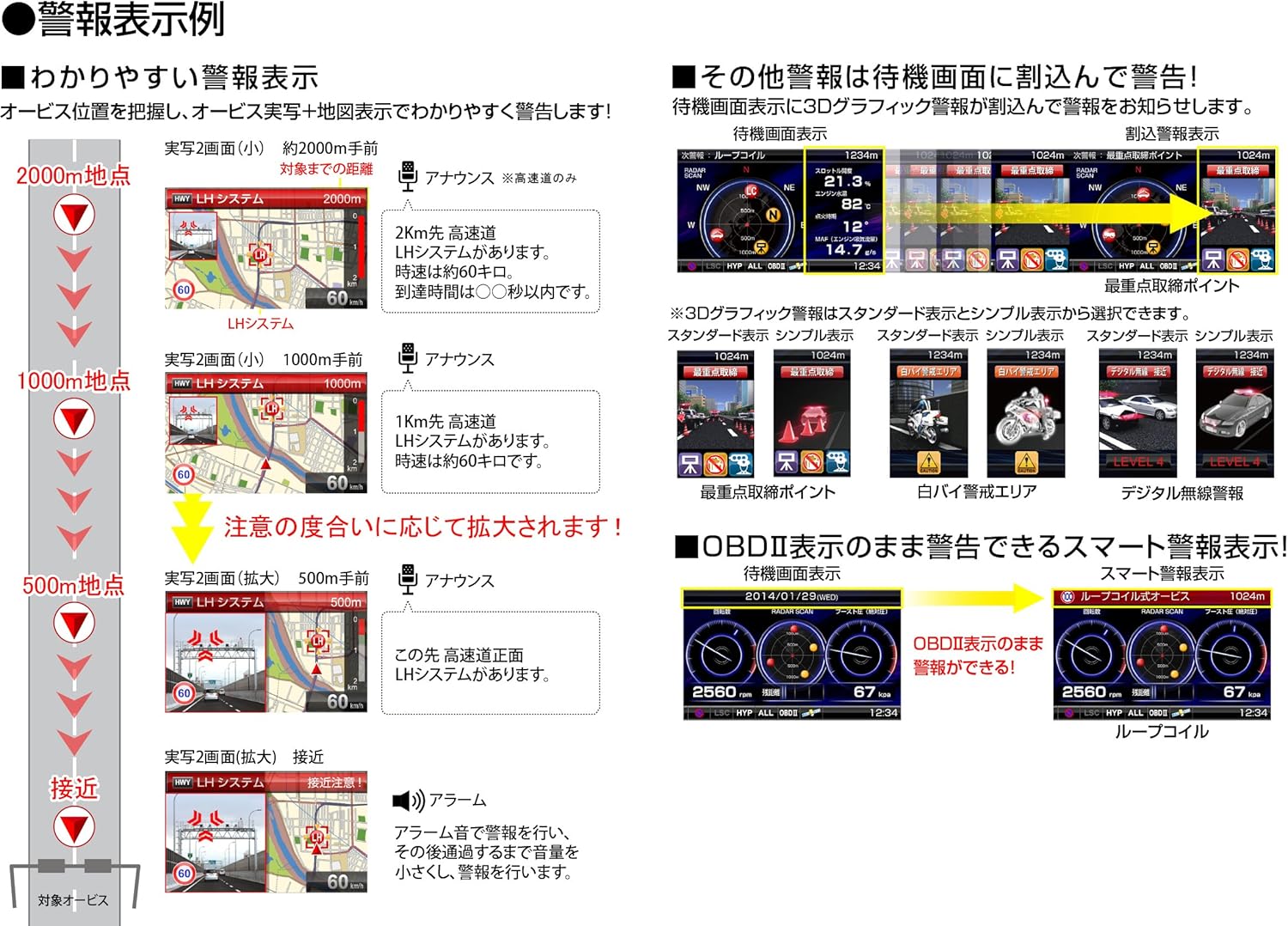
Image: This image shows examples of warning displays, indicating distance to the alert point and the type of warning (e.g., LH system, police station).
- Distance-based Alerts: Warnings are provided at 2000m, 1000m, and 500m distances, with visual and audio cues.
- Zone 30 Alerts: When approaching or driving within a "Zone 30" area, the unit displays a warning icon and provides an announcement.
- OBDII Smart Warnings: If connected via OBDII, the unit can display smart warnings alongside vehicle data.
External Input Switching
When using the external input function, you can switch between display modes:
- Image Playback Mode: Switch by motion sensor.
- Backup Monitor Mode: Switches automatically based on input signal (e.g., when shifting to reverse).
Maintenance
Data Updates
To ensure the most accurate and up-to-date information, it is recommended to regularly update the GPS data and public enforcement information. These updates are available monthly for free download from the COMTEC website.
You will need to download the data to a microSD card and then update the unit. Refer to the COMTEC website for detailed instructions on the update process.
Cleaning the Unit
Gently wipe the unit's screen and body with a soft, dry cloth. Avoid using abrasive cleaners or solvents, as they may damage the display or casing.
Troubleshooting
If you encounter issues with your COMTEC ZERO 85M, please refer to the following common troubleshooting steps:
- No Power: Ensure the power cable is securely connected to both the unit and the vehicle's 12V power outlet. Check the vehicle's fuse for the power outlet.
- No GPS Signal: Ensure the unit has a clear view of the sky. GPS reception may be difficult in tunnels, underground parking, or dense urban areas. Allow sufficient time for the unit to acquire satellites after startup.
- False Radar Warnings: The unit features a "Radar Cancel Point Detection" function. If you frequently receive false warnings in a specific location (e.g., near automatic doors), you can register that location as a cancel point to mute future alerts there.
- Motion Sensor Not Responding: Ensure there are no obstructions in front of the motion sensor. Try performing the gestures clearly and deliberately.
- External Input Not Displaying: Verify that the optional ZR-09 AV input cable kit is correctly connected and that the external device (backup camera, DVD player) is powered on and functioning. Ensure the unit is switched to the external input display mode.
- OBD2 Data Not Displaying: Confirm that the optional OBD2-R2 adapter is correctly connected to both the unit and the vehicle's OBD2 port. Verify that your vehicle model is compatible with the OBD2 adapter.
If the problem persists after attempting these steps, please contact COMTEC customer support or visit their official website for further assistance.
Specifications
| Feature | Specification |
|---|---|
| Manufacturer | COMTEC |
| Brand | COMTEC |
| Model Name | ZERO 85M |
| Product Dimensions (Depth x Width x Height) | 21 x 300 x 80 mm |
| Product Weight | 347 g |
| Voltage | 12 Volts |
| Frequency Band | 18 bands |
| Power Source | Corded Electric |
| Display Type | LCD |
| Country of Origin | Japan |
| Material | Super heat-resistant ABS resin |
| Included Accessories | Remote control, 12V cigarette plug cord (4m), Power wiring unit, Electro-tap, Cord clamps for wiring, Hook-and-loop fastener for remote control, microSD card, Instruction manual |
Warranty and Support
Information regarding the product warranty is typically provided with the purchase documentation. Please refer to the warranty card or the official COMTEC website for details on warranty coverage, terms, and conditions.
For technical support, product inquiries, or service requests, please visit the official COMTEC website or contact their customer service department. Contact information can usually be found on the manufacturer's website or in the included documentation.
Official COMTEC Website: https://www.comtec.co.jp/
