
Nokia RM-1172/230 DS
Nokia 230 Dual SIM User Manual
Model: RM-1172/230 DS
Introduction
This user manual provides essential information for the safe and efficient operation of your Nokia 230 Dual SIM mobile phone. Please read this manual carefully before using the device to ensure proper functionality and to avoid damage.
The Nokia 230 is a feature phone designed for communication, featuring a 2-megapixel front camera with LED flash and a durable sandblasted aluminum rear cover.
Package Contents
- Nokia 230 Dual SIM Handset
- Battery (1 Lithium Ion battery included)
- Charger
- User Manual (this document)
Device Overview
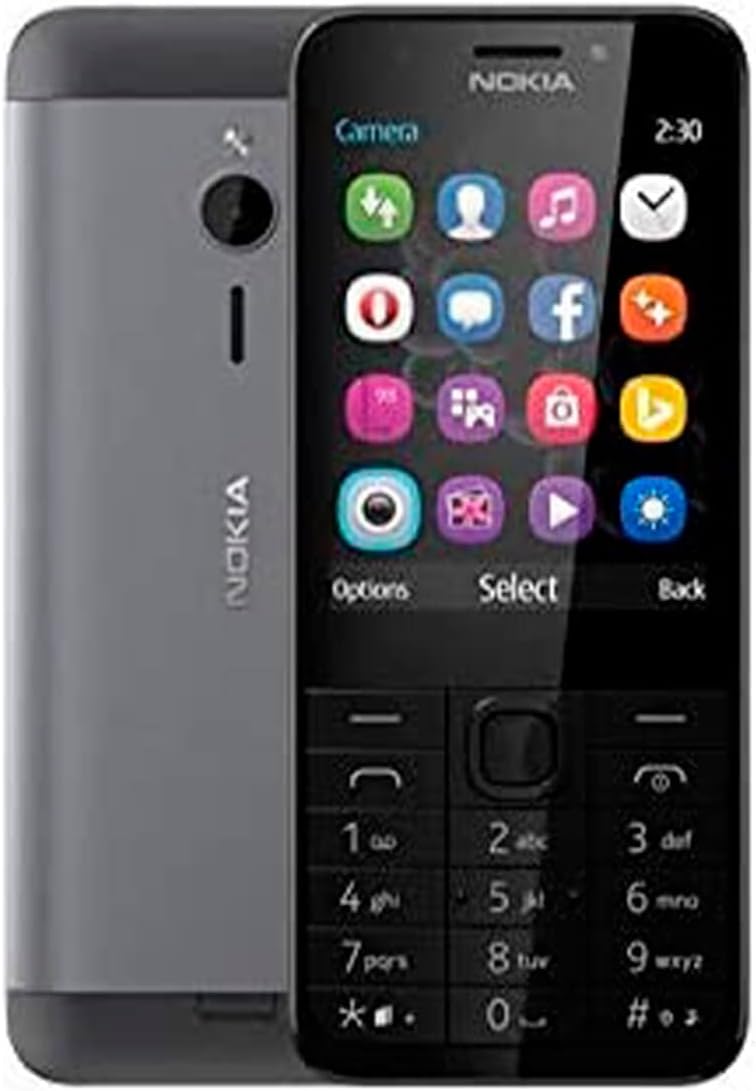
Figure 1: Front and back view of the Nokia 230 Dual SIM phone. The front displays the screen and keypad, while the back shows the camera and aluminum cover.

Figure 2: Front and side view of the Nokia 230 Dual SIM, highlighting its slim profile and keypad layout.

Figure 3: Rear view of the Nokia 230 Dual SIM, showcasing the 2-megapixel camera with LED flash and the sandblasted aluminum finish.
Key Components:
- Display: 2.8-inch QVGA (320 x 240 pixels) screen.
- Keypad: Alphanumeric keypad with navigation keys.
- Front Camera: 2 MP with LED flash, ideal for selfies.
- Rear Camera: 2 MP with LED flash.
- Audio Jack: 3.5 mm for headphones.
- Microphone: For voice calls and recordings.
- Speaker: For audio output.
Setup
1. Installing the SIM Card(s) and Battery
- Remove the back cover by gently prying it from the notch at the bottom of the phone.
- If present, remove the battery.
- Insert the SIM card(s) into the designated slots. Ensure the gold contacts face downwards and the card is correctly oriented. This phone supports Dual SIM functionality.
- Insert the battery, aligning the contacts.
- Replace the back cover, pressing firmly until it clicks into place.
2. Charging the Battery
Before first use, fully charge the battery. Connect the charger to the phone's charging port and plug it into a wall outlet. The battery indicator on the screen will show charging progress. A full charge typically takes a few hours.
3. Powering On/Off
- To Power On: Press and hold the Power/End key until the phone vibrates and the Nokia logo appears.
- To Power Off: Press and hold the Power/End key, then select "Power off" from the options.
Operating Instructions
Basic Navigation
- Use the navigation keys (up, down, left, right) to scroll through menus and options.
- Press the Select key (center of navigation keys) to confirm a selection.
- Press the Back key to return to the previous screen.
- The Options key provides context-sensitive menu choices.
Making Calls
- From the home screen, enter the phone number using the keypad.
- Press the Call key (green button) to initiate the call.
- To end a call, press the End key (red button).
Sending Messages
- Go to Menu > Messaging > Create message.
- Type your message using the keypad.
- Enter the recipient's phone number or select from contacts.
- Select Send.
Using the Camera
The Nokia 230 features both front and rear 2-megapixel cameras with LED flash.
- From the menu, select Camera.
- Use the navigation keys to adjust settings or zoom (if available).
- Press the Select key to take a photo.
- To switch between front and rear cameras, look for an icon or option within the camera interface.
Dual SIM Management
For models with Dual SIM functionality, you can manage your SIM cards through the settings menu. This allows you to choose which SIM to use for calls, messages, or data (if applicable).
Maintenance
Cleaning the Device
- Use a soft, lint-free cloth to wipe the screen and body of the phone.
- Avoid using harsh chemicals, cleaning solvents, or strong detergents.
- Do not expose the phone to excessive moisture.
Battery Care
- Do not expose the battery to extreme temperatures.
- Use only original Nokia chargers and batteries.
- If the battery is damaged or swollen, discontinue use and replace it with an authorized Nokia battery.
Software Updates
Periodically check for software updates through the phone's settings menu to ensure optimal performance and security. Follow on-screen instructions for any available updates.
Troubleshooting
| Problem | Possible Cause | Solution |
|---|---|---|
| Phone does not power on. | Battery is drained or not properly inserted. | Charge the battery. Ensure the battery is correctly inserted. |
| Cannot make or receive calls. | No network signal, SIM card issue, or incorrect network settings. | Check network signal strength. Reinsert SIM card(s). Check network settings in the phone menu. Contact your service provider. |
| Poor audio quality during calls. | Weak signal, obstructed microphone/speaker, or volume too low. | Move to an area with better signal. Ensure microphone and speaker are clear. Adjust call volume. |
| Battery drains quickly. | Excessive usage, background applications, or old battery. | Reduce screen brightness. Close unnecessary applications. Consider replacing the battery if it's old. |
Specifications
| Feature | Detail |
|---|---|
| Model Name | Nokia 230 Dual SIM |
| Model Number | RM-1172/230 DS |
| Dimensions | 2.1 x 0.43 x 4.91 inches |
| Item Weight | 6 ounces (169 Grams) |
| Display Size | 2.8 Inches |
| Resolution | 320 x 240 pixels |
| Operating System | Proprietary |
| RAM | 16 MB (0.02 GB) |
| Cameras | Front: 2 MP with LED flash, Rear: 2 MP with LED flash |
| Battery Type | Lithium Ion (included) |
| Battery Capacity | 1100 Milliamp Hours (1200 mAh rating) |
| Phone Talk Time | Up to 22 Hours |
| Connectivity | Bluetooth, Cellular |
| Audio Jack | 3.5 mm |
| Color | Black |
Warranty and Support
For warranty information, please refer to the warranty card included with your product or visit the official Nokia support website. Keep your proof of purchase for warranty claims.
If you encounter issues not covered in this manual, please contact Nokia customer support for assistance. Support contact details can typically be found on the official Nokia website or on your product packaging.
Online Support: www.nokia.com/phones/en_us/support
Related documentsRM-1172/230 DS


Ask a question about this manual
Ask about setup, troubleshooting, compatibility, parts, safety, or missing instructions. Manuals+ will review the question and use this page’s manual context to help answer it.