
1. Introduction
Thank you for choosing the Karella Premium Silver Electronic Dartboard. This manual provides essential information for the safe and effective use of your new dartboard. Please read these instructions carefully before installation and operation, and retain them for future reference.
2. Package Contents
Ensure all items listed below are present in your package:
- Karella Premium Silver Electronic Dartboard
- 12 Soft Darts
- Power Adapter
- Instruction Manual (this document)

Image: The integrated storage drawer, shown here with various dart tips and accessories, provides convenient organization for your darts.
3. Setup and Installation
3.1 Mounting the Dartboard
The Karella Premium Silver dartboard is designed for wall mounting. Select a sturdy wall location with sufficient space for throwing darts. The standard throwing distance is 2.37 meters (7 feet 9.25 inches) from the face of the dartboard to the throwing line. The center of the bullseye should be 1.73 meters (5 feet 8 inches) from the floor.
- Mark the desired height for the bullseye (1.73m from the floor).
- Securely fasten the dartboard to the wall using appropriate screws and anchors (not included) through the mounting points on the back of the unit. Ensure the dartboard is level and stable.

Image: A full front view of the Karella Premium Silver Electronic Dartboard, ready for installation and play.
3.2 Power Connection
Connect the provided power adapter to the dartboard's power input jack and then plug it into a standard electrical outlet. The dartboard will power on automatically or enter standby mode.
4. Operating Instructions
4.1 Basic Controls
The control panel, located below the dartboard, features various buttons for game selection, player settings, and sound control.
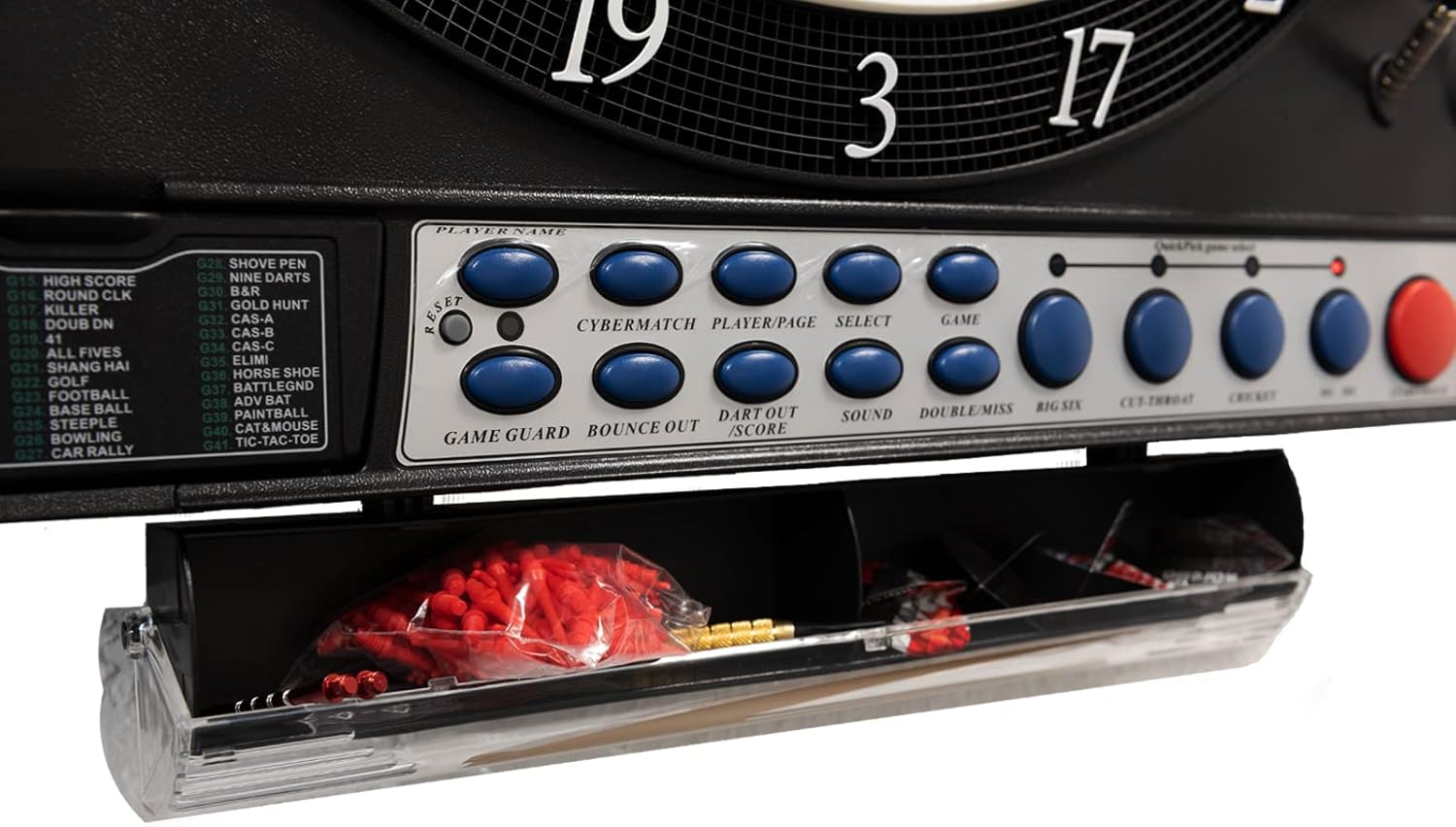
Image: A detailed view of the control panel buttons, including game selection, player controls, and sound adjustment.
4.2 Power On/Off
Press the POWER button to turn the dartboard on or off. When powered on, the display will illuminate.
4.3 Player Selection
The dartboard supports up to 16 players. Use the PLAYER/PAGE button to select the number of players for your game. The LED display will show the current player's score.

Image: A close-up of the electronic LED display, showing player scores and game information.
4.4 Game Selection
The dartboard offers approximately 40 games with 220 variations. Use the GAME button to cycle through available games. Press SELECT to confirm your choice. Refer to the game list printed on the dartboard's control panel for specific game numbers and variations.
4.5 Sound Control
Press the SOUND button to adjust the volume level. The dartboard features electronic voice announcements and sound effects. There are multiple volume levels, including a mute option.
4.6 Special Functions
- Double In / Double Out / Master Out: These options are available for '01 games and can be selected using the dedicated buttons to set specific game rules.
- Game Guard (Keypad Lock): Activates a keypad lock to prevent accidental button presses during play.
- Handicap Function: Allows for variable difficulty settings to balance gameplay among players of different skill levels.
- Cybermatch 2000: Challenge yourself against one of five computer opponents with varying skill levels.
- Miss Option: Allows for recording missed throws.
- Calculation of Throws to Win: For '01 games, the dartboard can display the number of throws needed to win.
5. Key Features
- Electronic Scoring: Automatic score tracking for all players.
- Extra Large Catch Ring: Designed to catch missed darts, reducing bounce-outs and protecting your wall.
- 2-Zone Bullseye: An integrated bullseye with two distinct scoring zones for enhanced gameplay.
- Voice Announcements and Sound Effects: Provides an interactive playing experience with audio feedback.
- LED Displays: Five bright LED indicators show current scores for up to 16 players, and four LED indicators are dedicated to Cricket tournament scoring.
- Integrated Dart Holder and Tray: Convenient storage for darts and accessories.

Image: A close-up view of the dartboard's segments, highlighting the 2-zone bullseye and the scoring areas.

Image: The dartboard in use, with several soft darts accurately embedded in different scoring segments.
6. Maintenance and Care
6.1 Cleaning
To clean the dartboard, wipe the surface with a soft, dry cloth. Do not use abrasive cleaners or solvents, as these can damage the electronic components and finish. Ensure the dartboard is unplugged before cleaning.
6.2 Dart Care
Regularly inspect your soft darts for wear and tear. Replace broken or bent tips to ensure proper function and prevent damage to the dartboard segments. Store darts in the integrated holder or a dedicated dart case when not in use.
7. Troubleshooting
If you encounter issues with your Karella Premium Silver Electronic Dartboard, refer to the following common problems and solutions:
| Problem | Possible Cause | Solution |
|---|---|---|
| Dartboard does not power on. | Power adapter not connected or faulty. | Ensure the power adapter is securely plugged into the dartboard and a working electrical outlet. Test the outlet with another device. |
| Darts are not registering scores. | Dart tips are broken or bent; segment is stuck. | Check dart tips and replace if necessary. Gently press on the dartboard segment where the dart landed to ensure it is not stuck. |
| Sound is not working or too low. | Volume is set too low or muted. | Press the SOUND button repeatedly to increase the volume or unmute. |
| Display shows incorrect scores. | Segment is stuck or dart registered incorrectly. | Press the BOUNCE OUT button if a dart falls out without registering. Ensure darts are fully inserted into segments. |
8. Specifications
| Feature | Detail |
|---|---|
| Model Number | 8075.01 |
| Brand | Karella |
| Dimensions (H x W x D) | 70 x 55 x 6 cm (approximately 27.5 x 21.6 x 2.3 inches) |
| Weight | 6.28 kg (approximately 13.8 lbs) |
| Material | Sisal (main material, likely referring to the dartboard surface material or a component, though electronic dartboards typically use plastic segments) |
| Color | Silver |
| Player Capacity | Up to 16 players |
| Games / Variations | Approx. 40 games / 220 variations |
| Power Source | AC Adapter (included) |
| UPC | 716214995277 |
9. Warranty and Support
For warranty information and customer support, please refer to the documentation provided with your purchase or contact the retailer where the product was acquired. Keep your proof of purchase for any warranty claims.