
SINGCALL APE510
SINGCALL APE510 Wireless Call Button User Manual
Model: APE510
1. Introduction
The SINGCALL APE510 is a robust, waterproof, dustproof, and shockproof wireless call button designed for various service environments. This device functions as a transmitter and requires a compatible SINGCALL receiver (not included) to form a complete call system. It is ideal for use in restaurants, cafes, hospitals, factories, offices, and other settings where quick and efficient communication is needed.
This manual provides detailed instructions on the setup, operation, maintenance, and specifications of your APE510 wireless call button.
2. Product Overview

Figure 1: Front view of the SINGCALL APE510 wireless call button. It features a prominent red "CALL" button in the center and two small white buttons at the top and bottom.

Figure 2: Angled view of the SINGCALL APE510, showing its compact, rectangular design and the red call button.
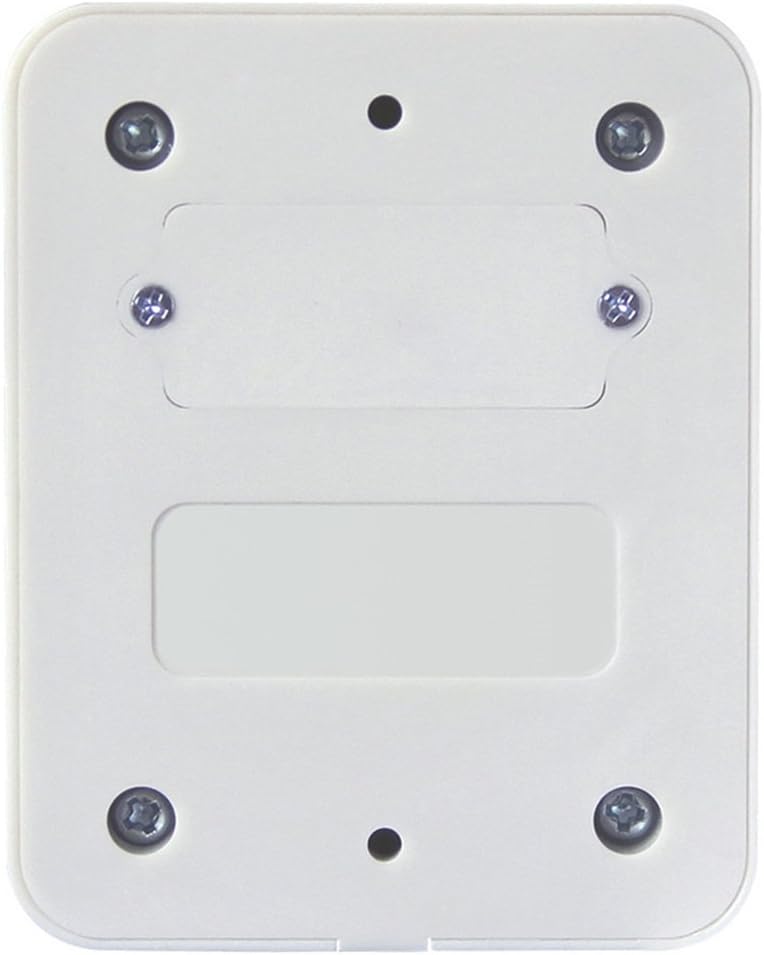
Figure 3: Rear view of the SINGCALL APE510, showing the mounting points for screws and the battery compartment cover.
3. Setup
The APE510 call button is a transmitter unit. It must be paired with a compatible SINGCALL receiver (e.g., wrist receiver, display receiver) to function as part of a complete call system. Receivers are sold separately.
3.1 Unpacking
Carefully unpack the contents. You should find:
- 1 x SINGCALL APE510 Wireless Call Button
- 2 x Mounting Screws
- 1 x Adhesive Sticker
3.2 Battery Installation
The APE510 comes with a pre-installed 12V 23mA Alkaline battery. If replacement is needed:
- Locate the battery compartment on the rear of the device (refer to Figure 3).
- Carefully open the compartment cover.
- Remove the old battery and insert a new 12V 23mA Alkaline battery, ensuring correct polarity.
- Close the battery compartment cover securely.
Note: The typical battery life is 12-18 months, depending on usage.
3.3 Mounting the Call Button
The APE510 can be mounted using screws or the provided adhesive sticker.
3.3.1 Screw Mounting
- Choose a suitable location for the call button.
- Mark the positions for the two mounting screws on the desired surface.
- Drill pilot holes if necessary.
- Secure the call button to the surface using the provided screws.
3.3.2 Adhesive Mounting
- Ensure the mounting surface is clean, dry, and smooth.
- Peel off the protective backing from the adhesive sticker.
- Press the call button firmly onto the desired surface for at least 30 seconds.
3.4 Pairing with a Receiver
Refer to the user manual of your specific SINGCALL receiver model for detailed pairing instructions. Generally, the process involves putting the receiver into pairing mode and then pressing the call button on the APE510 to register it with the receiver.
4. Operating Instructions
The SINGCALL APE510 is designed for simple operation.
4.1 Making a Call
To send a call signal:
- Ensure the call button is securely mounted and within range of its paired receiver.
- Press the large red "CALL" button firmly.
- Upon successful transmission, the paired receiver will display the call number or emit an alert, depending on its configuration.
Note: The effective indoor transmission distance is typically 60-80 meters, while the open distance can be up to 1500 meters. Obstacles like walls and electronic interference can reduce the range.
4.2 Understanding Call Signals
The APE510 transmits a unique signal that identifies it to the receiver. The receiver will then process this signal according to its programming, which may include displaying a number, playing an alert sound, or vibrating.
5. Maintenance
To ensure the longevity and optimal performance of your SINGCALL APE510 call button, follow these maintenance guidelines:
- Cleaning: Wipe the device regularly with a soft, damp cloth. Do not use harsh chemicals, abrasive cleaners, or solvents, as these can damage the housing and buttons.
- Battery Replacement: Replace the battery when the signal strength weakens or the device stops transmitting. Refer to Section 3.2 for battery installation instructions.
- Environmental Protection: Although the APE510 is waterproof, dustproof, and shockproof, avoid prolonged exposure to extreme temperatures, direct sunlight, or highly corrosive environments.
- Inspection: Periodically check the mounting for security and ensure the call button is not loose.
6. Troubleshooting
If you encounter issues with your SINGCALL APE510, refer to the following table:
| Problem | Possible Cause | Solution |
|---|---|---|
| Call button not transmitting / Receiver not responding |
|
|
| Button feels stiff or unresponsive |
|
|
| Reduced transmission range |
|
|
7. Specifications
| Feature | Detail |
|---|---|
| Model | APE510 |
| Dimensions (L x W x H) | 82 mm x 65 mm x 28 mm |
| Weight | 100 g |
| Housing Material | PC (Import from Germany) |
| Button Material | PC (Import from Taiwan) with Japanese Soken glue |
| Button Lifespan | Millions of presses |
| Frequency Range | 433.92 MHz |
| Frequency Deviation | 0.5 MHz |
| Transmission Distance (Open) | Up to 1500 meters |
| Transmission Distance (Indoor) | 60-80 meters |
| Power Supply | 1 x 12V 23mA Alkaline Battery |
| Battery Life | 12-18 months (typical) |
| Waterproof Rating | Strong (Super-waterproof) |
| Additional Features | Dustproof, Shockproof, EMC anti-interference, Stable construction, Red silicone button, High reliability |
8. Warranty and Support
Specific warranty information for the SINGCALL APE510 is not provided in this manual. Please refer to the product packaging, your purchase receipt, or the official SINGCALL website for warranty details and customer support contact information.
For technical assistance or inquiries, please visit the official SINGCALL website or contact their customer service department.
Related documentsAPE510


Ask a question about this manual
Ask about setup, troubleshooting, compatibility, parts, safety, or missing instructions. Manuals+ will review the question and use this page’s manual context to help answer it.