
RadioShack 6400237
Contents
RadioShack Replacement Soldering Tips User Manual
Model: 6400237
Introduction
This manual provides essential information for the safe and effective use of your RadioShack Replacement Soldering Tips. These copper-clad tips are designed to restore optimal performance to compatible soldering guns, ensuring efficient heat transfer for various soldering tasks.

Image Description: A detailed close-up of a single copper-clad replacement soldering tip, showcasing its chisel-style end and bent shaft design.
Compatibility
These replacement soldering tips are specifically designed for use with the following soldering gun models:
- RadioShack 6402187 (64-2187) dual-heat soldering gun
- Archer 6402190 (64-2190) soldering gun
- Weller D440 (D-440) soldering gun
- Weller 8200 soldering gun
- Weller 8250A soldering gun
- ECG J-100 (JT-104 Tip) soldering gun
- Various other soldering gun models that accept 2.6-inch chisel tips.
Installation Instructions
Follow these steps carefully to replace the soldering tip on your compatible soldering gun. Always ensure the soldering gun is unplugged from the power source and completely cool before attempting any installation or maintenance.

Image Description: The back of the product packaging displays a diagram and text instructions for replacing the soldering tip. It illustrates the process of inserting the tip and securing it with nuts.
- Prepare the Tip: Fasten the small nuts onto the new replacement tip as indicated in the product diagram.
- Initial Insertion: Carefully insert the ends of the tip into the designated side holes of the soldering gun. Push them in approximately ½ inch, then gently pull forward to begin forming the bend.
- Full Insertion: Continue to guide the tip ends through the tubing opening and fully into the side holes until properly seated.
- Secure the Tip: Begin fastening the nuts by hand, ensuring the threads engage correctly. Once hand-tight, use a wrench to finish tightening until the tip is securely in place. Avoid overtightening, which could damage the gun or tip.
Operating Your Soldering Gun with New Tips
These copper-clad tips are designed for efficient heat transfer, making them suitable for quick soldering jobs that require high temperatures. Follow these guidelines for optimal performance:
- Pre-tinning: Always pre-tin the new tip with a small amount of solder before its first use. This process helps prevent oxidation and significantly improves heat transfer efficiency.
- Temperature Control: Use the appropriate temperature setting on your soldering gun for the specific solder and electronic components you are working with. Refer to your soldering gun's manual for temperature guidance.
- Cleanliness: Maintain tip cleanliness during operation by regularly wiping it on a damp cellulose sponge or brass wool cleaner.
- Proper Contact: Ensure good contact between the soldering tip, the component lead, and the solder pad for effective and consistent heat transfer.
Tip Maintenance and Care
Proper maintenance extends the life of your soldering tips and ensures consistent, high-quality soldering results.
- Regular Cleaning: Clean the tip frequently using a damp cellulose sponge or a brass wire cleaner. Avoid using abrasive materials or files, as these can damage the tip's protective plating.
- Re-tinning: After each cleaning, or when the tip appears dull, re-tin it with fresh solder to protect it from oxidation and maintain its soldering properties.
- Proper Storage: When the soldering gun is not in use, ensure the tip is clean and lightly tinned before storing it. This prevents oxidation during storage.
- Inspection: Periodically inspect the tip for signs of wear, pitting, or excessive oxidation. Replace the tip when it shows significant degradation to ensure optimal soldering quality and performance.
Troubleshooting Common Issues
Poor Heat Transfer or Solder Not Melting
- Check Tip Cleanliness: Ensure the tip is clean and free of oxidation. A dirty or oxidized tip will not transfer heat effectively. Clean and re-tin the tip if necessary.
- Verify Tip Seating: Make sure the tip is securely installed and making good electrical contact within the soldering gun. A loose tip can lead to poor heat transfer.
- Solder Type: Confirm you are using the correct type of solder for your application and that it is not old or contaminated.
Tip Oxidation
- Consistent Pre-tinning: Always pre-tin new tips and re-tin after cleaning or when the tip is idle for a short period.
- Temperature Management: Avoid using excessively high temperatures for prolonged periods, as this can accelerate tip oxidation. Use the lowest effective temperature.
- Use Flux: Employ appropriate flux to aid in soldering and help prevent oxidation during the process.
Product Specifications
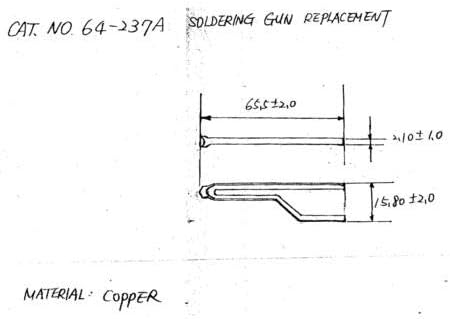
Image Description: A technical drawing illustrates the precise dimensions of the soldering tip, showing a total length of approximately 65.5 mm and a tip width of 15.8 mm.
| Feature | Detail |
|---|---|
| Product Name | Replacement Soldering Tips |
| Brand | RadioShack |
| Model Number | 6400237 |
| Material | Copper-clad |
| Tip Style | Chisel |
| Length | Approximately 2.6 inches (65.5 mm) |
| Unit Count | 2-Pack |
| UPC | 0040293142926 |
| Manufacturer | RadioShack |
Warranty Information
Specific warranty details for this product may vary. Please refer to the original product packaging or contact RadioShack customer support for comprehensive warranty information. It is recommended to keep your purchase receipt as proof of purchase for any warranty claims.
Customer Support
For further assistance, technical support, or inquiries regarding your RadioShack Replacement Soldering Tips, please visit the official RadioShack website or contact their customer service department.
Online Resources: www.radioshack.com
Note: Product specifications and compatibility are subject to change without notice.
Ask a question about this manual
Ask about setup, troubleshooting, compatibility, parts, safety, or missing instructions. Manuals+ will review the question and use this page’s manual context to help answer it.