
Introduction
This manual provides essential instructions for the safe and efficient operation, setup, and maintenance of your Heidolph MR HEI-Tec Magnetic Stirring Hotplate. Please read this manual thoroughly before operating the device to ensure proper function and to prevent injury or damage.
Safety Information
Always observe the following safety precautions:
- Ensure the device is placed on a stable, level, and heat-resistant surface.
- Do not operate the hotplate near flammable materials.
- Wear appropriate personal protective equipment (PPE) such as safety glasses and heat-resistant gloves.
- Disconnect the power supply before cleaning or servicing the unit.
- Avoid touching the hotplate surface during and immediately after operation, as it remains hot.
- Ensure proper ventilation in the work area.
- Only use the provided PT1000 temperature sensor or an approved equivalent.
Product Overview
The Heidolph MR HEI-Tec is a magnetic stirring hotplate designed for laboratory applications requiring precise temperature control and efficient stirring. It features a digital display for easy monitoring and setting of parameters.
Key Features
- Digital display for easy setting and monitoring of values.
- Independent safety circuit to switch off heating if hotplate temperature exceeds 25°C over set temperature.
- Digital speed setting from 100 to 1,400 rpm with 2% accuracy.
- Temperature setting up to 300°C.
- Illuminated button to indicate active stirring mode.
- Separate on/off switch for heating with illumination for visual control.
- Optional Pt 1000 temperature sensor for precise temperature control, overshoot protection, and reproducible results.
Components
Familiarize yourself with the main components of the MR HEI-Tec hotplate:

Figure 1: Front view of the Heidolph MR HEI-Tec Magnetic Stirring Hotplate. Shows the hotplate surface, digital display, control knob, and stirring/heating buttons.
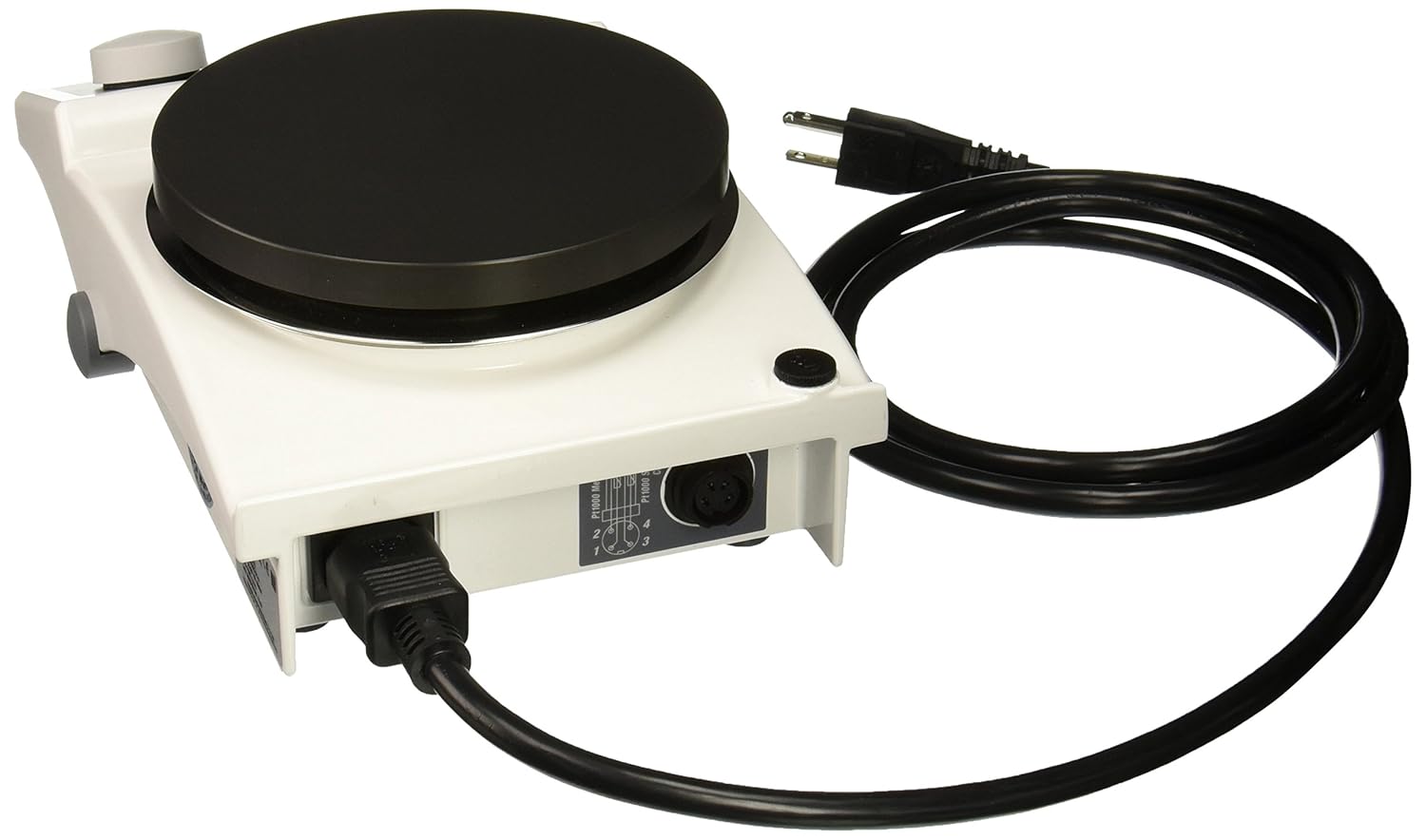
Figure 2: Rear view of the Heidolph MR HEI-Tec Magnetic Stirring Hotplate. Displays the power input and the PT1000 temperature sensor connection port.
Setup
1. Unpacking
Carefully remove the hotplate from its packaging. Inspect the unit for any signs of damage incurred during transit. Retain the original packaging for future transport or storage.
2. Placement
Place the MR HEI-Tec on a stable, level, non-flammable, and heat-resistant workbench. Ensure there is adequate clearance around the unit for ventilation and safe operation.
3. Power Connection
Connect the power cord to the power input socket on the rear of the hotplate (refer to Figure 2). Plug the other end into a grounded 115V AC power outlet. Ensure the power supply matches the unit's requirements.
4. PT1000 Temperature Sensor Connection (Optional)
If using the optional PT1000 temperature sensor for external temperature control, insert the sensor's plug into the designated PT1000 port on the rear of the unit (refer to Figure 2). Position the sensor within your sample solution for accurate temperature measurement.
Operating Instructions
1. Powering On/Off
To power on the unit, press the main power switch located on the side or rear of the device. The digital display will illuminate.
2. Setting Stirring Speed
- Place a suitable stirring bar into your vessel containing the liquid to be stirred.
- Place the vessel on the center of the hotplate surface.
- Press the stirring button (often indicated by a propeller icon) to activate the stirring function. The button will illuminate.
- Rotate the control knob to adjust the stirring speed. The digital display will show the current RPM. The speed can be set from 100 to 1,400 rpm.
- To stop stirring, press the stirring button again.
3. Setting Heating Temperature
- Press the heating button (often indicated by a wave or heat icon) to activate the heating function. The button will illuminate.
- Rotate the control knob to set the desired temperature. The digital display will show the set temperature, which can be adjusted up to 300°C.
- The hotplate will begin to heat, and the display will show the actual surface temperature or the temperature measured by the PT1000 sensor if connected.
- To stop heating, press the heating button again. The heating indicator light will turn off.
4. Using the PT1000 Temperature Sensor (External Control)
When the PT1000 sensor is connected, the hotplate will use its readings for precise temperature control of your sample. The independent safety circuit will monitor the hotplate surface temperature to prevent overheating, switching off heating if it exceeds 25°C above the set point.
5. Safety Features
- Independent Safety Circuit: Automatically cuts off heating if the hotplate surface temperature exceeds the set temperature by 25°C, protecting your sample and the device.
- Separate Heating On/Off: The dedicated heating button prevents accidental heating. Its illumination provides clear visual confirmation when heating is active.
Maintenance
1. Cleaning
Always disconnect the unit from the power supply before cleaning. Allow the hotplate surface to cool completely. Wipe the exterior surfaces with a soft, damp cloth and a mild detergent. Do not use abrasive cleaners or solvents. Ensure no liquids enter the device.
2. Storage
When not in use, store the hotplate in a clean, dry environment, away from direct sunlight and extreme temperatures. If storing for extended periods, it is recommended to use the original packaging.
3. General Care
Regularly inspect the power cord and plug for any signs of damage. Ensure the hotplate surface is free from scratches or damage that could affect performance. Do not attempt to repair the unit yourself; contact qualified service personnel.
Troubleshooting
This section addresses common issues you might encounter. For problems not listed here, please contact customer support.
| Problem | Possible Cause | Solution |
|---|---|---|
| Unit does not power on. | No power supply; power cord loose; main switch off. | Check power connection; ensure main switch is on; test outlet. |
| Stirring not working. | Stirring function not activated; stirring bar not present or too large/small; speed set to zero. | Press stirring button; ensure appropriate stirring bar is used; increase speed setting. |
| Heating not working or inconsistent. | Heating function not activated; temperature set to zero; PT1000 sensor faulty or disconnected. | Press heating button; set desired temperature; check PT1000 connection; ensure sensor is immersed. |
| Hotplate overheats or heating cuts off prematurely. | Safety circuit activated; poor ventilation; incorrect PT1000 sensor placement. | Allow unit to cool; ensure adequate ventilation; verify PT1000 sensor is correctly immersed and functioning. |
Technical Specifications
| Feature | Specification |
|---|---|
| Model Number | 1202Y50EA |
| Stirring Speed Range | 100 - 1,400 rpm (accuracy 2%) |
| Temperature Range | Up to 300°C |
| Safety Temperature Cut-off | 25°C over set temperature |
| External Temperature Sensor | PT1000 (optional) |
| Power Supply | 115V |
| Package Dimensions | 12.4 x 8.5 x 5.1 inches |
| Item Weight | 2.2 Pounds |
| Manufacturer | HEIDOLPH - BRINKMANN |
| Date First Available | August 29, 2014 |
Warranty and Support
For warranty information, technical support, or service inquiries, please contact your authorized Heidolph distributor or visit the official Heidolph website. Please have your model number (1202Y50EA) and serial number ready when contacting support.
