
1. Introduction and Overview
The Hach DR 900 Multiparameter Handheld Colorimeter is a portable, robust instrument designed for comprehensive water testing. It supports over 90 colorimetric parameters, making it a versatile tool for various analytical needs. Its waterproof, dustproof, and shock-resistant design ensures reliable performance in diverse field conditions.

Figure 1: The Hach DR 900 Multiparameter Handheld Colorimeter, a compact and durable device for water quality analysis.
2. Key Features
- Your Favorites at Your Fingertips: Easily access frequently used tests.
- Field Ready in Every Way Possible: Designed for durability and reliability in challenging environments.
- Intuitive User Interface: Simple navigation and operation for efficient testing.
- Simple Data Communication: Facilitates easy transfer of measurement data.
- Satisfies Your Core Testing Needs: Comprehensive parameter support for diverse applications.
3. Setup
Before initial use, ensure the device is properly prepared.
3.1 Battery Installation
The DR 900 requires 4 AA batteries for operation. To install or replace batteries:
- Locate the battery compartment cover on the rear of the device.
- Open the cover.
- Insert 4 AA batteries, ensuring correct polarity as indicated inside the compartment.
- Securely close the battery compartment cover to maintain the device's waterproof integrity.
3.2 Initial Power-On
Press and hold the power button (usually located at the bottom center of the keypad) until the display illuminates. The device will perform a brief self-check before displaying the main measurement screen.

Figure 2: The Hach DR 900 handheld colorimeter, demonstrating its compact size and user-friendly button layout for easy operation.
4. Operating Instructions
The DR 900 is designed for straightforward operation, allowing users to quickly perform various water quality tests.
4.1 Navigating the Interface
Use the directional arrow keys to navigate through menus and select options on the display. The 'Select' button (often the center button of the directional pad) confirms choices, and the 'Back' button (usually a dedicated button) returns to the previous screen.
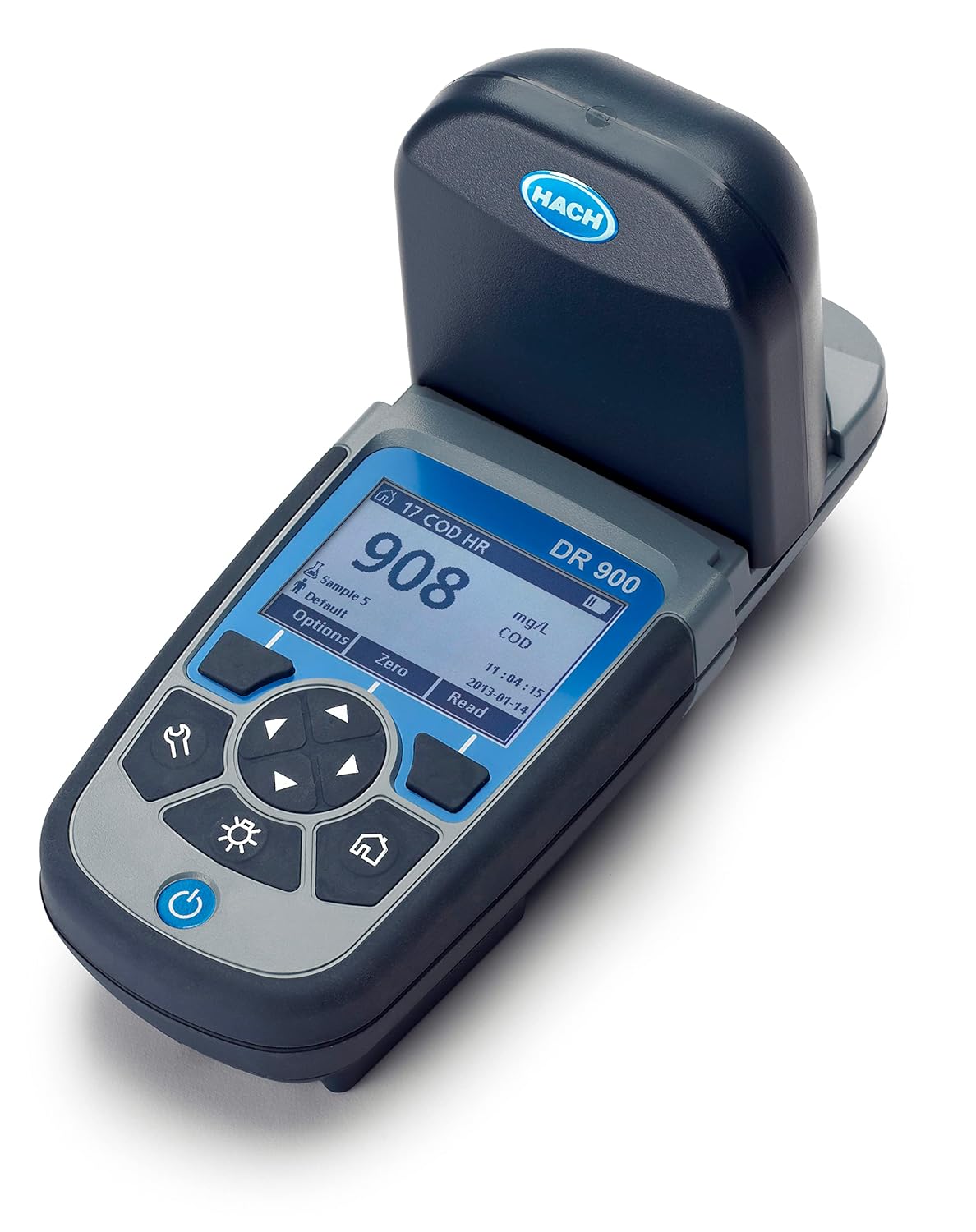
Figure 3: The DR 900 displaying a measurement result, indicating its capability for precise readings like Chemical Oxygen Demand (COD).
4.2 Performing a Measurement
Specific measurement procedures vary by parameter. Generally, the process involves:
- Select the desired test parameter from the "All Programs" or "Favorites/User Programs" menu.
- Prepare your sample according to the specific test method (e.g., adding reagents).
- Insert the prepared sample vial into the sample compartment.
- Press the 'Zero' button to calibrate the instrument with a blank sample (if required by the method).
- Press the 'Read' button to initiate the measurement. The result will be displayed on the screen.

Figure 4: The DR 900 shown with two sample vials, illustrating the readiness for sample insertion and testing.
4.3 Data Logging and Communication
The DR 900 allows for data logging of measurements. Data can be transferred via USB for further analysis and record-keeping. Refer to the detailed user manual for instructions on data management and communication protocols.

Figure 5: A user operating the Hach DR 900 in a professional environment, highlighting its suitability for industrial applications.
5. Maintenance
Proper maintenance ensures the longevity and accuracy of your DR 900 Colorimeter.
5.1 Cleaning
Wipe the exterior of the device with a damp cloth. Do not use abrasive cleaners or solvents. Ensure the sample compartment is clean and free of debris before each measurement.
5.2 Storage
Store the device in a cool, dry place away from direct sunlight and extreme temperatures. If storing for extended periods, remove the batteries to prevent leakage.
6. Troubleshooting
This section provides general guidance for common issues. For detailed troubleshooting, refer to the comprehensive user manual provided with your device.
6.1 Device Not Powering On
- Check battery installation and ensure correct polarity.
- Replace old or depleted batteries with new AA batteries.
6.2 Inaccurate Readings
- Ensure sample vials are clean and free of scratches or fingerprints.
- Verify that the correct test parameter and method are selected.
- Confirm that reagents are fresh and properly prepared.
- Perform a zero calibration with a blank sample as per the method instructions.
7. Specifications
| Attribute | Detail |
|---|---|
| Model Number | 9385100 |
| Manufacturer | HACH COMPANY |
| Package Dimensions | 12 x 9 x 6 inches |
| Item Weight | 1 Pounds |
| Batteries Required | 4 AA batteries |
| First Available Date | August 28, 2014 |
| National Stock Number | 6630-01-623-0976 |
8. Warranty and Support
For warranty information, technical support, or service inquiries, please contact HACH Company directly or visit their official website. Keep your purchase receipt and product serial number handy for faster assistance.
You can find more information about HACH products and support on the HACH Store on Amazon.
