
Introduction
This manual provides detailed instructions for the installation, operation, and maintenance of your Defiant 270 Degree Outdoor Motion Security Light. Designed for large outdoor areas, this security light features motion-activated technology, adjustable settings, and durable construction for reliable, energy-efficient operation. Please read this manual thoroughly before installation and use to ensure proper function and safety.
Safety Information
WARNING: Risk of electric shock. Disconnect power at the fuse or circuit breaker before installation or servicing. All wiring connections must be in accordance with local and national electrical codes.
- Ensure the power supply is turned off before beginning installation.
- Consult a qualified electrician if you are unsure about wiring procedures.
- Do not install near combustible materials or in areas with explosive atmospheres.
- This product is designed for outdoor use and is water resistant. However, avoid direct high-pressure water spray.
- Use only bulbs specified for this fixture.
Package Contents
Verify that all components are present before beginning installation:
- Defiant 270 Degree Outdoor Motion Security Light Fixture
- Mounting Hardware
- Remote Control
- Instruction Manual (this document)
Setup and Installation
Follow these steps for safe and proper installation of your security light.
1. Pre-Installation
- Turn off power at the circuit breaker or fuse box.
- Select a suitable mounting location. The light should be mounted on a wall or eave, ideally 8-12 feet (2.4-3.7 meters) above the ground for optimal motion detection.
- Ensure the chosen location allows for a clear line of sight for the motion sensor and provides adequate coverage for the desired area.
2. Mounting the Fixture
Use the provided mounting hardware to securely attach the light fixture to the wall or eave. Ensure the mounting surface is stable and can support the weight of the fixture.
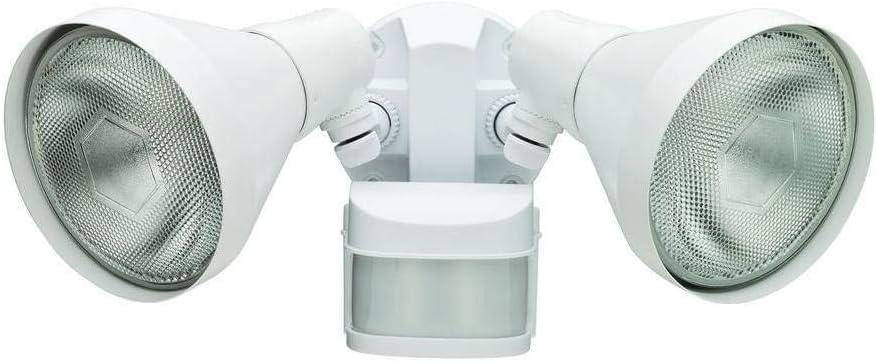
Figure 1: Overview of the Defiant 270 Degree Outdoor Motion Security Light. This image shows the white fixture with two adjustable light heads and a motion sensor located below the central mounting plate. The light heads feature reflective interiors for broad illumination.
3. Wiring Connections
Connect the light fixture's wires to your household wiring according to standard electrical codes. Typically, this involves connecting the black wire (live) to the black wire, the white wire (neutral) to the white wire, and the green or bare copper wire (ground) to the ground wire from your electrical box. Secure all connections with wire nuts.
- Black to Black: Live/Hot wire
- White to White: Neutral wire
- Green/Bare Copper to Green/Bare Copper: Ground wire
Once wiring is complete, carefully push the wires into the junction box and secure the fixture to the mounting plate.
4. Bulb Installation
This fixture accepts standard LED flood light bulbs. Insert the appropriate bulbs into each light head. Do not overtighten.
Operating Instructions
After installation, restore power to the circuit. The light will enter a warm-up period before becoming fully operational.
Adjusting Light Heads
The two light heads are independently adjustable. Loosen the adjustment knobs, position the light heads to illuminate the desired area, and then tighten the knobs to secure them.
Motion Sensor Adjustment
The motion sensor can be adjusted for sensitivity and detection range. Use the controls on the sensor unit to set the desired detection area and sensitivity level. The 270-degree detection range allows for wide coverage.
Time and Lux Settings
Your security light features adjustable settings for how long the light stays on after motion is detected (Time) and the ambient light level at which the sensor becomes active (Lux/Dusk-to-Dawn). Refer to the markings on the sensor for specific adjustment dials.
- TIME: Controls the duration the light remains on after motion stops. Typically adjustable from a few seconds to several minutes.
- LUX: Determines the ambient light level at which the motion sensor will activate the light. Set to a lower LUX for activation only in darker conditions (dusk-to-dawn operation), or higher LUX for activation in brighter conditions.
Remote Control Operation
The included remote control allows for convenient adjustment of settings without needing to access the fixture directly. Consult the remote control's specific instructions for pairing and function details.
Maintenance
Regular maintenance ensures optimal performance and longevity of your security light.
- Cleaning: Periodically wipe the fixture with a soft, damp cloth to remove dirt and debris. Do not use abrasive cleaners or solvents. Ensure power is off before cleaning.
- Bulb Replacement: If a bulb burns out, turn off power at the circuit breaker, allow the bulb to cool, and replace it with a new LED flood light bulb of the appropriate wattage.
- Sensor Check: Occasionally check the motion sensor lens for obstructions like spiderwebs or leaves, which can affect performance.
Troubleshooting
| Problem | Possible Cause | Solution |
|---|---|---|
| Light does not turn on. | No power; faulty bulb; sensor settings incorrect. | Check circuit breaker. Replace bulb. Adjust LUX setting to ensure activation in darkness. |
| Light stays on continuously. | Sensor detecting constant motion; TIME setting too long; faulty sensor. | Clear obstructions from sensor's view. Adjust TIME setting. If problem persists, sensor may be faulty. |
| Light turns on during daylight. | LUX setting too high. | Adjust LUX setting to a lower sensitivity (towards the "moon" icon) so it only activates in low light conditions. |
| Motion detection range is poor. | Sensor obstructed; mounting height incorrect; sensitivity too low. | Clear sensor lens. Adjust mounting height. Increase sensor sensitivity. |
Specifications
| Feature | Detail |
|---|---|
| Brand | Defiant |
| Model Number | DFI-5424-WH |
| Color | White |
| Power Source | Corded Electric |
| Voltage | 120 Volts |
| Wattage | 120 watts (fixture rating) |
| Light Source Type | Accepts LED bulbs |
| Special Feature | Motion Sensor (270 Degree Detection) |
| Control Method | Remote Control, Manual Adjustment |
| Indoor/Outdoor Usage | Outdoor |
| Item Weight | 1.44 Pounds |
| Water Resistance Level | Water Resistant |
| Included Components | Remote Control, Mounting Hardware |
Warranty and Support
For warranty information or technical support, please contact Defiant customer service. Keep your purchase receipt as proof of purchase.
While specific warranty details are not provided in this manual, Defiant products typically come with a limited warranty covering defects in materials and workmanship. Please refer to the product packaging or the official Defiant website for the most current warranty policy.
For assistance, visit the Defiant support page or call their customer service line. Contact information can usually be found on the product packaging or the manufacturer's website.


