
1. Introduction
Thank you for choosing the Xanlite PR20WR Rechargeable LED Projector. This manual provides essential information for the safe and efficient operation, maintenance, and troubleshooting of your device. Please read these instructions carefully before use and retain this manual for future reference.
2. Safety Instructions
Always observe the following safety precautions to prevent injury or damage to the product:
- Do not look directly into the LED light when it is on, as it can cause eye strain or damage.
- Keep the projector away from flammable materials.
- Do not attempt to disassemble or modify the projector. This will void the warranty and may cause electric shock or fire.
- Ensure the charging cable and adapter are in good condition before charging.
- The projector has an IP54 rating, meaning it is protected against dust ingress and splashing water from any direction. It is not designed for immersion in water.
- Operate and charge the device within recommended temperature ranges.
- Keep out of reach of children.
3. Product Overview
Familiarize yourself with the components of your Xanlite PR20WR LED Projector:
- LED Light Panel: The primary light source.
- Adjustable Stand: Allows for positioning the light at various angles.
- Handle: For easy carrying.
- Power Button: To turn the light on/off.
- Charging Port: For connecting the USB charging cable.
- Battery Indicator Lights: Shows the current charge level.

Image 3.1: Overall view of the Xanlite PR20WR LED Projector, showing its robust design and handle.
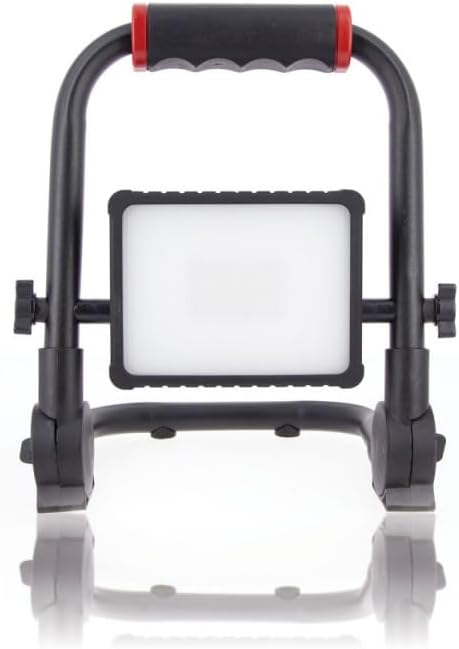
Image 3.2: Front view of the projector, highlighting the LED light panel and the sturdy frame.
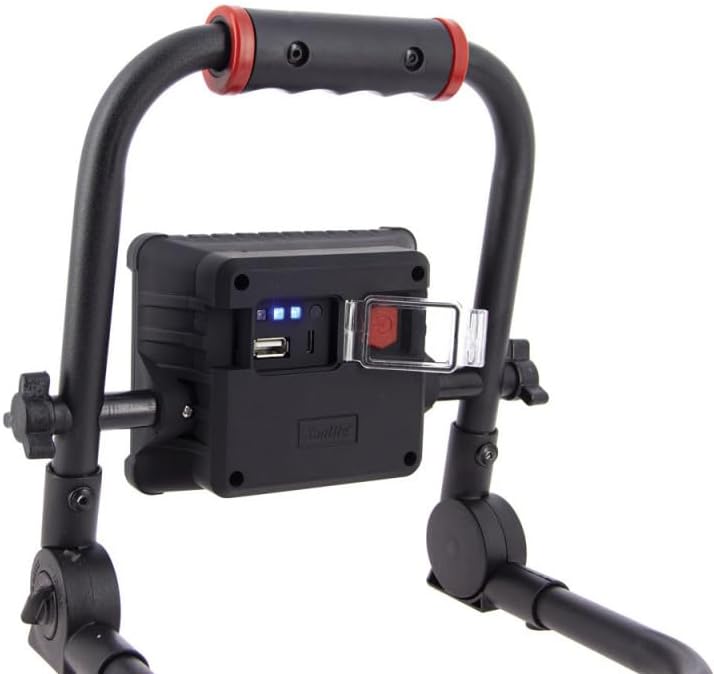
Image 3.3: Rear view of the projector, displaying the charging port and blue battery indicator lights.

Image 3.4: Detail of the adjustable stand mechanism, allowing for precise angle adjustments.
4. Setup
- Unpack: Carefully remove the projector and all accessories from the packaging.
- Initial Charge: Before first use, fully charge the projector. Refer to Section 6 for charging instructions.
- Adjust Stand: Loosen the knobs on the sides of the stand to adjust the angle of the light panel. Tighten the knobs once the desired angle is achieved.
5. Operating Instructions
- Power On/Off: Press the power button located on the back of the unit to turn the LED projector on or off.
- Adjust Angle: Use the adjustable stand to direct the light beam as needed. Ensure the stand is stable on a flat surface.
6. Charging
The Xanlite PR20WR projector features a rechargeable battery.
- Connect Charger: Plug the provided USB charging cable into the charging port on the back of the projector. Connect the other end to a suitable USB power adapter (not included) or a powered USB port.
- Monitor Charge: The battery indicator lights on the back of the unit will illuminate to show the charging status. All lights will be solid when fully charged.
- Charging Time: Charging time may vary depending on the power source. Disconnect the charger once fully charged.
7. Maintenance
- Cleaning: Wipe the projector with a soft, damp cloth. Do not use abrasive cleaners or solvents.
- Storage: Store the projector in a cool, dry place when not in use. If storing for extended periods, charge the battery every 3-6 months to maintain its lifespan.
- Battery Care: Avoid completely draining the battery frequently. Recharge when the battery indicator shows low power.
8. Troubleshooting
| Problem | Possible Cause | Solution |
|---|---|---|
| Projector does not turn on. | Battery is depleted. | Charge the projector fully. |
| Power button not pressed correctly. | Ensure the power button is pressed firmly. | |
| Short operating time after full charge. | Battery degradation over time. | This is normal for rechargeable batteries. Ensure full charge before use. |
| Operating in extreme temperatures. | Use the projector within recommended temperature ranges. | |
| Projector not charging. | Faulty charging cable or adapter. | Try a different USB charging cable and power adapter. |
| Charging port is damaged. | Contact customer support for assistance. |
9. Specifications
| Brand: | Xanlite |
| Model: | PR20WR |
| Power: | 20 Watts |
| Voltage: | 230 Volts |
| Luminous Flux: | 1300 Lumens |
| Color Temperature: | 6000 Kelvin (Cool White) |
| Material: | Plastic |
| Dimensions: | 25.5 x 21.5 x 22 cm |
| Weight: | 1.24 kg |
| Protection Rating: | IP54 |
| Power Source: | AC/DC (Rechargeable Battery) |
| Components Included: | LED spotlight, USB charging cable (implied) |
10. Warranty and Support
Xanlite products are manufactured to high-quality standards. For information regarding warranty coverage, please refer to the warranty card included with your purchase or contact your retailer. For technical support or service inquiries, please contact Xanlite customer service through their official website or the contact information provided with your product.