
1. Introduction
The Broan-NuTone FG701 Universal CleanCover is designed to revitalize your existing bath fan with a fresh, stylish grille. This low-profile cover is compatible with small, medium, and large Broan and NuTone ventilation fans, offering an easy upgrade that can be completed in under 5 minutes without requiring ceiling patching or cutting.
Its crisp, bright white finish is intended to complement popular white ceiling paint colors, enhancing the aesthetic of your bathroom.
2. Safety Information
- Always turn off power to the fan at the circuit breaker before beginning any installation or maintenance.
- Wear appropriate personal protective equipment, such as safety glasses and gloves.
- Ensure the fan housing is securely mounted before installing the grille cover.
- If you are unsure about any part of the installation process, consult a qualified electrician or HVAC professional.
3. Installation Instructions
The Broan-NuTone FG701 is designed for quick and easy installation. No special tools are typically required beyond what is needed to remove your old grille.
3.1. Prepare for Installation
- Turn Off Power: Locate the circuit breaker for your bathroom fan and turn off the power. Verify the power is off by attempting to turn on the fan.
- Remove Existing Grille: Gently pull down on your existing fan grille. Most grilles are held in place by spring clips. Squeeze the spring clips together to release the grille from the fan housing. Disconnect any light or nightlight plugs if present.
- Clean Fan Housing: While the grille is removed, it is an opportune time to clean any dust or debris from the fan housing.
3.2. Attach New Grille Cover
The FG701 comes with various spring options to ensure a universal fit for different fan housing sizes. Refer to the diagram below to select the appropriate springs for your fan housing dimensions.
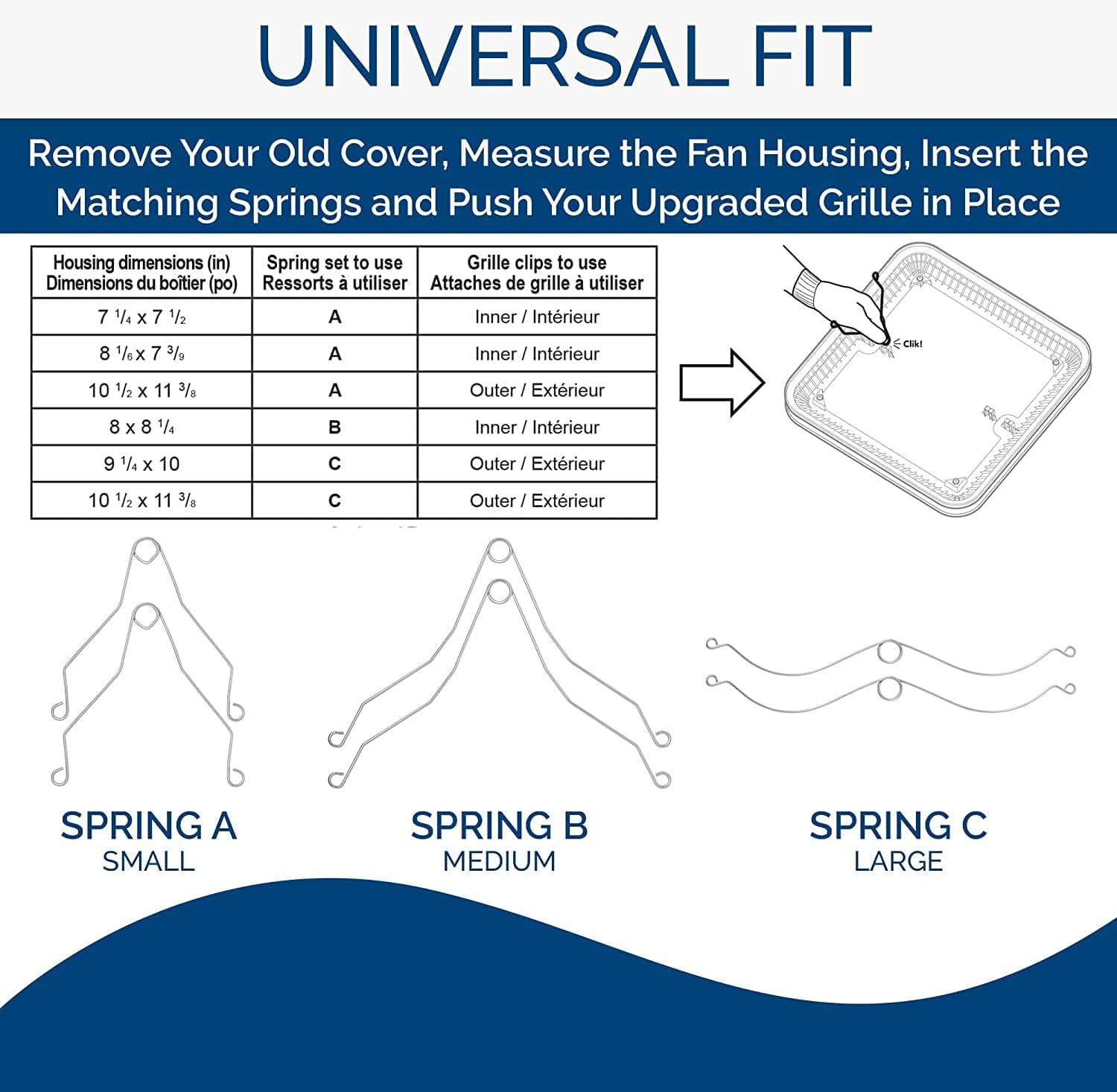
This diagram illustrates how to select the correct spring type (Small, Medium, Large) based on your fan housing dimensions to ensure proper installation of the CleanCover grille.
- Select Springs: Based on your fan housing dimensions, choose the correct set of spring clips (A, B, or C) provided with the FG701.
- Attach Springs to Grille: Insert the chosen spring clips into the designated slots on the new CleanCover grille. Ensure they are securely seated.
- Connect Electrical (if applicable): If your fan has a light or nightlight feature, connect the electrical plug from the fan housing to the corresponding receptacle on the new grille cover.
- Install Grille: Squeeze the spring clips together and insert them into the slots in the fan housing. Push the grille firmly upwards until it is flush with the ceiling. Release the clips to secure the grille in place.

This image shows the underside of the FG701 grille cover, highlighting where the various spring clips attach for installation.

An example of the FG701 grille cover installed in a bathroom, demonstrating its low-profile and seamless integration with the ceiling.
3.3. Installation Videos
Video 1: Broan Product Video
This official Broan-NuTone video provides a general overview of the product and its features, including visual cues for installation.
Video 2: Freshen Up Your Bathroom with a New Bath Fan Cover
An official Broan-NuTone video demonstrating the process of upgrading a bath fan cover, including removal of the old grille and installation of a new one.
4. Operating Instructions
The Broan-NuTone FG701 is a passive component that functions as a cover for your existing exhaust fan. Its design allows for optimal airflow from the fan. No specific operational steps are required for the grille cover itself; its function is integrated with the operation of your existing ventilation fan.
5. Maintenance
Regular cleaning of your Broan-NuTone FG701 grille cover will help maintain its appearance and ensure efficient airflow.
- Turn Off Power: Always turn off power to the fan at the circuit breaker before cleaning.
- Remove Grille: Gently pull down on the grille and squeeze the spring clips to detach it from the fan housing.
- Clean: Wipe the grille with a soft, damp cloth using mild soap and water. Avoid abrasive cleaners or harsh chemicals, as these can damage the finish.
- Dry: Ensure the grille is completely dry before reattaching.
- Reinstall: Reattach the grille by squeezing the spring clips and pushing it back into the fan housing until it is flush with the ceiling.
- Restore Power: Turn the power back on at the circuit breaker.
6. Troubleshooting
- Grille does not fit flush: Ensure the correct spring clips were selected and properly installed into the grille and fan housing. Verify that no obstructions are preventing the grille from seating correctly.
- Grille rattles: Check that the spring clips are firmly seated in both the grille and the fan housing. Adjust the clips if necessary to ensure a snug fit.
- Fan not operating after installation: Confirm that the power to the fan has been restored at the circuit breaker. If your grille has a light, ensure all electrical connections are secure.
7. Specifications
| Feature | Specification |
|---|---|
| Brand | Broan-NuTone |
| Model Name | FG701 |
| Color | White |
| Product Dimensions | 13.25"D x 13.25"W x 1.3"H |
| Item Weight | 1.2 Pounds |
| Material Type | Other |
| Installation Type | DIY - Easy |
| Special Features | Universal Fit, Easy Installation |

This diagram provides a visual representation of the grille cover's dimensions.
8. Warranty and Support
The Broan-NuTone FG701 Universal CleanCover is backed by a one-year limited warranty. For warranty claims or technical support, please contact Broan-NuTone customer service.
Contact Information:
Website: www.broan-nutone.com
Phone: Refer to the product packaging or website for the most current support numbers.