
Introduction
This manual provides comprehensive instructions for the installation, operation, and maintenance of your Broan-NuTone 4130SF Fingerprint Resistant Ductless Under-Cabinet Range Hood. Designed for kitchens where external ducting is not an option, this range hood efficiently recirculates air through a charcoal filter to cleanse the air of smoke and odors. Its PrintGuard technology ensures a fingerprint-resistant stainless finish that is easy to clean and scratch-resistant, maintaining a high-end appearance. Please read this manual thoroughly before installation and use to ensure safe and optimal performance of your appliance.
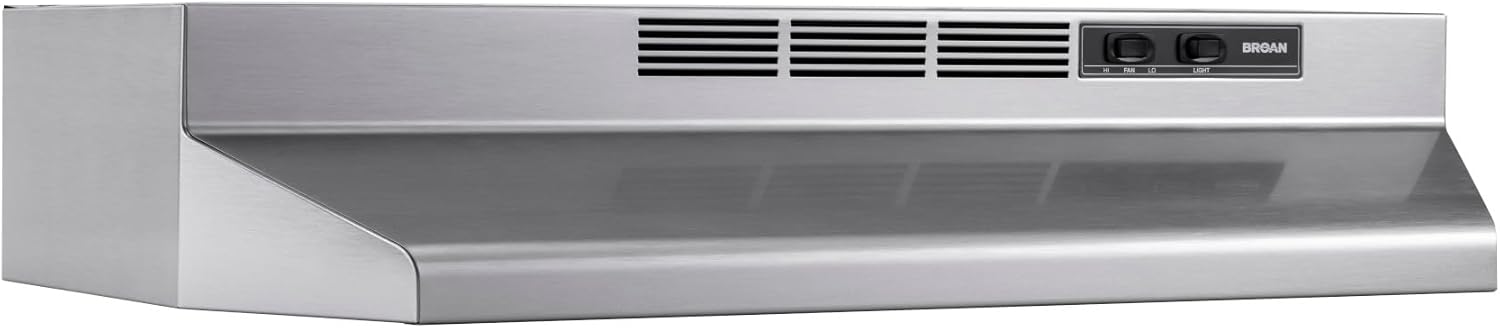
Figure 1: Front view of the Broan-NuTone 4130SF Ductless Under-Cabinet Range Hood.
Safety Information
For your safety, always follow these basic precautions when installing, operating, or maintaining your range hood. Failure to do so may result in fire, electric shock, or personal injury.
- Read all instructions: Before operating the appliance, read all instructions carefully.
- Electrical Safety: Ensure the power supply matches the voltage specified on the rating label. Disconnect power before servicing or cleaning.
- Proper Installation: Install the range hood according to the instructions provided in this manual and local building codes.
- Ventilation: This is a ductless (recirculating) range hood. Ensure proper air circulation in the kitchen.
- Cleaning: Clean the filter and exterior regularly to prevent grease buildup, which can be a fire hazard.
- Lighting: Use only the specified type and wattage of light bulb (sold separately).
- Children Safety: Keep children away from the appliance during operation and cleaning.
- Flammable Materials: Do not operate the range hood near flammable liquids or vapors.
What's in the Box
Upon unpacking your Broan-NuTone 4130SF Range Hood, please verify that all the following components are included:
- Range Hood Unit
- Charcoal Filter
- Mounting Hardware
- Installation Instructions Manual (PDF available online)
Note: Light bulb is sold separately and is not included in the box.
Specifications
| Feature | Detail |
|---|---|
| Brand | Broan-NuTone |
| Model Number | 4130SF |
| Material | Alloy Steel |
| Mounting Type | Under Cabinet Mount |
| Product Dimensions (L x W x H) | 17.5" x 30" x 6" |
| Item Weight | 10.4 Pounds |
| Controls Type | Push Button (Rocker Switches) |
| Number of Speeds | 2 |
| Light Source Type | Incandescent (Bulb sold separately) |
| Wattage | 75 watts |
| Filter Type | Baffle (Charcoal filter for recirculation) |
| Ventilation Type | Recirculation (Ductless) |
| Special Features | Fingerprint Resistant, Scratch Resistant, Rust Proof |
| Voltage | 120 Volts |
| Compliance | ADA Compliant |

Figure 2: Product dimensions and key features like "Made in USA" and "PrintGuard" technology.
Installation
For detailed installation instructions, please refer to the official Installation Manual (PDF) provided by Broan-NuTone. Below are general steps for under-cabinet mounting:
- Preparation: Ensure the cabinet area is clean and clear. Locate the electrical outlet for the range hood.
- Mounting Location: Mark the mounting holes on the underside of the cabinet according to the template or measurements provided in the detailed manual.
- Drilling: Drill pilot holes for the mounting screws.
- Wiring: Connect the range hood's electrical wiring to the household wiring. Ensure power is OFF at the circuit breaker before beginning any electrical work.
- Mounting the Hood: Secure the range hood to the underside of the cabinet using the provided mounting hardware. Ensure it is level and firmly attached.
- Filter Installation: Install the charcoal filter into the designated slot.

Figure 3: Rear view of the range hood, illustrating potential mounting points and internal components like the filter housing.
Setup
After physical installation, perform the following steps to set up your range hood for first use:
- Install Light Bulb: Insert an incandescent light bulb (max 75 watts, sold separately) into the light socket.
- Restore Power: Once all connections are secure and the light bulb is installed, restore power to the range hood at the circuit breaker.
- Test Functionality: Test the fan speeds and light operation using the control switches.
Operating Instructions
Your Broan-NuTone 4130SF Range Hood features simple rocker switches for controlling the fan and light.
- Fan Control: The fan control switch allows you to select between two speeds:
- Low Speed: For light cooking or simmering, providing quiet and efficient air circulation.
- High Speed: For heavy cooking, frying, or when significant smoke and odors are present, ensuring maximum air cleansing.
- Light Control: The light control switch operates the integrated light, providing illumination for your cooktop. It has a single ON/OFF setting.

Figure 4: Key components of the range hood, including the ductless design, 2-speed blower, charcoal filter, and light area.
Maintenance
Regular maintenance ensures the longevity and optimal performance of your range hood.
Cleaning the Exterior
The Broan-NuTone 4130SF features PrintGuard technology, making its stainless finish fingerprint-resistant and easy to clean.
- Wipe the exterior surfaces with a soft cloth dampened with mild soap and water.
- Avoid abrasive cleaners, steel wool, or scouring pads, as these can damage the finish.
- Dry thoroughly with a clean, soft cloth to prevent water spots.

Figure 5: Illustration of the PrintGuard technology, highlighting its fingerprint-resistant, scratch-resistant, and easy-to-clean properties.
Cleaning the Charcoal Filter
The charcoal filter is crucial for air purification in ductless models. It is dishwasher safe for convenient cleaning.
- Removal: Carefully remove the charcoal filter from the range hood. Refer to the installation manual for specific instructions if needed.
- Cleaning: Place the filter in your dishwasher for a thorough cleaning cycle. Alternatively, wash by hand with hot water and a degreasing detergent.
- Drying: Allow the filter to dry completely before reinstalling.
- Replacement: Charcoal filters are generally not reusable indefinitely and should be replaced periodically (e.g., every 3-6 months depending on usage) to maintain optimal performance. Consult the product specifications or manufacturer's recommendations for replacement filter part numbers.
Troubleshooting
If you encounter issues with your Broan-NuTone 4130SF Range Hood, refer to the following common problems and their solutions:
| Problem | Possible Cause | Solution |
|---|---|---|
| Fan does not operate | No power supply, faulty switch, motor issue. | Check circuit breaker. Ensure unit is properly plugged in. Contact customer support if switch or motor is suspected. |
| Light does not work | Bulb burnt out, faulty light switch, loose connection. | Replace light bulb. Check light switch. Ensure connections are secure. |
| Poor air circulation/odor removal | Clogged charcoal filter, incorrect fan speed. | Clean or replace charcoal filter. Ensure fan is set to appropriate speed for cooking activity. |
| Excessive noise | Loose mounting, foreign object in fan, motor issue. | Check mounting screws for tightness. Inspect fan for obstructions. Contact customer support if motor noise persists. |
Warranty and Support
Your Broan-NuTone 4130SF Range Hood comes with a 1 Year Manufacturer Warranty. This warranty covers defects in materials and workmanship under normal use.
For warranty claims, technical assistance, or to purchase replacement parts (such as filters or light bulbs), please contact Broan-NuTone Customer Support:
- Website: Visit the official Broan-NuTone website for support resources and contact information.
- Phone: Refer to the contact details provided in your product packaging or on the manufacturer's website.
Please have your model number (4130SF) and purchase date available when contacting support.