
Important Safety Instructions
Please read these instructions carefully before operating the unit. Keep this manual for future reference.
- Do not expose this appliance to rain or moisture.
- Do not use this apparatus near water.
- Clean only with a dry cloth.
- Do not block any ventilation openings. Install in accordance with the manufacturer's instructions.
- Do not install near any heat sources such as radiators, heat registers, stoves, or other apparatus (including amplifiers) that produce heat.
- Protect the power cord from being walked on or pinched, particularly at plugs, convenience receptacles, and the point where they exit from the apparatus.
- Only use attachments/accessories specified by the manufacturer.
- Unplug this apparatus during lightning storms or when unused for long periods of time.
- Refer all servicing to qualified service personnel. Servicing is required when the apparatus has been damaged in any way, such as power-supply cord or plug is damaged, liquid has been spilled or objects have fallen into the apparatus, the apparatus has been exposed to rain or moisture, does not operate normally, or has been dropped.
Package Contents
Please check the contents of the package to ensure all items are present:
- Edifier R1700BT Active Bookshelf Speakers (1 pair)
- RCA-RCA Audio Cable (1)
- RCA-3.5mm Audio Cable (1)
- Speaker Connection Cable (1)
- Wireless Remote Control (1)
- User Manual (This document)

Image: Contents of the Edifier R1700BT speaker package, showing both speakers, various audio cables, and the remote control.
Product Overview
The Edifier R1700BT is a 2.0 channel active bookshelf speaker system featuring Bluetooth connectivity and multiple wired inputs. It delivers 66W RMS total power output.
Front View
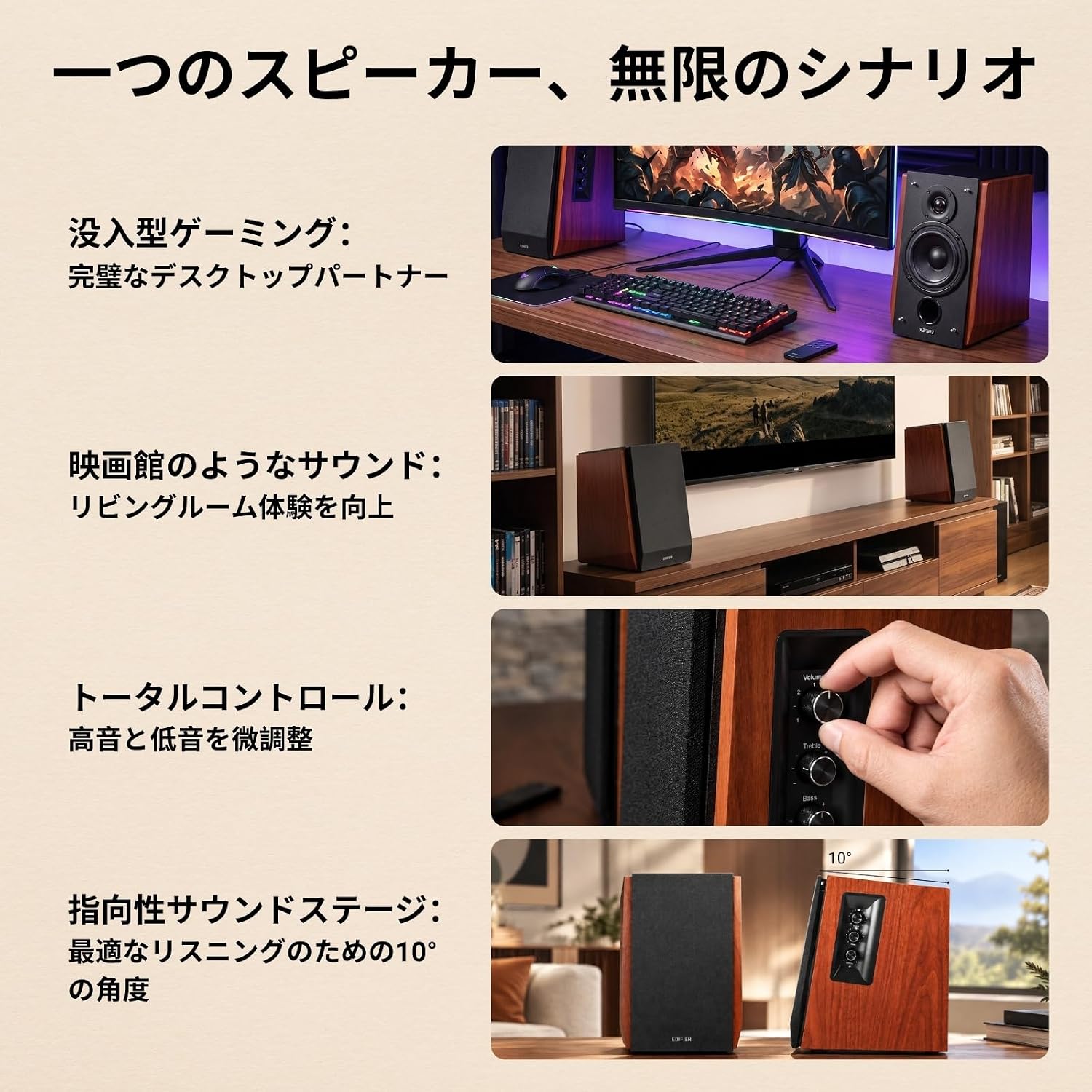
Image: Front view of the Edifier R1700BT speakers with the protective grilles removed, showing the tweeter, woofer, and bass reflex port.
- 0.75-inch Silk Dome Tweeter
- 4-inch Mid-range/Woofer Driver
- Front-facing Bass Reflex Port
Side Panel Controls (Active Speaker)

Image: Close-up of the side panel on the active speaker, showing the control knobs.
- Volume Control: Adjusts the overall volume. Press to cycle through input modes (Bluetooth, AUX, PC).
- Treble Control: Adjusts the high-frequency output.
- Bass Control: Adjusts the low-frequency output.
- Power Indicator: LED light indicating power status and input mode.
Rear Panel Connections (Active Speaker)
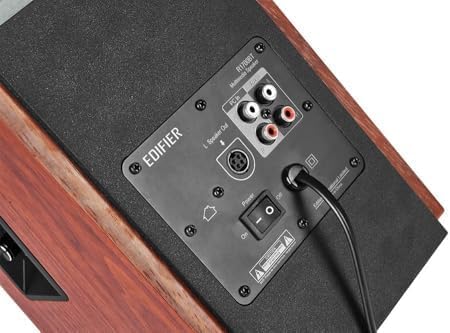
Image: Rear panel of the active speaker, showing input ports, speaker output, power switch, and power cable.
- PC Input: RCA input for connecting to a computer.
- AUX Input: RCA input for connecting to other audio sources.
- L Speaker Out: Connects to the passive (left) speaker.
- Power Switch: Turns the speaker system on or off.
- Power Cable: Permanently attached power cable.
Setup
1. Speaker Placement
For optimal stereo imaging and sound quality, place the speakers at an equal distance from your listening position, forming an equilateral triangle. Ensure the active speaker (with controls and inputs) is on the right and the passive speaker is on the left, as viewed from the front.

Image: Edifier R1700BT speakers positioned on a media console next to a turntable, illustrating typical placement.
2. Connecting Speakers
- Connect the speaker connection cable from the "L Speaker Out" port on the rear of the active (right) speaker to the input port on the rear of the passive (left) speaker. Ensure the connectors are fully inserted.
3. Connecting Audio Sources
The R1700BT offers multiple ways to connect your audio devices:
- PC Input: Use the RCA-RCA cable to connect your computer's audio output to the "PC" input on the active speaker.
- AUX Input: Use the RCA-RCA cable or the RCA-3.5mm cable to connect devices like CD players, TVs, or game consoles to the "AUX" input on the active speaker.
- Bluetooth: For wireless connection, refer to the "Bluetooth Pairing" section under Operating Instructions.
4. Power Connection
- Ensure all audio connections are made.
- Plug the attached power cable into a wall outlet.
- Flip the power switch on the rear panel of the active speaker to the "ON" position. The power indicator LED on the side panel will illuminate.
Operating Instructions
Power On/Off
Use the power switch located on the rear panel of the active speaker to turn the system on or off.
Input Selection
You can select the audio input source using the volume knob on the side panel of the active speaker or the remote control:
- Using the Volume Knob: Press the volume knob to cycle through input modes: Bluetooth (blue LED), AUX (green LED), PC (green LED).
- Using the Remote Control: Press the dedicated "Bluetooth", "AUX", or "PC" buttons on the remote control to select the desired input.
Bluetooth Pairing
- Select "Bluetooth" input mode. The LED indicator will turn blue and flash, indicating it's in pairing mode.
- On your Bluetooth device (e.g., smartphone, tablet), search for "EDIFIER R1700BT" in the Bluetooth settings.
- Select "EDIFIER R1700BT" to connect. Once connected, the blue LED will stop flashing and remain solid.
- To disconnect or pair with a new device, press and hold the volume knob for 2-3 seconds, or press the Bluetooth button on the remote control for 2-3 seconds. The blue LED will flash again, indicating it's ready for a new pairing.
Volume and Tone Control
Adjust the sound to your preference using the knobs on the side panel of the active speaker or the remote control:
- Volume: Rotate the volume knob clockwise to increase volume, counter-clockwise to decrease. On the remote, use the volume up (+) and volume down (-) buttons.
- Treble: Rotate the "Treble" knob to adjust high frequencies.
- Bass: Rotate the "Bass" knob to adjust low frequencies.
Remote Control Functions
The included wireless remote control provides convenient access to key functions:
- Power: Standby/Power On
- Mute: Mute/Unmute audio
- Volume +/-: Adjust volume level
- Bluetooth: Select Bluetooth input, press and hold to disconnect/re-pair
- AUX: Select AUX input
- PC: Select PC input
Image: The compact wireless remote control for the Edifier R1700BT speakers.
Maintenance
- Cleaning: Use a soft, dry cloth to clean the speaker cabinets. Do not use abrasive cleaners, waxes, or solvents.
- Dust: Regularly dust the speaker grilles and drivers with a soft brush or vacuum cleaner with a brush attachment.
- Environment: Avoid placing speakers in direct sunlight, near heat sources, or in areas with high humidity or extreme temperatures.
- Cables: Ensure all cables are securely connected and not pinched or strained.
Troubleshooting
| Problem | Possible Cause | Solution |
|---|---|---|
| No sound |
|
|
| Distorted sound |
|
|
| Bluetooth connection issues |
|
|
| Remote control not working |
|
|
Specifications
| Power Output: | RMS 15W × 2 (Treble) + 18W × 2 (Bass) (Total 66W) |
| Frequency Response: | 60Hz - 20KHz |
| Signal-to-Noise Ratio: | ≥85dBA |
| Input Sensitivity: | PC: 700 ± 50mV; AUX: 550 ± 50mV |
| Input Type: | PC, AUX, Bluetooth |
| Bass Unit: | 4 inch (116mm) |
| Treble Unit: | Φ19mm silk dome tweeter |
| Bluetooth Version: | V5.1 |
| Bluetooth Range: | Up to 10 meters (30 feet) |
| Dimensions (W x H x D): | 154mm x 254mm x 214mm (6.06 x 10 x 8.43 inches) |
| Weight: | Approx. 6.6 kg (14.5 lbs) |
Warranty and Support
This Edifier R1700BT speaker system comes with a 12-month warranty from the date of purchase. Please retain your proof of purchase for warranty claims.
The warranty covers manufacturing defects and malfunctions under normal use. It does not cover damage caused by misuse, accidents, unauthorized modifications, or improper installation.
For technical support, warranty service, or further inquiries, please contact your local Edifier distributor or visit the official Edifier website: