
Olympus PEN E-PL7
Olympus E-PL7 Mirrorless Digital Camera User Manual
Model: PEN E-PL7
Introduction
This manual provides essential information for the safe and effective use of your Olympus E-PL7 Mirrorless Digital Camera. The Olympus E-PL7 combines a sleek design with powerful imaging capabilities, featuring a 16MP Live MOS Sensor and 3-axis in-body image stabilization for sharp, vibrant photographs.
Key features of your Olympus E-PL7 include:
- 16MP Live MOS Sensor for high-resolution images.
- 3-Axis In-Body Image Stabilization to reduce blur from camera shake.
- Built-In Wi-Fi for easy sharing and remote control.
- 81 Point FAST AF with Small Target AF for precise and rapid focusing.
- 3-inch LCD touchscreen that flips out for versatile shooting angles.
- Included 14-42mm EZ Lens with 3x optical zoom.
What's in the Box
Please ensure all items are present before beginning setup:
- Olympus E-PL7 Camera Body
- M.Zuiko Digital ED 14-42mm F3.5-5.6 EZ Lens
- Lithium-Ion Battery (BLS-50)
- Battery Charger
- USB Cable
- Shoulder Strap
- Instruction Manual (this document)
Setup
1. Charging the Battery
Before first use, fully charge the supplied Lithium-Ion battery (BLS-50). Insert the battery into the charger and plug the charger into a power outlet. The charging indicator light will change when charging is complete.
2. Inserting the Battery and Memory Card
Open the battery/card compartment cover on the bottom of the camera. Insert the charged battery with the correct orientation until it clicks into place. Insert a compatible SD, SDHC, or SDXC memory card into the card slot until it clicks. Close the compartment cover securely.

Figure 1: Front view of the Olympus E-PL7 camera with the 14-42mm EZ lens mounted. The camera body is silver and black, showcasing the lens and the "OLYMPUS PEN" branding.
3. Attaching the Lens
Align the white dot on the lens with the white dot on the camera body's lens mount. Gently push the lens onto the mount and turn it clockwise until it locks into place with a click. To remove the lens, press the lens release button on the camera body and turn the lens counter-clockwise.
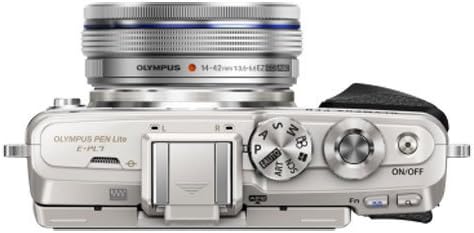
Figure 2: Top view of the Olympus E-PL7 camera. This image highlights the camera's top plate, including the mode dial, shutter button, and power switch, along with the mounted lens.
4. Initial Settings
Upon first power-on, the camera may prompt you to set the date, time, and language. Follow the on-screen instructions using the control dial and buttons.
Operating the Camera
Power On/Off
Press the ON/OFF button located on the top plate of the camera to power it on or off. Ensure the lens is extended if it's a collapsible type (like the 14-42mm EZ lens) before shooting.
Selecting a Shooting Mode
Rotate the mode dial on the top of the camera to select your desired shooting mode. Common modes include:
- i-Auto: Intelligent Auto mode for automatic scene detection.
- P (Program Auto): Camera sets aperture and shutter speed, but you can adjust other settings.
- A (Aperture Priority): You set the aperture, camera sets shutter speed.
- S (Shutter Priority): You set the shutter speed, camera sets aperture.
- M (Manual): You set both aperture and shutter speed.
- ART: Art Filter modes for creative effects.
- SCN (Scene): Pre-set scene modes for specific situations (e.g., Portrait, Landscape).
Focusing and Shooting
The E-PL7 features an 81-point FAST AF system. To focus, half-press the shutter button. The camera will automatically select focus points or allow you to select them via the touchscreen. Once focus is achieved, fully press the shutter button to take a picture.
The 3-inch LCD touchscreen can be tilted for high or low angle shots, and even flipped down for selfies.
Using Built-in Wi-Fi
The built-in Wi-Fi allows you to connect your camera to a smartphone or tablet using the Olympus Image Share (OI.Share) app. This enables remote control of the camera, instant transfer of images, and geotagging. Refer to the OI.Share app's instructions for detailed connection steps.
Maintenance
Cleaning the Camera
- Camera Body: Wipe with a soft, dry cloth. For stubborn dirt, use a cloth lightly dampened with water, then wipe dry. Avoid using organic solvents.
- Lens and LCD Screen: Use a lens blower brush to remove dust. For smudges, use a specialized lens cleaning cloth and lens cleaning fluid. Never use abrasive materials.
- Image Sensor: The camera has a dust reduction system. If dust spots appear on images, use the camera's sensor cleaning function. For persistent dust, professional cleaning is recommended.
Storage
When not in use for extended periods, remove the battery from the camera. Store the camera in a cool, dry, well-ventilated place, away from direct sunlight, high temperatures, humidity, and strong magnetic fields. Use desiccant packets if storing in humid environments.
Troubleshooting
| Problem | Possible Cause / Solution |
|---|---|
| Camera does not power on. | Battery is not charged or incorrectly inserted. Ensure battery is charged and inserted correctly. |
| Images are blurry. | Lens is dirty, camera shake, or incorrect focus. Clean lens, use image stabilization, or ensure proper focus. |
| Memory card error. | Card is full, corrupted, or incompatible. Try a different card, format the card (this will erase all data), or check compatibility. |
| Wi-Fi connection fails. | Incorrect password, camera too far from device, or app issue. Re-enter password, move closer, or restart camera/device/app. |
| LCD screen is blank. | Camera is off, battery is low, or display settings. Power on camera, charge battery, or check display settings. |
For more detailed troubleshooting, please refer to the comprehensive digital manual available on the Olympus support website.
Specifications
| Feature | Detail |
|---|---|
| Product Dimensions | 45.24 x 15.12 x 26.38 inches |
| Item Weight | 10.9 ounces |
| ASIN | B00MVOURPQ |
| Item Model Number | PEN E-PL7 |
| Batteries | 1 Lithium Ion battery required (included) |
| Date First Available | August 28, 2014 |
| Manufacturer | Olympus |
| Compatible Mountings | Micro Four Thirds |
| Aspect Ratio | 16:9 |
| Photo Sensor Technology | MOS |
| Supported File Format | RAW |
| Image Stabilization | Digital (3-axis in-body) |
| Maximum Focal Length | 84 Millimeters (with 14-42mm lens) |
| Optical Zoom | 3 x (with 14-42mm lens) |
| Maximum Aperture | 3.5 f (with 14-42mm lens) |
| Expanded ISO Minimum | 100 |
| Brand | Olympus |
Warranty and Support
For information regarding the product warranty, please refer to the warranty card included with your camera or visit the official Olympus website. Warranty terms and conditions may vary by region.
For technical support, software updates, or additional resources, please visit the Olympus support page or contact their customer service. You can also visit the Olympus Store on Amazon for more product information.
Related documentsPEN E-PL7


Ask a question about this manual
Ask about setup, troubleshooting, compatibility, parts, safety, or missing instructions. Manuals+ will review the question and use this page’s manual context to help answer it.