1. Introduction
This manual provides essential information for the safe and efficient installation, operation, and maintenance of the SIEMENS SITOP PSU200M 6EP1334-3BA10 DC Power Supply. Please read this manual thoroughly before attempting to install or operate the device.
The SIEMENS SITOP PSU200M 6EP1334-3BA10 is a stabilized DC power supply designed for industrial applications, providing a reliable 24V DC output from a wide AC input range. Its compact design and DIN rail mounting capability make it suitable for various control cabinet installations.
2. Safety Instructions
WARNING: Failure to observe these safety instructions may result in death, serious injury, or property damage.
- Installation and maintenance must only be performed by qualified personnel.
- Ensure the power supply is disconnected from the main power source before any installation, wiring, or maintenance work.
- Protect the device from moisture, dust, and extreme temperatures.
- Do not operate the device if it is damaged.
- Observe all local and national electrical safety codes and regulations.
- The device is designed for use in industrial environments.
3. Product Overview
The SIEMENS SITOP PSU200M 6EP1334-3BA10 is a high-performance DC power supply. Key features include:
- Wide input voltage range: 120 to 500 V AC
- Stabilized output voltage: 24V DC
- High power rating: 240W
- Output current: 10 Amps
- DIN Rail mounting for easy integration
- LED status indicator for operational status
- Robust metal case for industrial durability
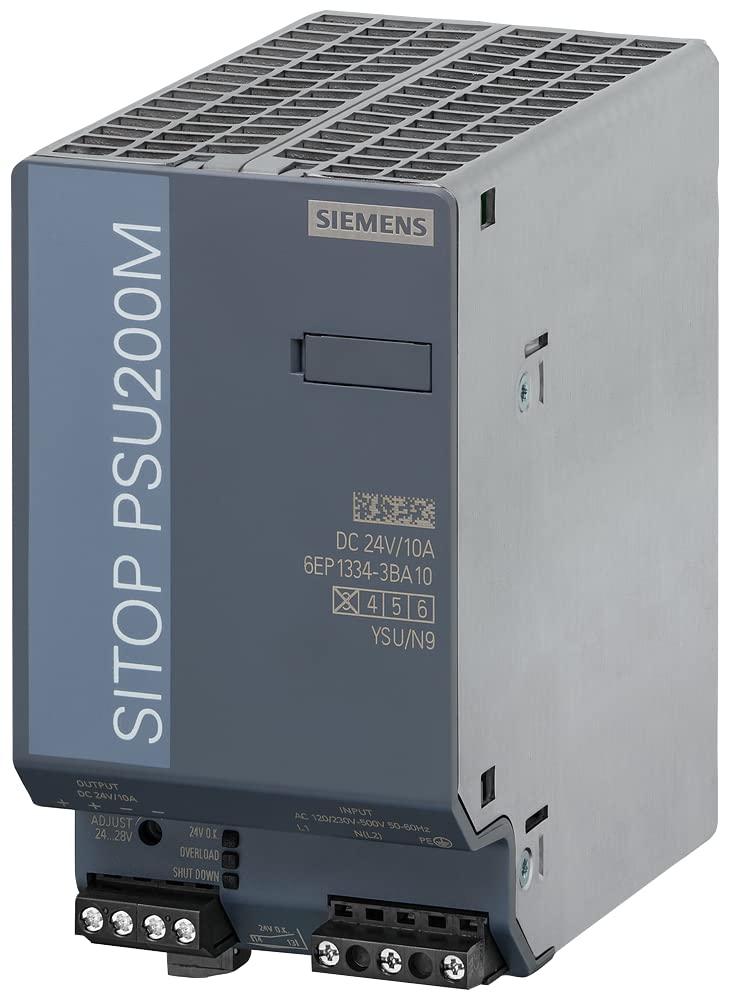
Figure 1: SIEMENS SITOP PSU200M 6EP1334-3BA10 Power Supply. This image shows the front view of the power supply unit, highlighting its compact form factor and terminal block connections.
4. Installation
4.1 Mounting
The SIEMENS SITOP PSU200M 6EP1334-3BA10 is designed for DIN rail mounting. Follow these steps:
- Ensure the DIN rail is securely fastened within the control cabinet.
- Hook the top edge of the power supply onto the DIN rail.
- Press the bottom edge of the power supply firmly against the DIN rail until it clicks into place.
- Verify that the power supply is securely mounted and cannot be easily dislodged.
4.2 Wiring
CAUTION: Ensure all power is disconnected before wiring. Use appropriate wire gauges for the current ratings.
- Input Connection: Connect the AC input (120 to 500 V AC, 50-60 Hz, single phase) to the designated input terminals. Observe correct phase and neutral connections.
- Output Connection: Connect the load to the 24V DC output terminals. Ensure correct polarity (+ and -). The output current is rated for 10 Amps.
- Grounding: Connect the protective earth (PE) terminal to a reliable ground connection.
- Tighten all terminal screws securely to prevent loose connections.
5. Operating Instructions
After successful installation and wiring, the power supply is ready for operation.
- Apply the specified AC input voltage to the power supply.
- Observe the LED status indicator. A green LED typically indicates normal operation and a stable 24V DC output. Refer to the device labeling for specific LED indications.
- The power supply will automatically provide a regulated 24V DC output to the connected load.
6. Maintenance
The SIEMENS SITOP PSU200M 6EP1334-3BA10 is designed for minimal maintenance. However, regular inspections are recommended to ensure optimal performance and longevity.
- Periodic Inspection: Visually inspect the power supply and its connections for any signs of damage, discoloration, or loose wiring.
- Cleaning: If necessary, clean the exterior of the power supply with a dry, lint-free cloth. Do not use liquid cleaners or solvents. Ensure the device is powered off and disconnected before cleaning.
- Ventilation: Ensure that the ventilation openings are not obstructed to allow for proper airflow and cooling. The cooling method is air.
7. Troubleshooting
This section provides guidance for common issues. For problems not listed here, contact SIEMENS technical support.
| Problem | Possible Cause | Solution |
|---|---|---|
| No output voltage / LED off | No input voltage; Blown fuse; Faulty wiring; Internal fault | Check input power supply; Check external fuses; Verify all wiring connections; If problem persists, contact support. |
| Output voltage too low | Overload; Short circuit in load; Internal fault | Reduce load; Check load for short circuits; If problem persists, contact support. |
| LED indicator shows fault | Overload; Overtemperature; Internal fault | Check load; Ensure adequate ventilation; If problem persists, contact support. |
8. Specifications
| Parameter | Value |
|---|---|
| Model Number | 6EP1334-3BA10 |
| Series | SITOP PSU200M |
| Input Voltage | 120 to 500 V AC |
| Input Frequency | 50 to 60 Hz |
| Phase | Single |
| Output Voltage | 24V DC |
| Output Current | 10 Amps |
| Power Rating | 240 Watts |
| Peak Amps | 30 Amps |
| Mounting | DIN Rail |
| Case Material | Metal Case |
| IP Rating | IP20 |
| Status Indicator | LED |
| Dimensions (LxWxH) | 0.95 x 0.87 x 0.48 inches |
| Item Weight | 1.96 pounds (0.89 Kilograms) |
| Cooling Method | Air |
| Standards | CB-Certificate, CE, CSA, EAC, RCM, REACH Art. 33, RoHS, UL, WEEE (2012/19/EU) |
| Manufacturer | Siemens |
| Country of Origin | Romania |
9. Warranty and Support
For information regarding product warranty, technical support, or service, please refer to the official SIEMENS website or contact your local SIEMENS representative. Ensure you have the model number (6EP1334-3BA10) and serial number available when contacting support.


