
Ricoh 407849
Contents
Ricoh 407849 SP C730 Transfer Unit Instruction Manual
Model: 407849 | Brand: Ricoh
1. Introduction
This manual provides essential information for the proper installation, operation, and maintenance of the Ricoh 407849 SP C730 Transfer Unit. This genuine Ricoh part is designed to ensure optimal performance and longevity for your compatible printer model.
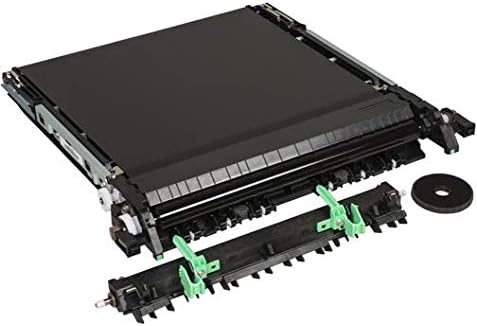
Image: The Ricoh 407849 SP C730 Transfer Unit, an essential component for image transfer in compatible Ricoh printers.
2. Product Overview
The Ricoh 407849 SP C730 Transfer Unit is a critical component in laser printers responsible for transferring the toner image from the drum to the paper. Using genuine Ricoh parts helps maintain print quality and extends the life of your printer.
Key Features:
- Genuine Ricoh transfer unit, ensuring compatibility and performance.
- Approximate yield: 130,000 pages, designed for high-volume printing environments.
- Specifically designed for use with the Ricoh SP C730DN printer model.
3. What's in the Box
Upon opening the package, verify that all components are present and undamaged.
- 1 x Ricoh 407849 SP C730 Transfer Unit

Image: The packaging box for a Ricoh printer accessory, similar to what the transfer unit would come in.
4. Setup and Installation
Installation of the transfer unit should be performed by a qualified technician or an experienced user following the specific instructions provided in your printer's service manual. Incorrect installation can damage the printer or the unit.
General Guidelines:
- Power Off: Ensure the printer is completely powered off and unplugged from the electrical outlet before beginning any installation.
- Locate Access Panel: Refer to your printer's manual to locate the access panel for the transfer unit.
- Remove Old Unit: Carefully remove the old transfer unit, noting its orientation. Be cautious of any residual toner.
- Install New Unit: Gently insert the new Ricoh 407849 SP C730 Transfer Unit into its designated slot, ensuring it clicks securely into place. Do not force the unit.
- Close Panel: Securely close all access panels.
- Power On: Plug in and power on the printer. The printer may perform a self-diagnostic check.
Important: Always consult your specific Ricoh SP C730DN printer's user or service manual for detailed, step-by-step installation instructions.
5. Operation
The Ricoh 407849 SP C730 Transfer Unit operates automatically as part of the printer's imaging process. Once installed, it requires no direct user interaction for its primary function.
During printing, the transfer unit applies an electrostatic charge to the paper, which attracts the toner from the imaging drum, forming the image on the paper. This process is integral to producing high-quality prints.
6. Maintenance
The transfer unit is a consumable part with a specified yield. Regular maintenance primarily involves monitoring print quality and replacing the unit when its lifespan is reached or when print quality degrades significantly.
Replacement Indicators:
- Printer display messages indicating the transfer unit needs replacement.
- Consistent print quality issues such as streaks, smudges, or faded areas that are not resolved by replacing toner cartridges or cleaning other components.
- Reaching the approximate page yield of 130,000 pages.
Note: Do not attempt to clean the transfer unit with abrasive materials or liquids, as this can cause irreparable damage. Handle the unit by its designated handles to avoid touching the sensitive transfer belt surface.
7. Troubleshooting
If you experience print quality issues after installing or during the use of the transfer unit, consider the following:
- Poor Print Quality (Streaks/Fading):
- Ensure the transfer unit is correctly seated and locked in place.
- Check if the unit has reached its end of life.
- Verify that genuine Ricoh toner cartridges are being used and are not low.
- Error Messages:
- If the printer displays an error related to the transfer unit, power cycle the printer (turn off, wait 30 seconds, turn on).
- If the error persists, re-install the transfer unit carefully.
- Consult your printer's manual for specific error codes and their resolutions.
For persistent issues, contact Ricoh customer support or a certified service technician.
8. Specifications
| Attribute | Detail |
|---|---|
| Model Number | 407849 |
| Product Type | Transfer Unit |
| Brand | Ricoh |
| Compatible Printer Model | Ricoh SP C730DN |
| Approximate Yield | 130,000 pages |
| Product Dimensions | 5.75 x 17.72 x 4.18 inches |
| Item Weight | 11.44 pounds |
| Manufacturer | Ricoh Innovations Corporation |
| Date First Available | December 15, 2016 |
9. Warranty and Support
Ricoh products are manufactured to high-quality standards. For information regarding warranty coverage, technical support, or service, please refer to the documentation included with your Ricoh printer or visit the official Ricoh support website.
You can find more information and support resources on the Ricoh Store on Amazon or the official Ricoh corporate website.
Ask a question about this manual
Ask about setup, troubleshooting, compatibility, parts, safety, or missing instructions. Manuals+ will review the question and use this page’s manual context to help answer it.