
1. Product Overview
The Klein Tools 55421BP-14 Tradesman Pro Tool Backpack is designed for professionals requiring durable and organized tool transport. This heavy-duty backpack features multiple pockets, a molded base, and robust construction to protect tools and withstand demanding job site conditions.
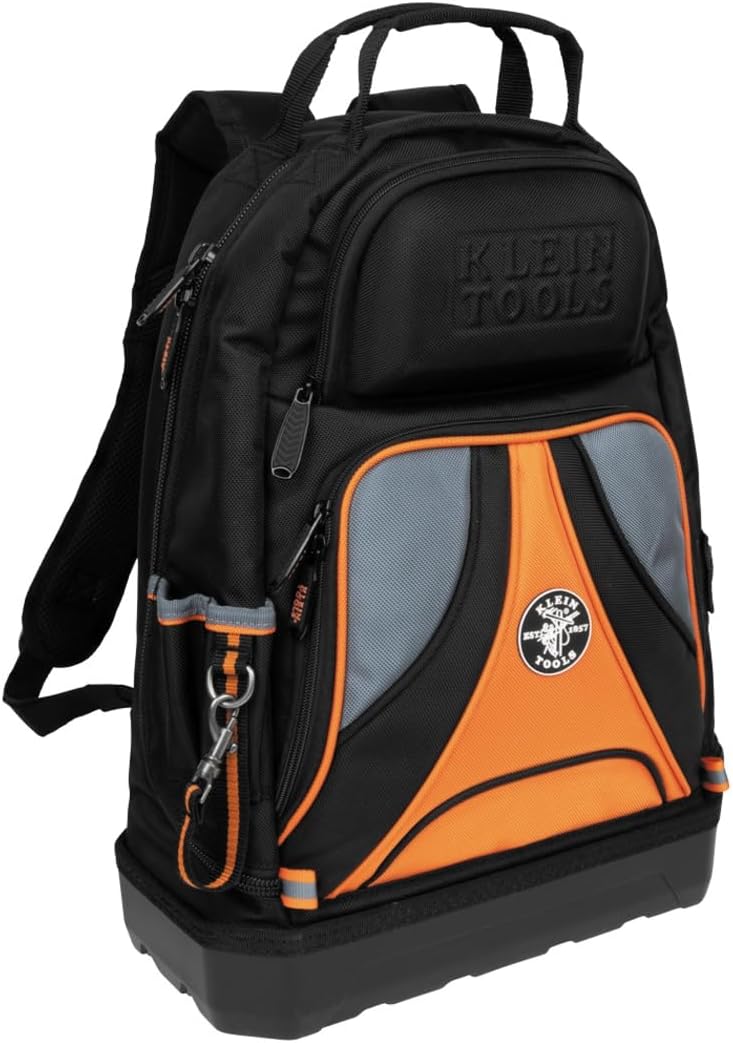
Figure 1: Klein Tools 55421BP-14 Tradesman Pro Tool Backpack, front view.
2. Key Features
This tool backpack is engineered with several features to enhance tool organization, protection, and user comfort:
- 39 Pockets: Ample storage for a wide range of hand tools and power tools.
- Hard, Molded Front Pocket: Provides dedicated protection for safety glasses or other delicate items.
- Front Zipper Pocket: Convenient storage for small parts, fasteners, or frequently accessed tools.
- Bright Orange Interior: Enhances visibility, making it easier to locate tools quickly.
- Durable Molded Base: Protects contents from water, mud, and other elements on the job site, ensuring stability.
- 1680d Ballistic Weave Construction: Offers superior durability and resistance to wear and tear.
- Padded Shoulder Straps and Handles: Designed for comfortable carrying, even when fully loaded.

Figure 2: Interior view showing multiple pockets for tool organization.

Figure 3: Close-up of the durable, fully molded bottom.
3. Setup and Initial Use
Before using your Klein Tools Tradesman Pro Tool Backpack, follow these steps:
- Unpack: Remove the backpack from its packaging. Inspect for any shipping damage.
- Adjust Shoulder Straps: Place the backpack on your back and adjust the padded shoulder straps to a comfortable length. Ensure the weight is evenly distributed.
- Organize Tools:
- Utilize the various interior pockets for screwdrivers, pliers, wrenches, and other hand tools.
- Place larger power tools or bulkier items in the main compartment.
- Store safety glasses in the hard, molded front pocket for protection.
- Use the small front zipper pocket for small parts, electrical tape, or frequently needed items.
- Load Evenly: Distribute the weight of your tools as evenly as possible to maintain balance and comfort during transport.
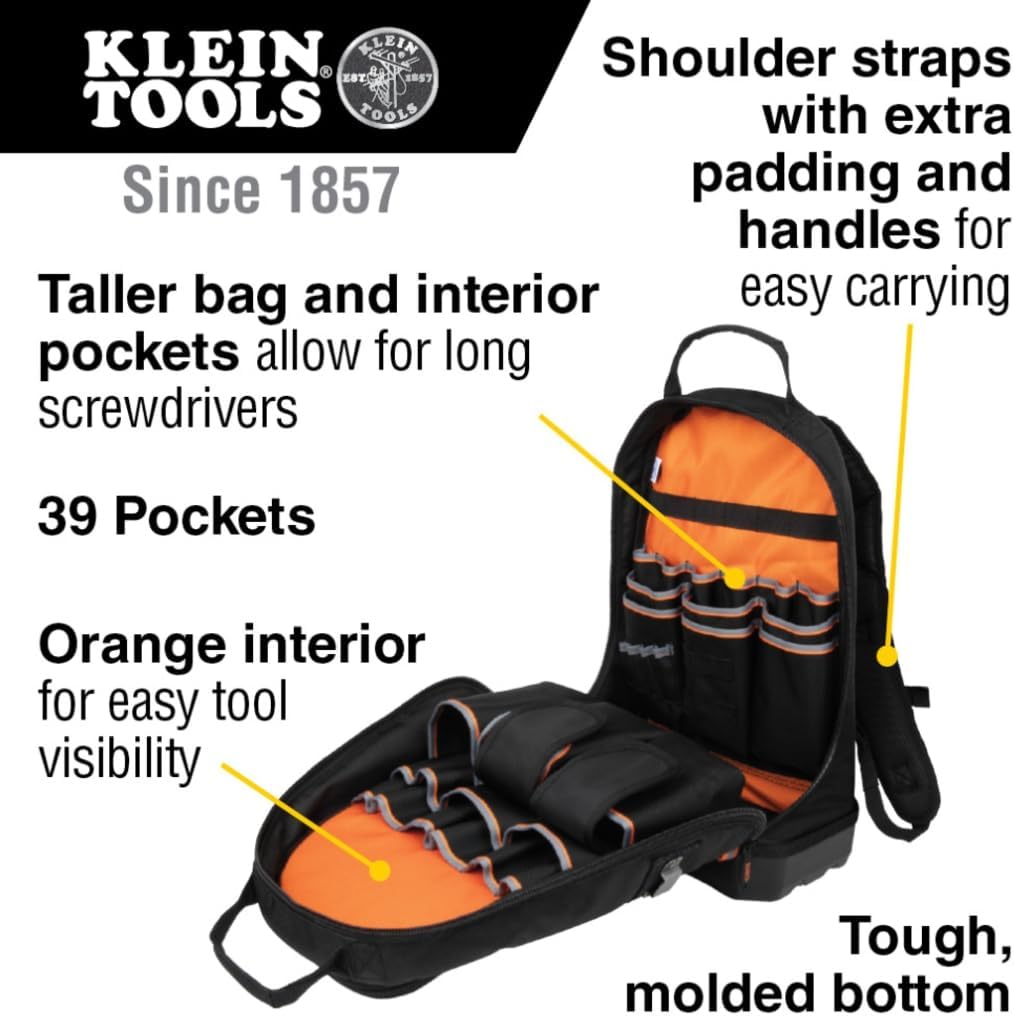
Figure 4: Backpack fully open, showing organized tools in various compartments.
4. Operating Instructions
The Tradesman Pro Tool Backpack is designed for ease of use and durability on the job site.
4.1 Carrying the Backpack
- Always use both shoulder straps for optimal weight distribution and comfort, especially when the backpack is heavily loaded.
- Utilize the top handle for short-distance carrying or when lifting the backpack into a vehicle.
4.2 Accessing Tools
- The main compartment features a wide opening for easy access to larger tools.
- The bright orange interior helps quickly identify tools within the pockets.
- The front pockets are designed for quick access to frequently used items without needing to open the main compartment.
5. Maintenance and Care
To ensure the longevity and performance of your Klein Tools backpack, follow these maintenance guidelines:
- Cleaning:
- Wipe down the exterior with a damp cloth and mild soap as needed.
- For stubborn dirt, use a soft brush.
- Do not machine wash or tumble dry, as this can damage the material and molded base.
- Allow the backpack to air dry completely before storing or reusing.
- Storage: Store the backpack in a dry place away from direct sunlight when not in use.
- Inspection: Periodically inspect zippers, seams, and straps for signs of wear or damage. Address any issues promptly to prevent further damage.
- Avoid Overloading: Do not exceed the recommended weight capacity to prevent strain on seams and zippers.
6. Troubleshooting
Here are some common issues and their potential solutions:
| Problem | Possible Cause | Solution |
|---|---|---|
| Zipper sticking or difficult to close. | Dirt, debris, or misalignment. | Clean zipper teeth with a small brush. Apply a zipper lubricant (e.g., wax or silicone spray). Ensure fabric is not caught in the zipper path. |
| Backpack feels uncomfortable or unbalanced. | Uneven weight distribution or improper strap adjustment. | Rearrange tools to distribute weight evenly. Adjust shoulder straps for a snug, comfortable fit. |
| Molded base appears scuffed or dirty. | Normal wear and tear from job site use. | Clean with a damp cloth. The molded base is designed for durability and protection. |
7. Specifications
Detailed specifications for the Klein Tools 55421BP-14 Tradesman Pro Tool Backpack:
- Model Number: 55421BP-14
- Material: 1680d Ballistic Weave Polyester
- Color: Black/Orange/Gray
- Product Dimensions (L x W x H): 14.5" x 7.25" x 20" (36.8 cm x 18.4 cm x 50.8 cm)
- Number of Pockets: 39
- Water Resistance Level: Water Resistant
- Item Weight: 6 pounds (2.72 kg)
- Maximum Weight Recommendation: 5 kg (11 lbs) - Note: This might be a typo in the source data, as 6 lbs empty weight and 5kg max load is unusual. Always exercise caution and do not overload.
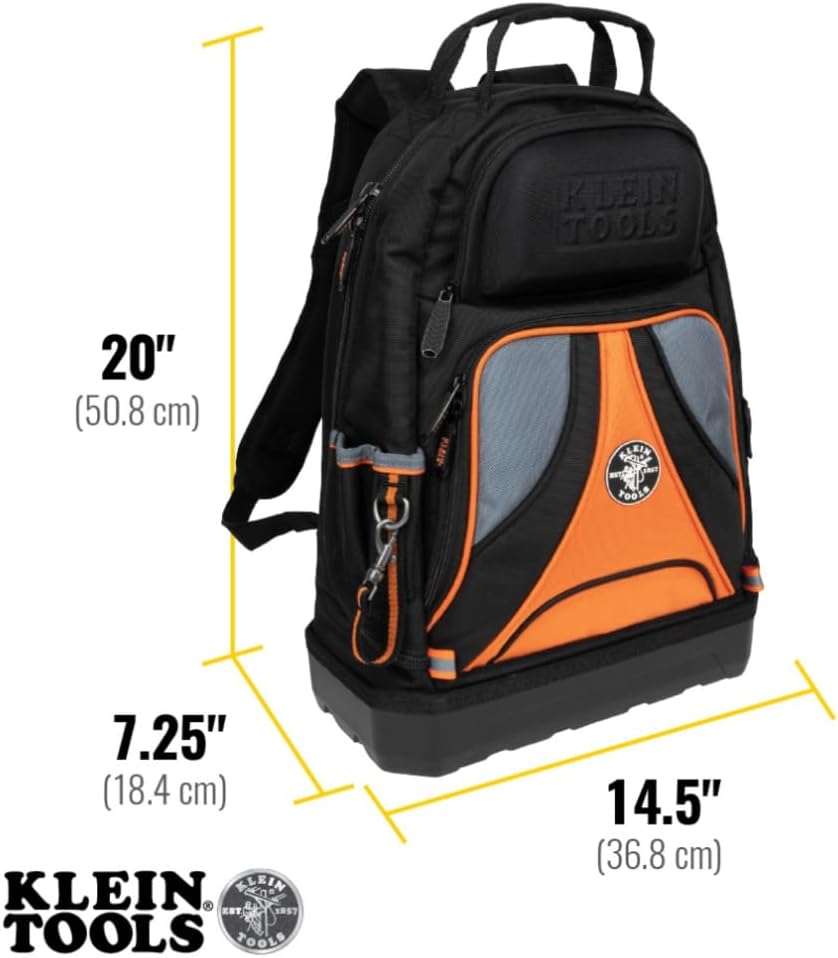
Figure 5: Diagram showing the dimensions of the backpack.
8. Safety Information
WARNING:
This product may expose you to chemicals which are known to the State of California to cause cancer and reproductive harm. For more information, go to www.P65Warnings.ca.gov.
Always ensure tools are securely stored within the backpack to prevent them from falling out and causing injury or damage.
9. Warranty and Support
For information regarding warranty coverage, product support, or to view other Klein Tools products, please visit the official Klein Tools website or contact their customer service department.
You can also visit the KLEIN TOOLS Store on Amazon.