
1. Introduction
This manual provides detailed instructions for the proper setup, operation, and maintenance of your DENON AVC-1550 AV Surround Amplifier. The AVC-1550 is equipped with a built-in AAC decoder and DTS-E decoder, and is compatible with Dolby Pro Logic II, offering a rich audio experience for your home theater system. Please read this manual thoroughly before using the amplifier to ensure optimal performance and safety.
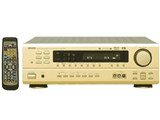
Figure 1: Front view of the DENON AVC-1550 AV Surround Amplifier. This image displays the main unit with its control knobs and display panel.
2. Important Safety Information
To prevent electric shock, fire, or damage to the unit, please observe the following safety precautions:
- Power Source: Connect the unit only to an AC outlet of the voltage specified on the rear panel.
- Ventilation: Ensure adequate ventilation. Do not block ventilation openings. Install the unit in a location with sufficient space around it.
- Water and Moisture: Do not expose the unit to rain or moisture. Do not place objects filled with liquids, such as vases, on the unit.
- Foreign Objects: Do not insert any metallic objects or flammable materials into the unit's openings.
- Servicing: Do not attempt to service the unit yourself. Refer all servicing to qualified service personnel.
- Cleaning: Disconnect the power cord from the wall outlet before cleaning. Use a dry, soft cloth for cleaning.
3. Setup
3.1 Unpacking
Carefully remove the amplifier from its packaging. Retain the original packaging materials for future transport or storage.
3.2 Speaker Connections
Connect your speakers to the appropriate terminals on the rear panel of the AVC-1550. Ensure correct polarity (+ to + and - to -) for all speakers.
- Front Speakers: Connect to the FRONT L/R terminals.
- Center Speaker: Connect to the CENTER terminal.
- Surround Speakers: Connect to the SURROUND L/R terminals.
- Subwoofer: Connect to the SUBWOOFER PRE OUT terminal using an RCA cable.
3.3 Audio/Video Component Connections
Connect your audio and video sources (e.g., DVD player, Blu-ray player, TV, game console) to the corresponding input jacks on the rear panel.
- Use appropriate cables (RCA, optical, coaxial) for audio connections.
- For video, use composite, S-video, or component video cables as supported by your devices and the amplifier.
3.4 Power Connection
After all other connections are made, plug the amplifier's power cord into a suitable AC wall outlet.
4. Operating Instructions
4.1 Basic Operation
- Power On/Off: Press the POWER button on the front panel or remote control to turn the unit on or off.
- Input Selection: Use the INPUT SELECTOR knob on the front panel or the input buttons on the remote control to choose your desired audio/video source.
- Volume Control: Adjust the master volume using the large VOLUME knob on the front panel or the VOLUME +/- buttons on the remote control.
4.2 Sound Modes
The AVC-1550 supports various sound modes to enhance your listening experience. Use the MODE button on the remote or front panel to cycle through available modes such as:
- Dolby Pro Logic II: For converting stereo sources into 5.1 channel surround sound.
- DTS-E: For decoding DTS-ES encoded soundtracks.
- Stereo: For standard two-channel audio playback.
- Direct: Bypasses tone controls for pure audio playback.
4.3 Tone Control
Adjust the bass and treble levels using the BASS and TREBLE controls on the front panel or remote control to customize the sound to your preference.
5. Maintenance
5.1 Cleaning
To maintain the appearance and performance of your amplifier:
- Always disconnect the power cord before cleaning.
- Use a soft, dry cloth to wipe the exterior surfaces.
- Do not use abrasive cleaners, waxes, or solvents as they may damage the finish.
- Periodically clean the ventilation openings to prevent dust buildup.
5.2 Storage
If you plan to store the unit for an extended period, disconnect it from the power outlet and store it in a cool, dry place, preferably in its original packaging.
6. Troubleshooting
If you experience problems with your AVC-1550, refer to the following common issues and solutions before contacting service personnel.
| Problem | Possible Cause | Solution |
|---|---|---|
| No power | Power cord not connected securely. Unit is in standby mode. | Check power cord connection. Press the POWER button. |
| No sound | Incorrect input selected. Volume is too low or muted. Speaker cables disconnected. | Select correct input source. Increase volume, check mute function. Verify speaker cable connections. |
| No video | Incorrect video input selected. Video cables not connected properly. | Select correct video input. Check video cable connections between source, amplifier, and TV. |
| Remote control not working | Batteries are depleted. Obstruction between remote and unit. | Replace batteries. Remove any obstructions. Ensure remote is pointed at the unit's sensor. |
7. Specifications
Key specifications for the DENON AVC-1550 AV Surround Amplifier:
- Brand: Denon
- Model: AVC-1550
- Audio Output Mode: Surround
- Item Weight: 9.7 Kilograms
- Control Method: Remote
- Decoder Support: Dolby Pro Logic II, AAC, DTS-E
- ASIN: B00MIOWE7S
Note: Specifications are subject to change without notice for product improvement.
8. Warranty and Support
For warranty information and customer support, please refer to the warranty card included with your product or visit the official Denon website. Keep your purchase receipt as proof of purchase for warranty claims.
Official Denon Website: www.denon.com


