
1. Introduction
This manual provides essential instructions for the safe and effective use of your Icom HM-167 Waterproof Speaker Microphone. Please read this manual thoroughly before using the product to ensure proper operation and to prevent damage.
The Icom HM-167 is designed for marine environments, offering reliable communication with its IPX7 waterproof rating and robust construction. It is compatible with various Icom handheld VHF radios, including the M72, M73, and GM1600 models.
2. Key Features
- Waterproof Design: Rated IPX7 for submersion in 1 meter of water for 30 minutes.
- Enhanced Audio: Provides clear and loud audio transmission and reception.
- Easy Access Controls: Designed for convenient operation with your compatible Icom radio.
- Durable Construction: Built to withstand harsh marine conditions.
3. Product Overview
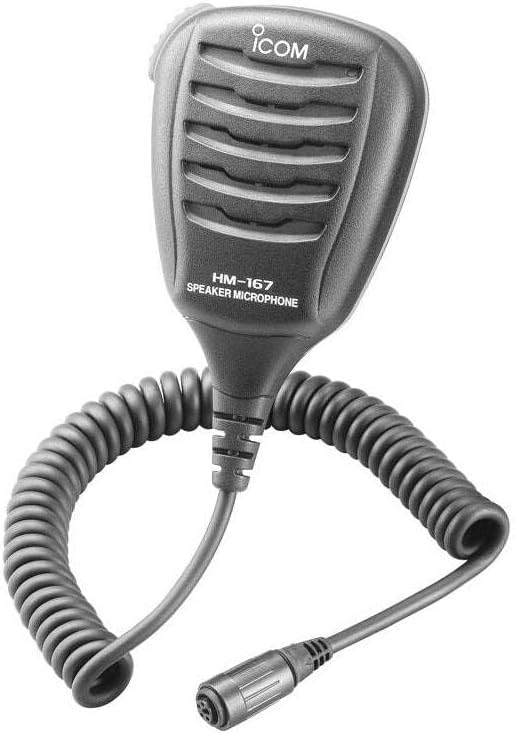
Figure 1: Icom HM-167 Waterproof Speaker Microphone
The Icom HM-167 speaker microphone features a compact, handheld design with a robust speaker grille and a push-to-talk (PTT) button. It includes a coiled cable for flexibility and a multi-pin connector for secure attachment to your Icom marine radio.
4. Package Contents
Verify that all the following items are included in your package:
- Icom HM-167 Speaker Microphone
- Belt Clip (pre-attached or separate)
- Instruction Manual (this document)
5. Setup
5.1. Attaching the Belt Clip (if separate)
- Align the belt clip with the designated slot on the back of the speaker microphone.
- Slide the clip firmly into place until it clicks securely.
5.2. Connecting to Your Radio
- Ensure your Icom handheld VHF radio is turned off.
- Locate the accessory jack on your radio (refer to your radio's manual for exact location).
- Align the multi-pin connector of the HM-167 with the radio's accessory jack.
- Gently push and twist the connector until it is firmly seated and secured. Do not force the connection.
- Once connected, you may turn on your radio.
6. Operating Instructions
6.1. Basic Operation
- Receiving: When the radio is on and the speaker microphone is connected, audio will be heard through the speaker on the HM-167.
- Transmitting: Press and hold the Push-To-Talk (PTT) button located on the side of the speaker microphone. Speak clearly into the microphone. Release the PTT button to return to receive mode.
- Volume Adjustment: Adjust the volume using the controls on your Icom handheld VHF radio.
6.2. Waterproof Functionality
The HM-167 is designed to be waterproof (IPX7). This means it can withstand submersion in 1 meter of water for up to 30 minutes. Ensure the connector is properly secured to the radio to maintain its waterproof integrity. After exposure to saltwater, rinse the speaker microphone thoroughly with fresh water and dry it completely.
7. Maintenance
7.1. Cleaning
- Regularly clean the exterior of the speaker microphone with a soft, damp cloth.
- After use in saltwater, always rinse the unit with fresh water to prevent salt buildup and corrosion.
- Do not use harsh chemicals, solvents, or abrasive cleaners.
7.2. Storage
When not in use, store the speaker microphone in a cool, dry place away from direct sunlight and extreme temperatures. Ensure the connector is clean and dry before storage.
8. Troubleshooting
| Problem | Possible Cause | Solution |
|---|---|---|
| No audio from speaker mic | Loose connection; Radio volume too low; Speaker mic faulty. | Ensure connector is firmly attached; Increase radio volume; Test with another speaker mic if available. |
| Cannot transmit | PTT button not pressed correctly; Radio not in transmit mode; Speaker mic faulty. | Press PTT button firmly; Check radio's operating mode; Test with another speaker mic if available. |
| Distorted audio | Moisture in microphone/speaker; Loose connection; Radio settings. | Ensure unit is dry; Re-seat connector; Check radio's audio settings. |
9. Specifications
| Feature | Detail |
|---|---|
| Model Name | HM-167 |
| Brand | ICOM |
| Waterproof Rating | IPX7 (1m depth for 30 minutes) |
| Microphone Form Factor | Handheld |
| Connectivity Technology | XLR |
| Connector Type | XLR |
| Material | Plastic |
| Color | Black |
| Item Dimensions (L x W x H) | 3.15 x 2.56 x 1.97 inches |
| Item Weight | 5.6 ounces (0.35 Pounds) |
| Impedance | 2200 Ohm |
| Signal-to-Noise Ratio | 75 dB |
| Compatible Radios | Icom M72, M73, GM1600 (and others as specified by Icom) |
10. Warranty and Support
10.1. Warranty Information
The Icom HM-167 Speaker Microphone comes with a standard manufacturer's warranty. Please refer to the warranty card included with your product or visit the official Icom website for detailed terms and conditions. Keep your proof of purchase for warranty claims.
10.2. Customer Support
For technical assistance, troubleshooting beyond this manual, or warranty service, please contact Icom customer support through their official website or the contact information provided in your product packaging.
Icom America Inc.
Website: www.icomamerica.com


