1. Introduction
This manual provides comprehensive instructions for the proper setup, operation, and maintenance of your Sony RM-DX300 remote control. This remote is specifically designed for use with Sony CD Changer models CDP-CX300, CDP-CX335, CDP-CX355, and CDP-X300. Please read this manual thoroughly before using the remote control to ensure optimal performance and longevity.
2. Safety Information
- Battery Handling: Always insert batteries with the correct polarity (+/-). Do not mix old and new batteries, or different types of batteries (e.g., alkaline and rechargeable). Remove batteries if the remote will not be used for an extended period to prevent leakage.
- Disposal: Dispose of used batteries according to local regulations. Do not dispose of batteries in fire.
- Liquid Exposure: Avoid exposing the remote control to liquids or excessive moisture.
- Temperature: Do not expose the remote control to extreme temperatures or direct sunlight.
- Cleaning: Use a soft, dry cloth for cleaning. Do not use abrasive cleaners or solvents.
3. Package Contents
Please check that your package contains the following items:
- Sony RM-DX300 Remote Control
- Instruction Manual (this document)
Note: Batteries are typically not included and must be purchased separately.
4. Setup
4.1 Battery Installation
To power your RM-DX300 remote control, you will need to install two (2) AA batteries (not included).
- Locate the battery compartment cover on the back of the remote control.
- Press down on the tab and slide the cover off in the direction indicated by the arrow.
- Insert two AA batteries, ensuring that the positive (+) and negative (-) terminals align correctly with the markings inside the compartment.
- Slide the battery compartment cover back into place until it clicks securely.
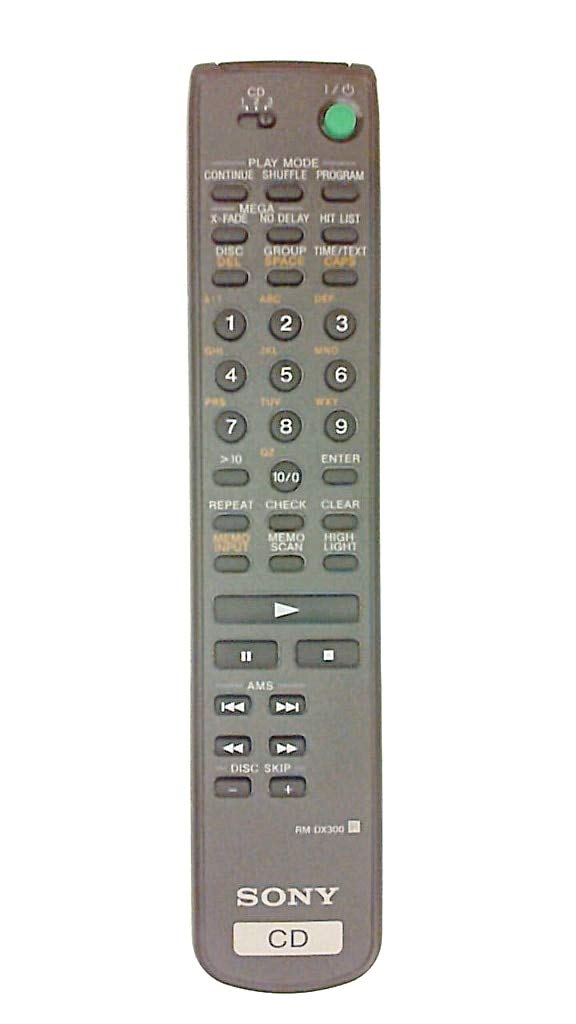
Image 4.1: The Sony RM-DX300 remote control. The battery compartment is located on the back.
5. Operating Instructions
The RM-DX300 remote control allows you to operate your compatible Sony CD Changer from a distance. Ensure there is a clear line of sight between the remote's infrared emitter and the CD changer's IR receiver.
5.1 Basic Functions
- POWER: Turns the CD changer on or off.
- PLAY (►): Starts CD playback.
- PAUSE (−): Pauses CD playback. Press again to resume.
- STOP (■): Stops CD playback.
- SKIP (►►| / |◄◄): Skips to the next track or returns to the beginning of the current/previous track.
- SEARCH (►► / ◄◄): Fast forwards or fast reverses through a track.
- DISC SELECT (Numeric Keypad): Directly select a disc by entering its number.
- TRACK SELECT (Numeric Keypad): Directly select a track by entering its number.
- PROGRAM: Allows programming of tracks for custom playback sequences. Refer to your CD changer's manual for detailed programming instructions.
- REPEAT: Repeats the current track, disc, or programmed sequence.
- SHUFFLE/RANDOM: Plays tracks or discs in a random order.
Note: Specific button labels and advanced functions may vary slightly depending on your CD changer model. Consult your CD changer's original instruction manual for detailed information on all features.
6. Maintenance
6.1 Cleaning the Remote
To clean the remote control, gently wipe its surface with a soft, dry cloth. Do not use liquid cleaners, sprays, or abrasive materials, as these can damage the remote's finish or internal components.
6.2 Battery Replacement
Replace the batteries when the remote control's range decreases or if it stops responding. Follow the battery installation steps outlined in Section 4.1. Always replace both batteries at the same time with new ones of the same type.
7. Troubleshooting
| Problem | Possible Cause | Solution |
|---|---|---|
| Remote control does not operate the CD changer. |
|
|
| Remote control operates intermittently. |
|
|
8. Specifications
| Model: | RM-DX300 |
| Compatible Devices: | Sony CD Changer models CDP-CX300, CDP-CX335, CDP-CX355, CDP-X300 |
| Connectivity Technology: | Infrared (IR) |
| Power Source: | 2 x AA Batteries (not included) |
| Product Dimensions: | 8.1 x 1.5 x 1 inches |
| Item Weight: | 3.2 ounces |
| Manufacturer: | Sony |
9. Warranty and Support
This remote control is manufactured by Sony. For information regarding warranty coverage, technical support, or service, please refer to the documentation provided with your original Sony CD Changer or visit the official Sony support website. Keep your purchase receipt as proof of purchase for warranty claims.
Sony Support Website: https://www.sony.com/electronics/support


