
Introduction
This manual provides detailed instructions for the safe and effective use of your Retevis RT20 Small Walkie Talkies. These portable two-way radios are designed for clear communication in various settings, featuring a compact size, hands-free operation, FM radio, and a keyboard lock function. Please read this manual thoroughly before operating the device.
Package Contents
Verify that all items listed below are included in your package. If any items are missing or damaged, please contact customer support.

This graphic details the contents of the Retevis RT20 walkie-talkie package, including five walkie-talkies, five lanyards, five USB power adapters, and five USB-C charging cables.
- Retevis RT20 Walkie Talkie Unit (5x)
- Lanyard (5x)
- USB Power Adapter (5x)
- USB-C Charging Cable (5x)
- 1000 mAh Lithium-Ion Battery (5x, pre-installed)

This image displays five Retevis RT20 walkie-talkies, each equipped with a blue lanyard, showcasing the compact design and included accessories.
Product Overview
Familiarize yourself with the components and controls of your Retevis RT20 walkie-talkie.
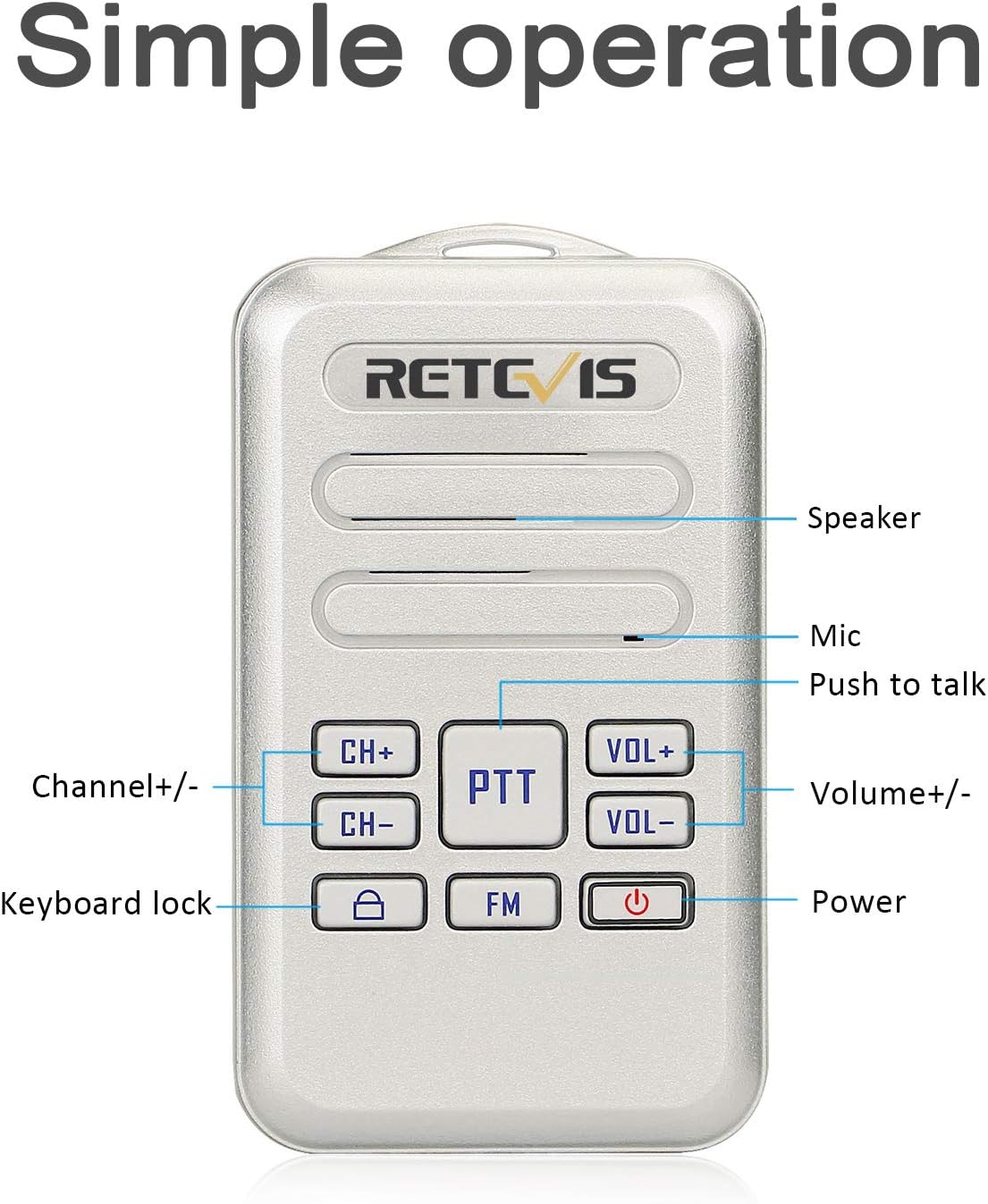
A detailed diagram highlighting the various controls and features of the Retevis RT20 walkie-talkie, including the speaker, microphone, Push-to-Talk (PTT) button, channel selection, volume adjustment, keyboard lock, FM radio function, and power button.
Key Components:
- Speaker: Outputs audio.
- Microphone: Captures your voice for transmission.
- PTT (Push-to-Talk) Button: Press and hold to transmit, release to listen.
- CH+ / CH- Buttons: Adjust the communication channel.
- VOL+ / VOL- Buttons: Adjust the speaker volume.
- Lock Button: Activates/deactivates the keyboard lock.
- FM Button: Toggles FM radio function.
- Power Button: Turns the device on or off.
- USB-C Charging Port: For charging the internal battery.
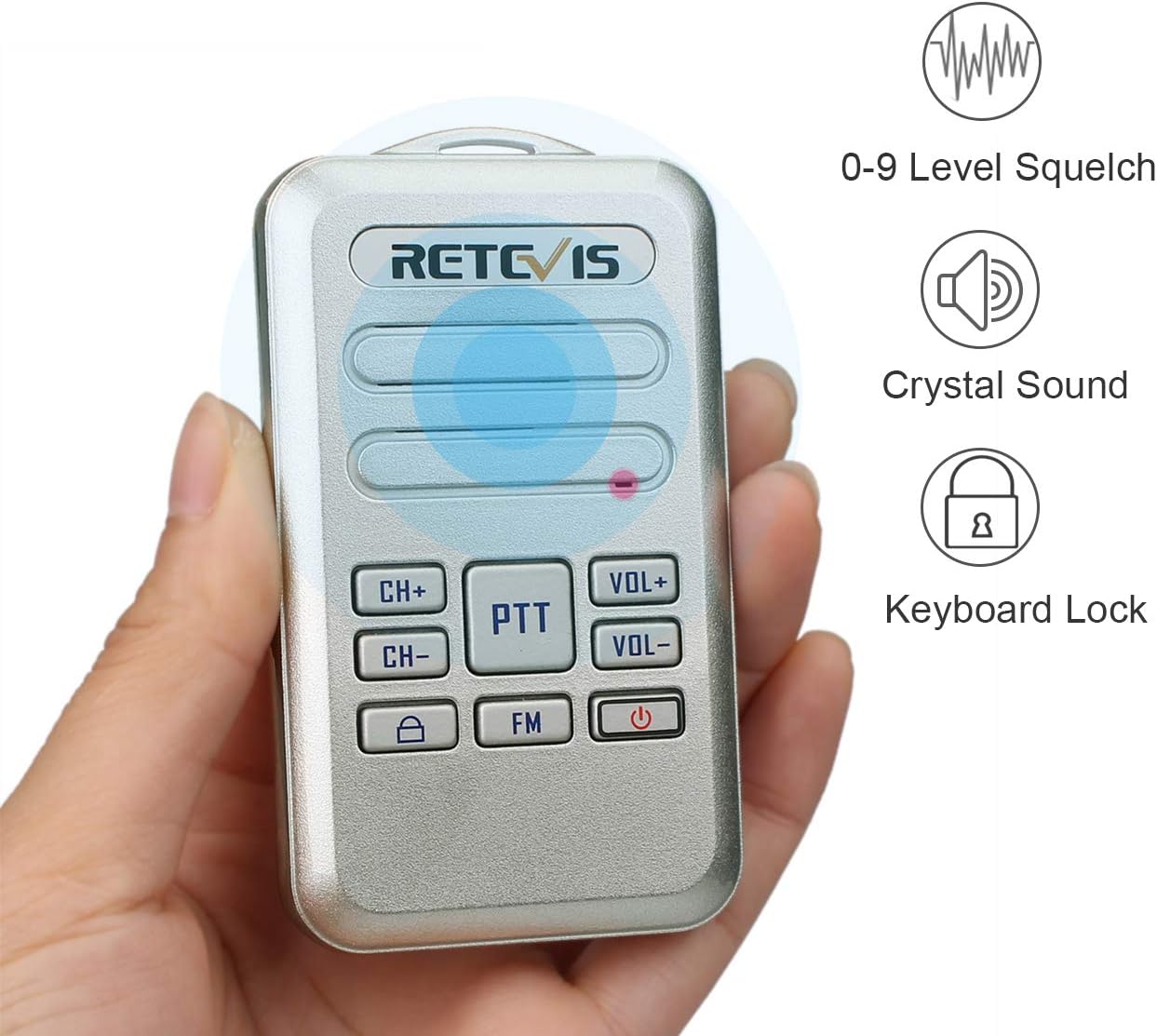
This image shows the Retevis RT20 walkie-talkie being held, emphasizing its compact size. Accompanying icons denote features such as adjustable squelch levels, clear audio transmission, and the keyboard lock function.
Setup
Charging the Battery
The Retevis RT20 walkie-talkie is equipped with a rechargeable 1000 mAh Lithium-Ion battery. Before first use, fully charge the device.
- Connect the provided USB-C charging cable to the USB-C port on the side of the walkie-talkie.
- Connect the other end of the USB-C cable to the USB power adapter.
- Plug the USB power adapter into a standard electrical outlet.
- The charging indicator light will illuminate. Once charging is complete, the indicator light may change color or turn off, depending on the unit.
- A full charge typically provides up to 12 hours of use. The device will provide a voice prompt, "please charge battery," when the battery level is low.

A visual guide to charging the Retevis RT20 walkie-talkie, highlighting its USB-C port and the charging process for its 1000mAh battery.

This image focuses on the USB-C charging port of the Retevis RT20 walkie-talkie and provides information about its 1000 mAh lithium-ion battery, including a voice prompt for low battery warnings.
Operating Instructions
Power On/Off
To turn the walkie-talkie on or off, press and hold the Power button until the device powers on or off.
Channel Selection
To change the communication channel:
- Press the CH+ button to increase the channel number.
- Press the CH- button to decrease the channel number.
Ensure all radios intended for communication are set to the same channel and CTCSS/DCS code for proper operation.
Volume Adjustment
To adjust the speaker volume:
- Press the VOL+ button to increase the volume.
- Press the VOL- button to decrease the volume.
Push-to-Talk (PTT)
To transmit your voice, press and hold the large PTT button. Speak clearly into the microphone. Release the PTT button to stop transmitting and listen for a response.
VOX (Voice Operated Exchange) Hands-free Function
The VOX function allows for hands-free transmission when your voice is detected.
- To activate VOX: Long press the VOL+ button for 2 seconds.
- To deactivate VOX: Long press the VOL+ button for 2 seconds again.
VOX sensitivity levels can be adjusted for optimal performance in different environments.

An illustration demonstrating the convenience of the Retevis RT20 walkie-talkie's shortcut keys, explaining how to activate VOX (Voice Operated Exchange) and the keyboard lock function with simple long presses.
Keyboard Lock
The keyboard lock prevents accidental button presses.
- To activate Keyboard Lock: Long press the Lock button for 2 seconds.
- To deactivate Keyboard Lock: Long press the Lock button for 2 seconds again.

This image visually explains the key lock feature of the Retevis RT20, showing the device and instructing users to long-press the lock button for 2 seconds to activate it, preventing accidental button presses.
FM Radio Function
The walkie-talkie includes an FM radio feature for entertainment.
- To activate FM Radio: Press the FM button.
- To deactivate FM Radio: Press the FM button again.

This image demonstrates the FM radio function of the Retevis RT20 walkie-talkie, showing the FM button and a person enjoying radio broadcasts.
Maintenance
- Cleaning: Use a soft, damp cloth to clean the exterior of the walkie-talkie. Do not use harsh chemicals or abrasive cleaners.
- Storage: Store the walkie-talkie in a cool, dry place away from direct sunlight and extreme temperatures.
- Battery Care: To prolong battery life, avoid fully discharging the battery frequently. Charge the battery regularly, even if the device is not in use for extended periods.
- Water Exposure: This device is not waterproof. Avoid exposing it to rain, splashes, or immersion in water.
Troubleshooting
If you encounter issues with your Retevis RT20 walkie-talkie, refer to the following common problems and solutions:
| Problem | Possible Cause | Solution |
|---|---|---|
| No power | Battery is depleted or not properly installed. | Charge the battery. Ensure the battery is correctly seated. |
| Cannot communicate with other radios | Radios are on different channels or CTCSS/DCS codes. Out of range. | Verify all radios are on the same channel and code. Move closer to the other radio. |
| Poor audio quality or static | Weak signal, interference, or low battery. | Move to an open area. Avoid obstacles. Charge the battery. |
| Buttons are unresponsive | Keyboard lock is active. | Long press the Lock button for 2 seconds to deactivate the keyboard lock. |
| Short communication range | Environmental factors (buildings, terrain), low battery. | Move to higher ground or an open area. Ensure batteries are fully charged. |

This graphic illustrates the potential communication range of the walkie-talkies within a multi-room indoor environment, showing how signals can travel through different areas.
Specifications
Detailed technical specifications for the Retevis RT20 walkie-talkie.

A visual representation of the Retevis RT20 walkie-talkie's physical dimensions, showing its length (89mm), width (51mm), and thickness (15mm), highlighting its mini size.
| Feature | Detail |
|---|---|
| Model Number | FA9138AX5 |
| Dimensions | 3.5 x 2.01 x 0.59 inches (89 x 51 x 15 mm) |
| Item Weight | 5.9 ounces |
| Battery Type | Lithium-Ion (1000 mAh) |
| Voltage | 3.7 Volts |
| Control Method | Voice |
| Noise Level | 40 dB |
| Special Features | VOX hands-free, Key lock, USB-C charging, FM Radio |
| UPC | 631976601191 |
Safety Information
Please observe the following safety precautions to ensure safe operation and prevent damage to the device or injury.
- Do not attempt to disassemble or modify the walkie-talkie. Repairs should only be performed by authorized service personnel.
- Keep the device away from extreme temperatures, direct sunlight, and moisture.
- Do not operate the walkie-talkie in explosive atmospheres (e.g., near flammable gases, dust, or powders).
- Use only the provided or approved charging cables and adapters.
- Avoid prolonged exposure to loud volume levels, which may cause hearing damage.
- Dispose of batteries and electronic components responsibly according to local regulations.
Warranty and Support
For warranty information or technical support, please refer to the documentation included with your purchase or visit the official Retevis website. You may also contact the seller directly for assistance.


