
Motocaddy S3PRODHC-schwarz
Motocaddy S3 PRO Lithium DHC Electric Golf Trolley User Manual
Model: S3PRODHC-schwarz
Introduction
This user manual provides essential information for the safe and efficient operation, maintenance, and troubleshooting of your Motocaddy S3 PRO Lithium DHC Electric Golf Trolley. Please read this manual thoroughly before using your trolley to ensure optimal performance and longevity.
Safety Information
Always observe the following safety precautions:
- Ensure the trolley is stable before releasing the handle.
- Do not operate the trolley on excessively steep slopes or uneven terrain that could cause it to tip over.
- Keep hands and clothing clear of moving parts, especially wheels and folding mechanisms.
- Store the battery in a cool, dry place and charge it only with the approved Motocaddy charger.
- Do not immerse the trolley or battery in water.
- Always engage the parking brake when stopping on an incline.
Package Contents
Verify that all items are present in your package:
- Motocaddy S3 PRO Lithium DHC Electric Golf Trolley frame
- Lithium Battery
- Battery Charger
- User Manual (this document)
- Accessory Station (if included with your model)

Image: The Motocaddy S3 PRO Lithium DHC Electric Golf Trolley, showing its main components including the frame, wheels, and handle.
Setup
Unfolding the Trolley
- Place the folded trolley on a flat surface.
- Release the upper frame latch and extend the handle upwards until it clicks into place.
- Release the lower frame latch and unfold the main frame until the rear wheels are fully extended and locked.
- Ensure all locking mechanisms are securely engaged before use.
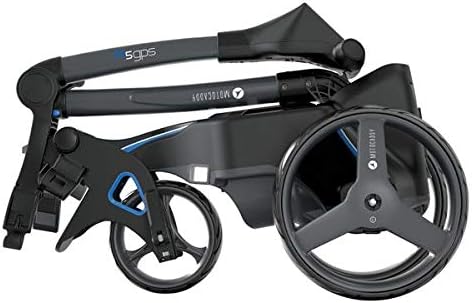
Image: The Motocaddy S3 PRO Lithium DHC Electric Golf Trolley in its compact, folded state, ready for transport or storage.
Battery Installation and Charging
- Connect the battery to the trolley's battery tray connector. Ensure a firm connection.
- Place the battery securely in its designated compartment.
- To charge, connect the charger to the battery and then to a power outlet. The charger indicator light will show charging status.
- Charge the battery fully before first use and after each round of golf.
Operating Instructions
Powering On and Off
Press and hold the main power button on the handle to turn the trolley on or off.
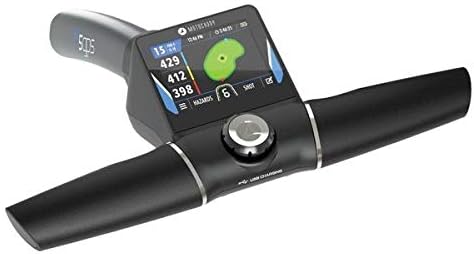
Image: A close-up view of the Motocaddy S3 PRO handle, featuring the control dial and the integrated digital display, which shows various operational parameters and GPS information.
Speed Control and DHC (Downhill Control)
Rotate the control dial on the handle to adjust the trolley's speed. The DHC feature automatically maintains a constant speed when descending hills, preventing the trolley from running away.
Distance Control Function (DCF)
The DCF allows you to send the trolley a set distance (e.g., 15, 30, 45 yards/meters) before it automatically stops. Press the DCF button, select your desired distance using the dial, and press the button again to activate.
GPS Functionality (if applicable)
Some models feature integrated GPS. The display provides distances to the front, middle, and back of the green, as well as hazards. Use the control dial to navigate through GPS menus and select courses.

Image: A visual representation of the various screens and functions available on the Motocaddy M5 GPS display, including golf play, settings, hazard distances, and score tracking.
Maintenance
Cleaning
Wipe down the trolley with a damp cloth after each use. Avoid using abrasive cleaners or high-pressure washers. Ensure all moving parts are free of dirt and debris.
Battery Care
- Always charge the battery fully after each round.
- Do not leave the battery fully discharged for extended periods.
- Store the battery in a cool, dry place when not in use.
- If storing for a long period, charge the battery every 6-8 weeks.
Wheel and Axle Inspection
Regularly check the wheels for wear and tear. Ensure the axles are clean and free from obstructions. Lubricate moving parts as recommended by Motocaddy.
Troubleshooting
| Problem | Possible Cause | Solution |
|---|---|---|
| Trolley does not power on. | Battery not connected or discharged. | Check battery connection. Charge battery fully. |
| Trolley stops unexpectedly. | Overload protection activated or low battery. | Reduce load. Charge battery. Check for obstructions in wheels. |
| Trolley pulls to one side. | Uneven weight distribution or wheel alignment issue. | Adjust golf bag position. Consult Motocaddy support for wheel alignment. |
| Display not working. | Loose connection or internal fault. | Ensure all cables are secure. Contact customer support if issue persists. |
Specifications
- Model: Motocaddy S3 PRO Lithium DHC
- Battery Type: Lithium
- Motor: Powerful, quiet motor
- Features: DHC (Downhill Control), Distance Control Function (DCF), USB Charging Port, Adjustable Handle Height
- Folded Dimensions: (Refer to product packaging or Motocaddy website for exact dimensions)
- Weight: (Refer to product packaging or Motocaddy website for exact weight)
Warranty and Support
Your Motocaddy S3 PRO Lithium DHC Electric Golf Trolley comes with a manufacturer's warranty. Please refer to the warranty card included with your purchase or visit the official Motocaddy website for detailed warranty terms and conditions.
For technical support, spare parts, or service inquiries, please contact Motocaddy Customer Service:
- Website: www.motocaddy.com
- Email: (Refer to website for contact email)
- Phone: (Refer to website for contact phone number)
When contacting support, please have your model number (S3PRODHC-schwarz) and purchase date ready.
Related documentsS3PRODHC-schwarz


Ask a question about this manual
Ask about setup, troubleshooting, compatibility, parts, safety, or missing instructions. Manuals+ will review the question and use this page’s manual context to help answer it.