
Delphi FG1173
Delphi FG1173 Fuel Module Instruction Manual
Model: FG1173
Brand: Delphi
Product Overview
The Delphi FG1173 Fuel Module is engineered as a leading OE supplier component, incorporating over 30 OE-proprietary innovations and 150 patents in fuel module and pump design. This module is designed to restore fast-pressure performance and system integrity, ensuring efficient fuel delivery with reduced energy consumption. Key features include internal springs for enhanced durability and stability, lower amperage draw to minimize load on the vehicle's electrical system, and a large volume reservoir for optimal performance in low-fuel conditions and during vehicle cornering. It also boasts gold-filled fuel-level sensors for improved debris and wear resistance, consistent pump flow, and an enhanced filtration system for extended pump life. The OE-service body harness and connector ensure superior performance, durability, and ease of installation.

Figure 1: Delphi FG1173 Fuel Module, showing the complete assembly.
Safety Information
Prioritize safety when working with fuel systems. Adhere to the following guidelines:
- Have a fire extinguisher nearby.
- Never smoke or work near anything that could cause a spark or ignite fuel, such as pilot lights and incandescent light bulbs.
- Always wear safety glasses, and gloves are recommended.
- Work in a well-ventilated area. Keep clean-up materials on hand, and clean up any spills immediately.
- Always relieve fuel pressure prior to opening fuel systems. Releasing fuel under pressure can cause fire and injury.
- Store fuel in an approved container like a gas caddy or gas can.
Installation Preparation: Fuel Tank Cleaning
Over time, dirt and contaminants can accumulate inside the fuel tank, potentially affecting the performance and longevity of a new fuel module. A thorough cleaning of the fuel tank is crucial before installing the new Delphi FG1173 Fuel Module to ensure a safe and effective repair.
Steps for Fuel Tank Cleaning:
- Initial Debris Removal: Before removing the fuel pump, clean off any dirt and debris from the top of the fuel tank, especially around the fuel pump module. A shop vacuum can be used to remove most of the loose debris, followed by a shop air hose for finer particles. Ensure eye protection is worn during this step.
- Remove Remaining Fuel Lines: Carefully disconnect any remaining fuel lines from the fuel pump module.
- Remove Lock Ring: Use an appropriate removal tool to carefully remove the lock ring securing the fuel pump module.
- Remove Fuel Pump: Once the lock ring is removed, carefully lift the old fuel pump module out of the tank. Ensure the area around the pump opening is thoroughly cleaned to prevent debris from falling into the tank. Tip the module to drain any residual fuel, taking care not to damage the fuel rod.
- Siphon Remaining Fuel: After removing the old fuel pump, siphon any remaining fuel from the tank into an approved container. This step is essential before cleaning the tank with water.
- Wash Inside Tank: Thoroughly wash the inside of the fuel tank with a solution of dish soap and water. Ensure all internal surfaces are scrubbed to remove contaminants.
- Drain Water: Thoroughly drain all the soapy water from the tank.
- Rinse Tank: Rinse the tank multiple times with clean water until no soap residue or contaminants are visible.
- Dry Tank Thoroughly: After rinsing, dry the tank completely. Use cloths to wipe out as much water as possible, then use compressed air to ensure all moisture is removed. Allow the tank to air dry for at least 30 minutes to ensure complete dryness before proceeding with installation.
Video 1: Detailed guide on how to safely and effectively clean a fuel tank before installing a new fuel module. (Source: PHINIA Delphi USA LLC)
Installation: Connecting the Float Arm
Proper connection of the float arm is critical for accurate fuel level readings. Refer to the video below for detailed instructions on this step during the installation of your Delphi FG1173 Fuel Module.
Video 2: Instructions on connecting the float arm to the fuel module. (Source: PHINIA Delphi USA LLC)

Figure 2: Top view of the Delphi FG1173 Fuel Module, showing the float arm assembly.
Product Features and Benefits
- Delphi is a global OE manufacturer and all fuel pumps are built to Delphi's OE standards; Lower failure rates due to its innovative design and durability.
- Empty float height and float retention matches OE specifications and guarantees correct gas gauge reading.
- Lower amperage draws less load on vehicle's electrical system; Always be sure to check and clean fuel tank to avoid unnecessary returns.
- Part is validated, tested and matched to the right vehicle application.
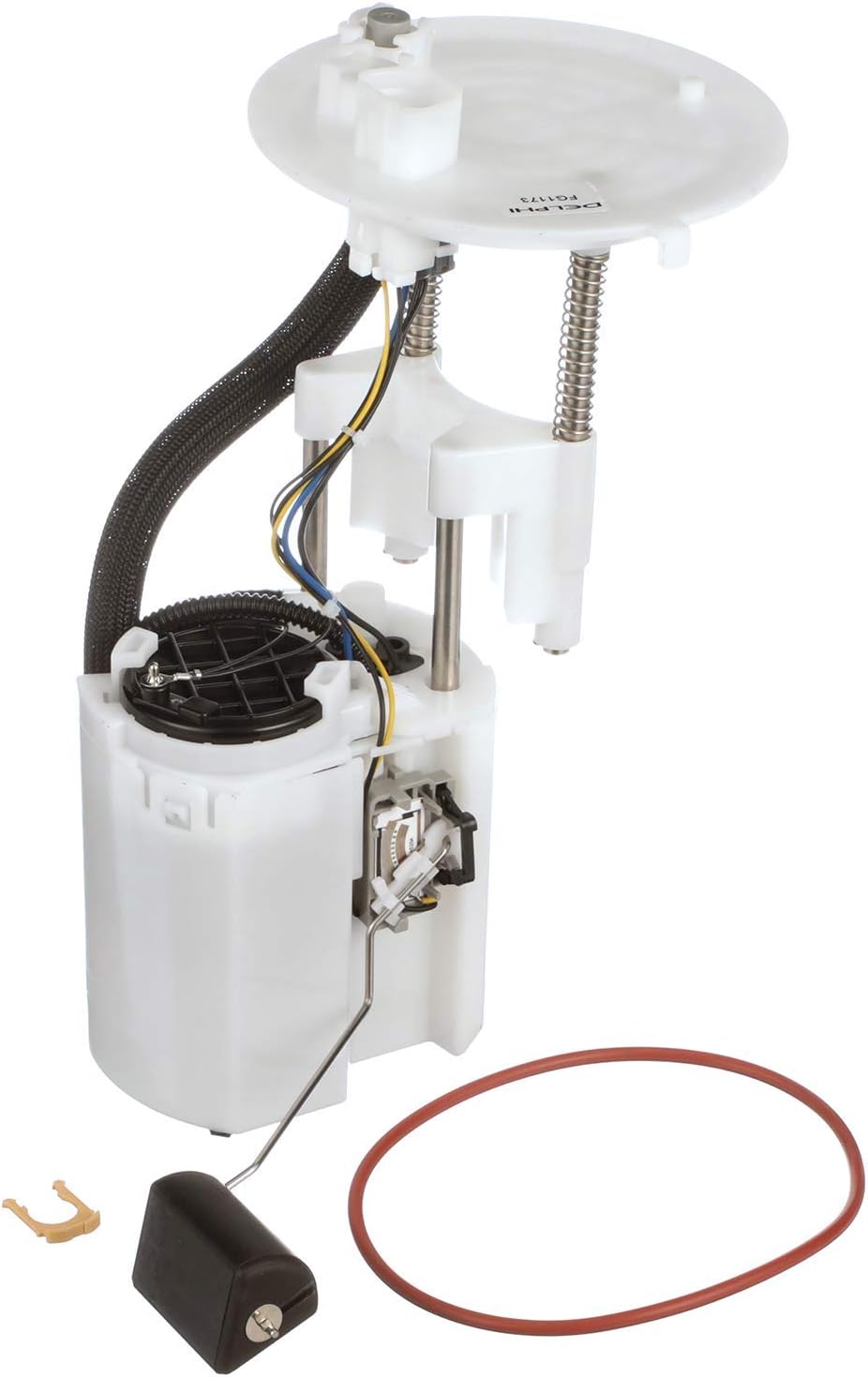
Figure 3: Delphi FG1173 Fuel Module with included O-ring for proper sealing.
Specifications
| Attribute | Value |
|---|---|
| Brand | Delphi |
| Model | FG1173 |
| Fit Type | Vehicle Specific Fit |
| Vehicle Service Type | Truck |
| Item Dimensions L x W x H | 15.7 x 8.3 x 8.3 inches |
| Material | Metals or Engineered Plastics |
| Item Weight | 3.4 Pounds |
| Style | Piston |
| Auto Part Position | Rear |
| Connector Type | NPT |
| Gas Type | Gasoline |
| Mounting Type | Tank Mount |
| Product Grade | Replacement Part |
| Country of Origin | Japan |
| UPC | 689604231470 |
What's in the Box
- Fuel Pump Module Assembly
Warranty Information
Delphi products purchased through, from, or on Amazon do not qualify for Delphi’s standard LIMITED warranty. When purchased through, from, or on Amazon, any warranty on this product is offered by and is the sole responsibility of the seller identified on the shipment details of your order. Please review all warranties carefully and contact the identified seller for all warranty details and claims.
Support and Contact
For further assistance or technical support regarding your Delphi FG1173 Fuel Module, please refer to the contact information provided by your seller or visit the official Delphi website for product resources and support.
You can also visit the Delphi Store on Amazon for more products and information.
Related documentsFG1173


Ask a question about this manual
Ask about setup, troubleshooting, compatibility, parts, safety, or missing instructions. Manuals+ will review the question and use this page’s manual context to help answer it.