
1. Product Overview
The GODOX DB-02 2-in-1 Cable Y Adapter is designed to optimize the performance of Godox PROPAC power packs, specifically models PB960 and PB820. This adapter allows for a significant reduction in flash recycling time, enabling photographers to capture shots more rapidly.
By utilizing the Y adapter, a single flash unit can draw power more efficiently, or two flash units can be powered simultaneously from one PROPAC power pack. For instance, a flash that typically recycles in 2 seconds with a standard connection can achieve a recycling time of approximately 1 second when used with the DB-02 adapter.
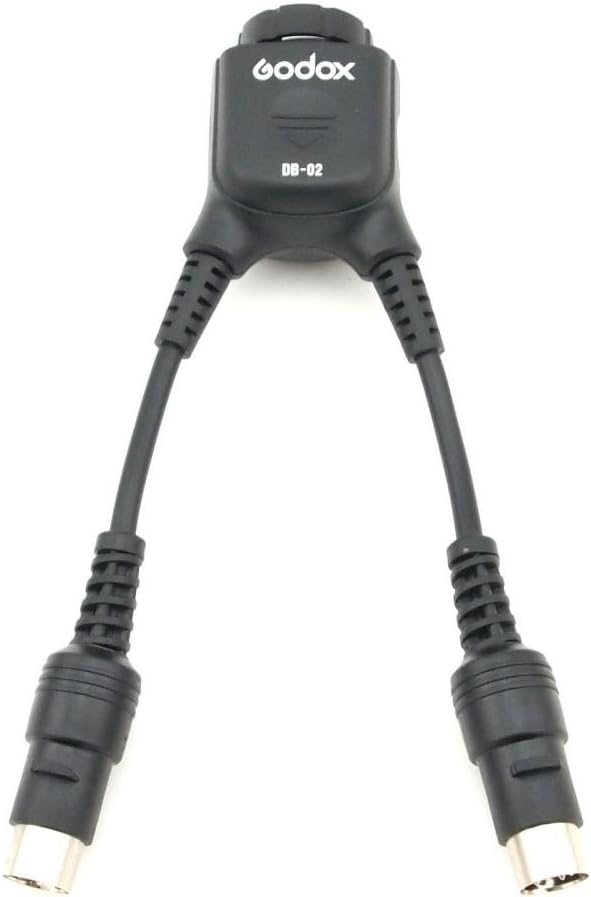
Figure 1.1: The GODOX DB-02 2-in-1 Cable Y Adapter, showing its main body and two output cables.
Package Contents:
- 1 x GODOX DB-02 2-in-1 Cable Y Adapter
2. Setup and Connection
Follow these steps to properly connect the DB-02 Y Adapter to your Godox PROPAC power pack and flash units.
2.1 Connecting to the Power Pack
- Ensure your Godox PROPAC power pack (PB960 or PB820) is turned off.
- Locate the main power output port on your PROPAC power pack.
- Connect the single input connector of the DB-02 Y Adapter to the power output port of the PROPAC power pack. Ensure a secure connection.

Figure 2.1: Close-up view of the single input connector on the DB-02 adapter, which connects to the power pack.
2.2 Connecting to Flash Units
- Identify the power input ports on your flash units.
- Connect the two output connectors of the DB-02 Y Adapter to the power input ports of your flash units.
- If using a single flash unit that supports dual power input, connect both output connectors to the respective ports on that flash.
- If using two separate flash units, connect one output connector to each flash unit.

Figure 2.2: Close-up view of the two output connectors on the DB-02 adapter, which connect to flash units.
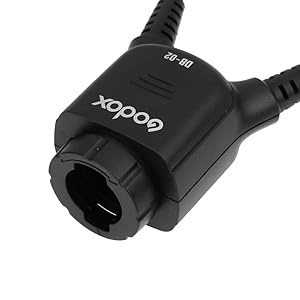
Figure 2.3: Example setup showing the DB-02 adapter connected between a PROPAC power pack and a flash unit.
3. Operating Instructions
Once the DB-02 Y Adapter is securely connected to your PROPAC power pack and flash units, you can begin operation.
- Turn on your Godox PROPAC power pack.
- Turn on your connected flash units.
- The DB-02 adapter will now facilitate faster recycling times for your flash units by drawing power more efficiently from the PROPAC power pack.
- Observe the reduced recycling time, which allows for quicker consecutive shots.
4. Maintenance
Proper care and maintenance will ensure the longevity and reliable performance of your GODOX DB-02 Y Adapter.
- Cleaning: Use a soft, dry cloth to clean the adapter. Avoid using liquid cleaners or solvents, as these can damage the electrical components.
- Storage: Store the adapter in a cool, dry place away from direct sunlight and extreme temperatures.
- Handling: Avoid bending or twisting the cables excessively, as this can cause internal damage. Always grasp the connectors when plugging or unplugging the adapter, not the cable itself.
- Inspection: Periodically inspect the cables and connectors for any signs of wear, fraying, or damage. If damage is observed, discontinue use and replace the adapter.
5. Troubleshooting
If you encounter issues while using your DB-02 Y Adapter, refer to the following common problems and solutions.
- Issue: Flash recycling time is not reduced.
Solution:
- Ensure all connections between the power pack, DB-02 adapter, and flash units are secure.
- Verify that the PROPAC power pack is adequately charged.
- Confirm that your flash units are compatible with the PROPAC power pack and are functioning correctly independently.
- Issue: No power to flash units.
Solution:
- Check if the PROPAC power pack is turned on and has sufficient charge.
- Inspect all cable connections for looseness or damage.
- Test the flash units and power pack with their original cables to rule out issues with those components.
- Issue: Adapter feels loose or connections are intermittent.
Solution:
- Ensure the connectors are fully inserted and locked into place if applicable.
- Avoid putting strain on the cables during use.
- If the issue persists, the adapter may be damaged and require replacement.
6. Specifications
| Feature | Specification |
|---|---|
| Model | DB-02 |
| Compatibility | Godox PROPAC Power Pack PB960, PB820 |
| Product Dimensions | 9.45 x 5.04 x 1.57 inches (24 x 12.8 x 4 cm) |
| Item Weight | 3.84 ounces (115g) |
| Function | Accelerates flash recycling time, allows dual flash connection |
7. Warranty and Support
For warranty information and technical support, please refer to the documentation provided with your original Godox PROPAC power pack or contact Godox customer service directly. Keep your purchase receipt as proof of purchase for any warranty claims.
You can typically find support contact details on the official GODOX website or through your authorized retailer.