
Introduction
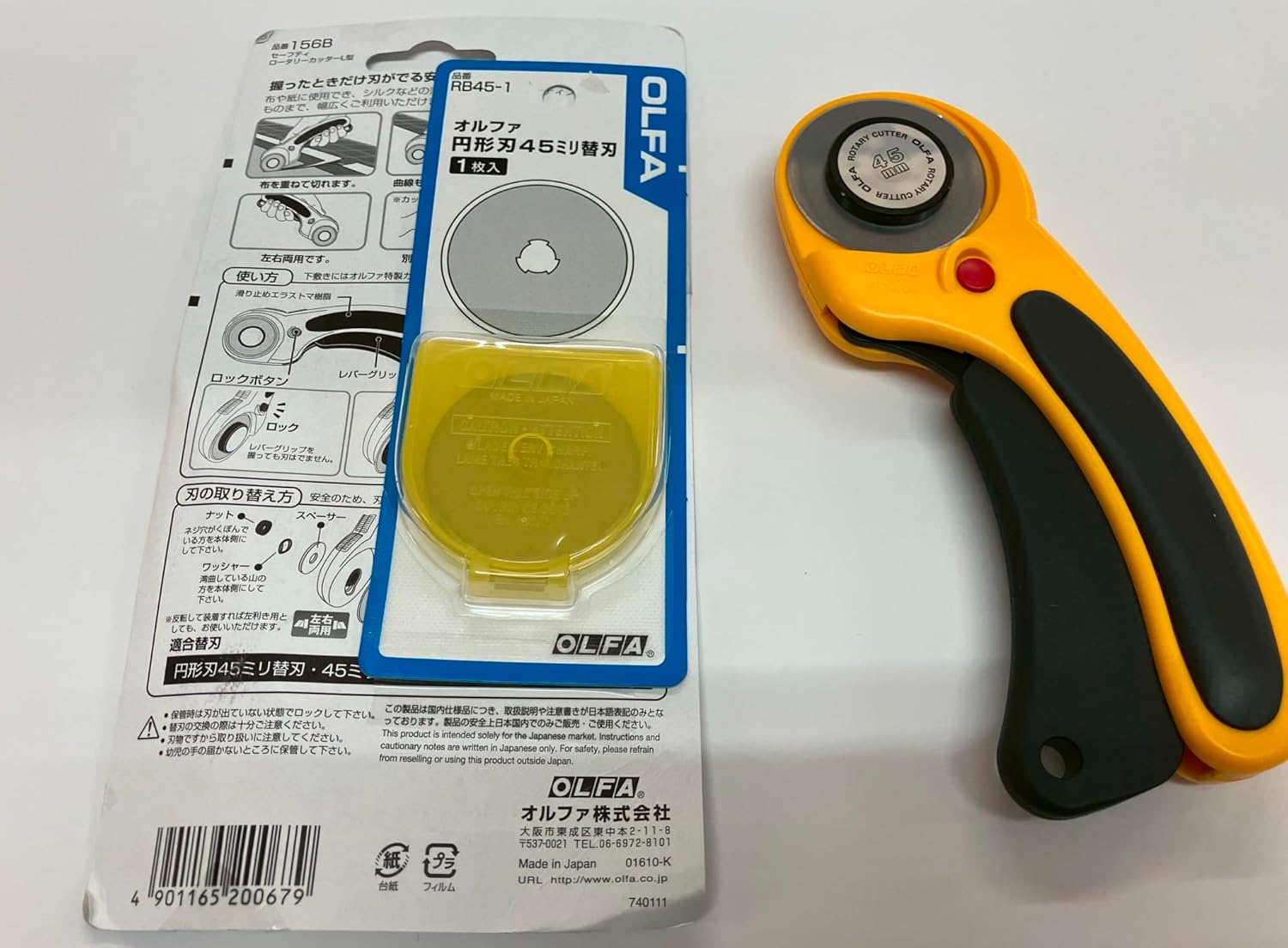
Thank you for choosing the OLFA 45mm Ergonomic Rotary Cutter and Blade Refill Set. This precision cutting tool is designed for a wide range of crafting, quilting, and sewing projects, offering superior sharpness and ease of use. Its ergonomic design ensures comfort during extended use, while integrated safety features prioritize user protection. This manual provides essential information for the safe and effective operation and maintenance of your rotary cutter.
Safety Information
- Extreme Sharpness: The rotary blade is extremely sharp. Always handle with care to prevent injury.
- Blade Retraction: The blade self-retracts into the handle for safety when not in use. Ensure the blade is fully retracted before setting the cutter down or storing it.
- Lock Mechanism: Utilize the blade lock mechanism for added safety during storage or transport.
- Keep Away from Children: Store the rotary cutter and replacement blades out of reach of children.
- Use a Cutting Mat: Always use a self-healing cutting mat to protect your work surface and prolong blade life.
- Proper Disposal: Dispose of dull or damaged blades safely in a designated blade disposal container.
Setup
- Unpacking: Carefully remove the rotary cutter and blade refill from its packaging.
- Blade Orientation (Left/Right-Handed Use): The OLFA 45mm Ergonomic Rotary Cutter is designed for both right- and left-handed users. The blade can be easily positioned on either side of the handle. To change the blade side, loosen the nut securing the blade, carefully remove the blade and washer, flip the blade to the desired side, and reassemble, ensuring the nut is securely tightened.
- Familiarize with Safety Lock: Locate the red button on the handle. This is the safety lock. When engaged, the blade cannot be exposed. Disengage it by sliding it to the 'unlock' position before use.
Operating Instructions
- Prepare Your Work Surface: Place your fabric or material on a self-healing cutting mat. Use a rotary cutting ruler for straight and accurate cuts.
- Grip the Cutter: Hold the ergonomic handle firmly. The design is intended to fit comfortably in your hand, reducing fatigue.
- Expose the Blade: Squeeze the trigger on the handle to expose the rotary blade. The blade will remain exposed as long as the trigger is held.
- Make the Cut: Position the blade against the edge of your ruler. Apply firm, even pressure and roll the cutter along the ruler's edge to make a smooth, precise cut. The tungsten steel blade is designed to cut through up to six layers of fabric.
- Retract the Blade: Release the trigger to automatically retract the blade into the handle, ensuring safety.

Maintenance
- Blade Replacement: When the blade becomes dull or damaged, replace it with a new OLFA 45mm rotary blade. To replace, loosen the central nut, carefully remove the old blade and washer, insert the new blade, and tighten the nut securely.
- Cleaning: Periodically clean any lint or debris from around the blade and handle mechanism using a soft brush or cloth. Ensure the cutter is dry before storage.
- Storage: Always store the rotary cutter with the blade retracted and the safety lock engaged. Keep it in a safe place to prevent accidental exposure or damage.
Troubleshooting
- Blade Not Cutting Cleanly: If the blade is skipping or not cutting through material smoothly, it may be dull. Replace the blade with a new one. Ensure you are applying consistent, firm pressure.
- Blade Not Retracting: Check for any fabric fibers or debris obstructing the retraction mechanism. Clean the area thoroughly. If the issue persists, ensure the trigger mechanism is not damaged.
- Difficulty Engaging Blade: Ensure the safety lock (red button) is in the 'unlock' position.
Specifications
| Feature | Detail |
|---|---|
| Brand | OLFA |
| Model Number | 156B & RB-45-1 |
| Blade Diameter | 45mm |
| Blade Material | Tungsten Steel |
| Handle Material | Alloy Steel |
| Item Length | 4.4 Inches |
| Item Weight | 4.6 ounces |
| Compatibility | Right- and Left-Handed Use |
| Cutting Capacity | Up to six layers of fabric |
Warranty and Support
For warranty information, product support, or to purchase additional replacement blades, please visit the official OLFA website or contact OLFA customer service. Keep your purchase receipt for warranty claims.