
Makita XPH07Z
Makita XPH07Z 18V LXT® Lithium-Ion Brushless Cordless 1/2" Hammer Driver-Drill Instruction Manual
Model: XPH07Z | Brand: Makita
Introduction
The Makita XPH07Z 18V LXT® Lithium-Ion Brushless Cordless 1/2" Hammer Driver-Drill is a powerful and durable tool designed for demanding drilling and driving applications in various materials including wood, masonry, and metal. Featuring a brushless motor, it delivers exceptional torque, extended runtime, and increased tool life. This manual provides essential information for the safe and effective operation, maintenance, and troubleshooting of your new hammer driver-drill.
Safety Information
Always read and understand all safety warnings, instructions, illustrations, and specifications provided with this power tool. Failure to follow all instructions listed below may result in electric shock, fire, and/or serious injury. Save all warnings and instructions for future reference.
- Wear eye protection.
- Wear hearing protection when operating in hammer mode.
- Use appropriate respiratory protection in dusty environments.
- Ensure work area is well-lit and clear of obstructions.
- Secure workpiece before drilling.
- Do not force the tool. Let the tool do the work.
- Disconnect battery pack before making any adjustments, changing accessories, or storing the tool.
Components and Features
Familiarize yourself with the key components of your Makita XPH07Z Hammer Driver-Drill.
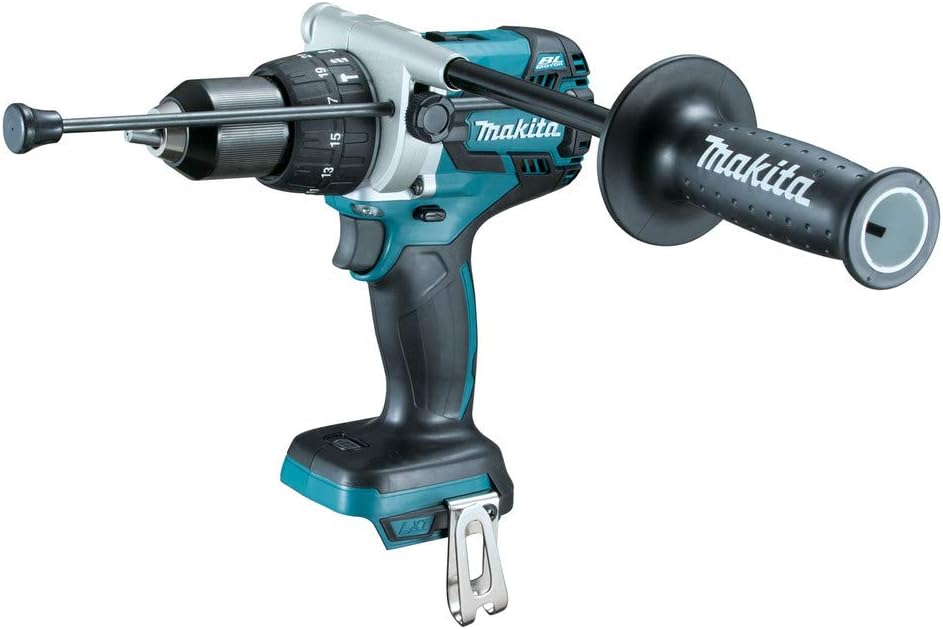
- Brushless Motor: Electronically controlled for optimized battery energy use, longer runtime, increased power, and speed.
- 1/2" Self-Ratcheting Chuck: Durable metal chuck for secure bit gripping.
- Side Handle: Provides improved control and reduces user fatigue, especially during high-torque applications.
- Depth Rod: Used with the side handle to set precise drilling depths.
- LED Lights: Dual LED lights illuminate the work area for improved visibility.
- Star Protection Computer Controls™: Communication technology between the tool and battery to protect against overload, over-discharge, and overheating.
Setup
Battery Installation and Removal
This tool is designed for use with Makita 18V LXT® Lithium-Ion batteries (sold separately).
- To install, align the battery pack with the housing and slide it in until it locks into place with a click.
- To remove, press the release button on the battery pack and slide it out.
Side Handle and Depth Rod Attachment
The side handle provides additional stability and control, especially when drilling large holes or in hammer mode.
- Loosen the side handle grip by twisting it counter-clockwise.
- Slide the handle collar over the front of the drill body.
- Position the handle to your desired angle for optimal control.
- Insert the depth rod into the hole on the side handle. Adjust its position to set the desired drilling depth.
- Tighten the side handle grip by twisting it clockwise until secure.

Operating Instructions
Selecting Operating Mode
The drill features multiple modes for various applications:
- Drill Mode: For general drilling in wood, metal, and plastics.
- Hammer Drill Mode: For drilling in masonry, concrete, and brick.
- Screwdriver Mode: For driving screws with adjustable clutch settings.
Rotate the mode selector ring located behind the chuck to choose the desired mode.
Speed Selection
The drill has two mechanical speed settings, controlled by a slider switch on top of the tool:
- Low Speed (1): For high-torque applications, driving large fasteners, or drilling large diameter holes.
- High Speed (2): For faster drilling in smaller diameters or lighter driving tasks.
Ensure the tool is stopped before changing speed settings to prevent gear damage.
Variable Speed Trigger
The trigger allows for variable speed control. Press the trigger lightly for slower speeds and increase pressure for higher speeds. This provides precise control for starting holes and delicate tasks.
Drilling Techniques

- Start drilling at a low speed to prevent the bit from walking.
- Apply steady, even pressure. Avoid excessive force.
- For deep holes, periodically withdraw the bit to clear debris.
- When drilling into metal, use cutting oil to prolong bit life and improve cutting efficiency.

Official Product Video
Video 1: Official Makita product overview of the XPH07Z Hammer Driver-Drill, highlighting its power, runtime, and key features. This video demonstrates the tool in various demanding applications, including drilling large holes in wood and masonry.
Maintenance
- Cleaning: Regularly clean the tool's ventilation openings to prevent overheating. Use a soft, dry cloth. Do not use harsh chemicals or abrasive cleaners.
- Chuck Maintenance: Periodically clean the chuck jaws to ensure proper gripping.
- Storage: Store the tool and battery in a cool, dry place, away from direct sunlight and moisture. Ensure the battery is removed from the tool before storage.
- Battery Care: Do not store batteries in a discharged state. Charge them regularly, even if not in use, to maintain optimal performance and lifespan.
Troubleshooting
| Problem | Possible Cause | Solution |
|---|---|---|
| Tool does not start | Battery not installed correctly or discharged. | Ensure battery is fully seated. Charge battery if necessary. |
| Reduced power or speed | Low battery charge or tool/battery overheating. | Recharge battery. Allow tool/battery to cool down. |
| Bit slips in chuck | Chuck not tightened sufficiently or jaws are dirty. | Tighten chuck firmly. Clean chuck jaws. |
| Overload indicator (red light) flashes | Tool is overloaded or battery is overheating. | Reduce load on the tool. Allow tool/battery to cool. |
Specifications
| Feature | Detail |
|---|---|
| Model Number | XPH07Z |
| Voltage | 18 Volts |
| Maximum Torque | 1,090 in.lbs. |
| Maximum RPM | 2,100 RPM |
| Blows Per Minute (BPM) | 0-31,500 BPM |
| Chuck Size | 1/2 inch |
| Power Source | Battery Powered (Lithium-Ion) |
| Item Weight | 5.54 pounds |
| Product Dimensions | 14.5"L x 12.3"W x 4.5"H |
Warranty and Support
The Makita XPH07Z Hammer Driver-Drill comes with a 3-year limited warranty on the tool. For detailed warranty information, service, or technical support, please refer to the official Makita website or contact their customer service department.
Additional resources:
Related documentsXPH07Z


Ask a question about this manual
Ask about setup, troubleshooting, compatibility, parts, safety, or missing instructions. Manuals+ will review the question and use this page’s manual context to help answer it.