
Introduction
This manual provides essential instructions for setting up, operating, maintaining, and troubleshooting your Motorola CT2 corded phone. Please read this manual thoroughly to ensure proper use and to maximize the features of your device.

Figure 1: Motorola CT2 Corded Phone, side view. This image shows the handset resting on the base unit, connected by a coiled cord.
Setup
- Unpacking: Carefully remove all components from the packaging. Ensure you have the phone base, handset, coiled handset cord, and telephone line cord.
- Connect Handset: Plug one end of the coiled handset cord into the handset and the other end into the designated jack on the phone base.
- Connect Telephone Line: Plug one end of the telephone line cord into the LINE jack on the phone base and the other end into your telephone wall jack.
- Power Source: The Motorola CT2 is a corded phone and draws power directly from the telephone line. No external power adapter is typically required for basic operation. However, a non-standard battery may be required for memory backup features (e.g., storing numbers during a power outage). Refer to the battery compartment for specific instructions if applicable.
- Initial Display Settings: Once connected, the 7-segment LCD should activate. You may need to adjust the LCD contrast (see Operating section) for optimal visibility.

Figure 2: Motorola CT2 Corded Phone, front view. This image displays the keypad, 7-segment LCD screen, and function buttons, illustrating the phone's layout for setup and operation.
Operating Instructions
Making a Call
- Lift the handset.
- Listen for a dial tone.
- Dial the desired telephone number using the keypad.
- Wait for the call to connect.
Receiving a Call
- When the phone rings, lift the handset to answer the call.
Using Memory Keys
The phone features 10 two-touch memory keys for frequently dialed numbers.
- To Store a Number:
- Lift the handset.
- Press the STORE button (if available, or refer to specific key markings).
- Dial the telephone number (up to 16 digits).
- Press the desired memory key (e.g., M1-M10).
- Hang up the handset.
- To Dial a Stored Number:
- Lift the handset.
- Press the desired memory key (e.g., M1-M10). The number will be dialed automatically.
Last Number Redial
The phone can redial the last number called (up to 32 digits).
- Lift the handset.
- Press the REDIAL button. The last dialed number will be automatically redialed.
Ringer Volume Adjustment
Adjust the ringer volume to High or Low using the dedicated switch or button on the phone base.
LCD Contrast Adjustment
The 7-segment LCD has 5 contrast levels. Use the contrast adjustment button (often labeled 'Contrast' or with an icon) to cycle through the levels until the display is clear.
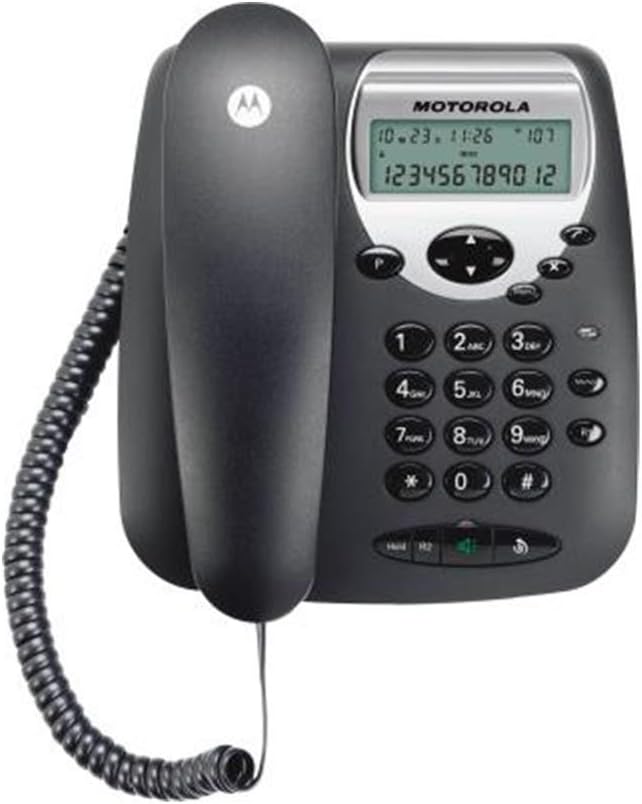
Figure 3: Motorola CT2 Corded Phone, angled front view. This image provides a closer look at the keypad and display, highlighting the buttons for dialing, memory, and feature adjustments.
Maintenance
- Cleaning: Use a soft, slightly damp cloth to clean the phone's exterior. Do not use harsh chemicals or abrasive cleaners. Ensure no liquid enters the phone's openings.
- Storage: If storing the phone for an extended period, disconnect it from the telephone line and store it in a cool, dry place away from direct sunlight and extreme temperatures.
- Cord Care: Avoid tangling or stretching the handset and line cords excessively to prevent damage.
Troubleshooting
| Problem | Possible Cause | Solution |
|---|---|---|
| No dial tone | Telephone line cord is disconnected or faulty. | Ensure the telephone line cord is securely plugged into both the phone base and the wall jack. Test with another phone if possible. |
| No display on LCD | LCD contrast is set too low or too high. | Adjust the LCD contrast using the dedicated button. |
| Cannot make or receive calls | Telephone line issue or service interruption. | Check if other phones on the same line are working. Contact your telephone service provider if the issue persists. |
| Ringer is too quiet or too loud | Ringer volume setting is incorrect. | Adjust the ringer volume switch/button on the phone base to High or Low. |
Specifications
- Brand Name: Motorola
- Item Model Number: CT2
- Phone Type: Corded Phone
- Color: Black
- Material: Plastic
- Power Source: Wired Electric (Line Powered)
- Connectivity: PSTN Networks
- Operation: Single Line Operation
- Display Type: 7-segment LCD
- LCD Contrast: 5 levels adjustable
- Ringer Volume: High/Low adjustable
- Last Number Redial: Up to 32 digits
- Number Memory: 16 numbers
- Memory Keys: 10 two-touch memory keys
- Keypad Type: Single Keypad
- Batteries: Non-standard battery required (for memory backup)
- Item Weight: Approximately 32 g (Note: This weight may refer to a component or packaging, actual product weight may vary)
- Shipping Dimensions: 33 x 20.7 x 7 cm
- First Available Date: July 25, 2014
Warranty and Support
For warranty information or technical support, please refer to the documentation included with your purchase or contact Motorola customer service. Keep your proof of purchase for warranty claims.


