
Introduction
The Ubiquiti Networks EdgeSwitch ES-24-250W is a fully managed, Power over Ethernet Plus (PoE+) Gigabit switch designed for robust network performance and intelligent switching. As part of the EdgeMAX product line, this switch facilitates network expansion and provides an extensive suite of advanced Layer-2 switching features and protocols, alongside Layer-3 routing capabilities. It is engineered to deliver reliable connectivity and power to various network devices.

Figure 1: Front view of the EdgeSwitch ES-24-250W, showing 24 RJ45 ports and 2 SFP ports.
Setup
Follow these steps for the initial setup of your EdgeSwitch ES-24-250W.
Package Contents
- EdgeSwitch ES-24-250W
- Power Cord
- Rack-Mount Brackets (if included)
- Screws and Cage Nuts (if included)
Physical Installation
- Rack Mounting: Securely attach the rack-mount brackets to the sides of the EdgeSwitch using the provided screws. Mount the switch into a standard 1U rack space using the cage nuts and screws. Ensure adequate airflow around the device for proper cooling.
- Power Connection: Connect the included power cord to the AC IN port on the rear of the EdgeSwitch and then to a suitable power outlet.

Figure 2: Rear view of the EdgeSwitch ES-24-250W, highlighting the AC power input.
- Network Connections:
- RJ45 Ports: Connect Ethernet cables from your network devices (computers, access points, IP cameras, etc.) to the 24 RJ45 Ethernet ports. These ports support 10/100/1000 Mbps speeds and PoE+.
- SFP Ports: For fiber optic connections, insert compatible SFP modules into the two 1 Gbps SFP Ethernet ports and connect fiber optic cables.
- Initial Management Access: The EdgeSwitch can be managed via its web interface or command-line interface (CLI). For initial access, connect a computer directly to any RJ45 port on the switch. The default IP address for management is typically 192.168.1.20. Refer to the Ubiquiti Networks website for detailed configuration guides.
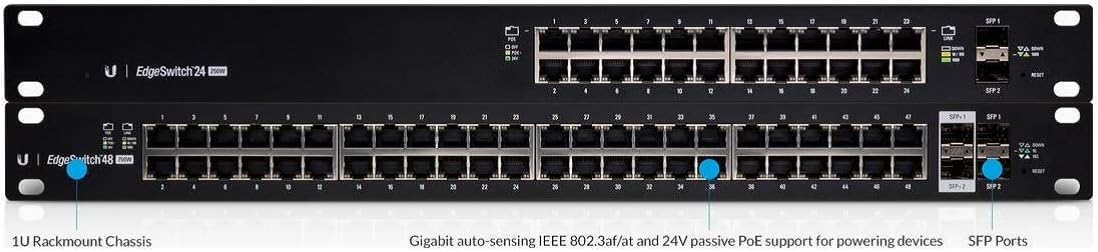
Figure 3: Detailed view of EdgeSwitch ports, including 1U Rackmount Chassis, Gigabit auto-sensing IEEE 802.3af/at and 24V passive PoE support, and SFP Ports.
Operating
The EdgeSwitch ES-24-250W is a managed switch, offering extensive control over your network traffic and connected devices.
Management Interface
Access the switch's management interface via a web browser or SSH/Telnet for CLI access. The web interface provides a graphical overview and configuration options for all switch features, including VLANs, Spanning Tree Protocol (STP), Link Aggregation Control Protocol (LACP), Quality of Service (QoS), and PoE settings.
Power over Ethernet (PoE)
The switch supports IEEE 802.3af/at (PoE+) and 24V passive PoE, allowing it to power compatible devices directly through the Ethernet cable. Ensure that connected devices are compatible with the PoE standard being supplied to avoid damage. PoE settings can be configured per port through the management interface.
Layer 2/3 Functionality
The EdgeSwitch provides advanced Layer 2 switching features for efficient data forwarding within your local network and Layer 3 routing capabilities for inter-VLAN routing and static routing, enhancing network segmentation and performance.
Maintenance
Regular maintenance ensures optimal performance and longevity of your EdgeSwitch.
Firmware Updates
Periodically check the Ubiquiti Networks website for the latest firmware updates. Keeping the firmware up-to-date ensures access to new features, performance improvements, and security patches. Follow the provided instructions carefully when performing firmware upgrades.
Cleaning
Ensure the switch's ventilation openings are clear of dust and debris to prevent overheating. Use a soft, dry cloth to clean the exterior. Do not use liquid cleaners or aerosols directly on the device.

Figure 4: Side view of the EdgeSwitch ES-24-250W, illustrating the cooling fan vents.
Environmental Considerations
Operate the switch within its specified temperature and humidity ranges. Avoid exposing the device to direct sunlight, excessive heat, or moisture. Ensure proper grounding for electrical safety.
Troubleshooting
This section addresses common issues you might encounter with your EdgeSwitch.
No Power
- Verify that the power cord is securely connected to both the switch and a working power outlet.
- Check the power source (e.g., wall outlet, power strip) to ensure it is supplying power.
- If using a surge protector, ensure it is turned on and functioning correctly.
No Network Connectivity
- Check the Ethernet cables for proper connection and damage. Try a different cable.
- Verify the link/activity LEDs on the switch port and the connected device.
- Ensure the connected device's network settings (IP address, subnet mask) are correct or set to obtain automatically via DHCP.
- If using SFP ports, ensure the SFP modules and fiber cables are correctly installed and compatible.
PoE Device Not Powering On
- Confirm that the connected device is PoE compatible and supports the PoE standard (802.3af/at or 24V passive) supplied by the EdgeSwitch.
- Check the PoE settings for the specific port in the switch's management interface to ensure PoE is enabled and configured correctly.
- Verify the total power budget of the switch (250W) is not exceeded by all connected PoE devices.
Resetting to Factory Defaults
If you encounter persistent issues or forget the management password, you may need to reset the switch to its factory default settings. Locate the reset button on the device (often a small pinhole button) and press and hold it for approximately 10 seconds while the device is powered on. This will restore the default IP address and configuration.
Specifications
| Feature | Specification |
|---|---|
| Model Number | ES-24-250W |
| Networking Interface | (24) 10/100/1000 Mbps RJ45 Ethernet Ports; (2) 1 Gbps SFP Ethernet Ports |
| Total Non-Blocking Throughput | 26 Gbps |
| Max. Power Consumption | 250W |
| Power Method | 100-240VAC/50-60 Hz, Universal Input |
| Dimensions | 485.04 x 44.45 x 285.6 mm (19.1 x 1.75 x 11.24 inches) |
| Weight | 3.7 kg (8.16 lb) |
| Switch Type | Layer 2/3, PoE |
| Voltage | 120 Volts (Operating Range: 100-240VAC) |
| Color | Black |
Warranty
The Ubiquiti Networks EdgeSwitch ES-24-250W typically comes with a one-year limited warranty. For specific terms and conditions, please refer to the warranty information provided with your product or visit the official Ubiquiti Networks website.
Support
For further assistance, technical support, or to access additional documentation and community forums, please visit the official Ubiquiti Networks support website. You can find detailed guides, FAQs, and contact information for customer service there.
Ubiquiti Networks Official Website: www.ui.com