
1. Introduction
Thank you for purchasing the Samsung RT27HAJSAPX/TL 253L Frost-Free Double Door Refrigerator. This manual provides essential information for the safe and efficient use of your appliance. Please read it thoroughly before operating the refrigerator and keep it for future reference.
This refrigerator features a 253-liter capacity, a 3-star energy rating, and a Digital Inverter Compressor for efficient and quiet operation. Key features include the Moist Fresh Zone, Easy Slide Out shelf, Cool Pack technology, and a deodorizing filter to maintain food freshness.
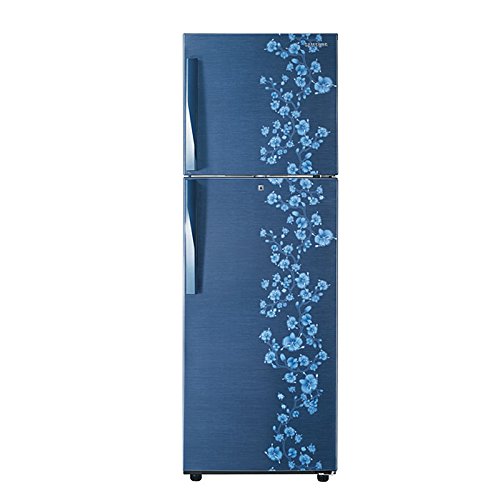
Image: Front view of the Samsung 253L Frost-Free Double Door Refrigerator, model RT27HAJSAPX/TL, in Orcherry Pebble Blue.
2. Safety Information
To ensure safe operation, always follow these basic precautions:
- Ensure the refrigerator is properly grounded.
- Do not use electrical appliances inside the food storage compartments unless they are of the type recommended by the manufacturer.
- Keep ventilation openings clear of obstruction.
- Do not damage the refrigerant circuit.
- Do not store explosive substances such as aerosol cans with a flammable propellant in this appliance.
- Unplug the appliance before cleaning or performing maintenance.
- Keep children away from the refrigerator, especially when the door is open.
3. Setup
3.1 Unpacking
Remove all packaging materials, including tape and protective films. Inspect the refrigerator for any damage incurred during transit.
3.2 Location and Leveling
- Place the refrigerator on a firm, level surface.
- Avoid direct sunlight, heat sources (stoves, heaters), and damp areas.
- Ensure adequate ventilation: leave at least 10 cm (4 inches) clearance at the back and sides for proper air circulation.
- Adjust the leveling feet at the bottom front of the refrigerator to ensure it is stable and level.
3.3 Power Connection
Connect the power cord to a dedicated 3-pin wall socket. This refrigerator is designed for stabiliser-free operation and can handle voltage fluctuations from 115V to 300V.
3.4 Initial Cleaning and Operation
Before storing food, clean the interior of the refrigerator with a soft cloth and a mild detergent solution. After cleaning, plug in the refrigerator and allow it to operate for 2-3 hours to reach its optimal cooling temperature before loading food items.
4. Operating
4.1 Temperature Control
Your refrigerator is equipped with a Digital Inverter Compressor that offers 7 adjustable speeds to meet your cooling requirements efficiently. Use the temperature control dial or buttons (location may vary) to set the desired temperature for the refrigerator and freezer compartments. Refer to the internal labels for recommended settings.
4.2 Storage Features
- Moist Fresh Zone: This specially designed drawer regulates moisture levels to keep fruits and vegetables fresh for longer.
- Easy Slide Out Shelf: The glass shelves are designed to slide out smoothly, providing easy access to items stored at the back.
- Dairy Guard: A dedicated compartment for dairy products, helping to prevent spoilage and spills.
- Big Guard: Store large bottles and containers conveniently in the door pockets.
- Deodorizing Filter: An activated carbon filter circulates fresh air, preserving the flavor of your food by preventing bad odors.
- Twist Ice Maker: Located in the freezer compartment for convenient ice production.
- Cool Pack: In the event of a power cut, the Cool Pack maintains optimum cooling throughout the refrigerator for up to 8 hours, keeping your food, especially frozen items, unspoiled.
4.3 Food Storage Guidelines
- Store raw meat and fish in sealed containers on the lowest shelf to prevent dripping onto other foods.
- Wrap or cover all food items to prevent drying out and odor transfer.
- Allow hot foods to cool before placing them in the refrigerator to avoid increasing internal temperature.
- Do not overload the refrigerator, as this can impede air circulation and cooling efficiency.
5. Maintenance
5.1 Cleaning the Interior
Unplug the refrigerator before cleaning. Use a soft cloth with a solution of mild detergent and warm water to clean the interior walls, shelves, and drawers. Rinse with clean water and dry thoroughly. Avoid abrasive cleaners or solvents.
5.2 Cleaning the Exterior
Wipe the exterior surfaces with a soft, damp cloth. For stubborn stains, use a mild detergent. Ensure the door gaskets are clean and free of debris to maintain a tight seal.
5.3 Deodorizing Filter
The built-in deodorizing filter is designed for long-term use and typically does not require replacement. If odors persist, ensure all food items are properly sealed.
5.4 Power Saving Tips
- Open the refrigerator door only when necessary and close it promptly.
- Do not place hot food directly into the refrigerator.
- Ensure the refrigerator is not overloaded to allow for proper air circulation.
- Keep the condenser coils at the back clean (if accessible) to improve efficiency.
6. Troubleshooting
If you encounter issues with your refrigerator, refer to the following common troubleshooting steps:
| Problem | Possible Cause | Solution |
|---|---|---|
| Refrigerator not cooling | Power outage; temperature setting too high; door not closed properly; overloaded. | Check power supply; adjust temperature setting; ensure door is sealed; reduce load. |
| Excessive noise | Refrigerator not level; items touching the back wall; normal compressor operation. | Adjust leveling feet; reposition items; some compressor sounds are normal. |
| Water leakage inside/outside | Clogged drain hole; water tray overflowing; door seal issue. | Clear drain hole; check water tray; inspect door seal for damage. |
| Door alarm sounds | Door not fully closed; door left open for too long. | Ensure door is completely shut; close door promptly after opening. |
If the problem persists after trying these steps, please contact Samsung customer support.
7. Specifications
| Feature | Specification |
|---|---|
| Brand | Samsung |
| Model Number | RT27HAJSAPX/TL |
| Capacity | 253 Liters |
| Configuration | Double Door |
| Defrost System Type | Frost Free |
| Energy Rating | 3 Star (BEE) |
| Special Feature | Inverter Compressor |
| Voltage Range | 115 to 300 Volts (Stabiliser Free Operation) |
| Shelf Type | Toughened Glass |
| Number of Shelves | 3 |
| Freezer Capacity | 53 Litres |
| Fresh Food Capacity | 181 Litres |
| Refrigerant | R-600A |
| Item Weight | 48300 Grams |
| Installation Type | Freestanding |
8. Warranty
This Samsung refrigerator comes with a comprehensive warranty:
- 1 Year Comprehensive Warranty on the entire refrigerator.
- 5 Years Warranty on the Compressor.
Please retain your purchase receipt for warranty claims. The warranty covers manufacturing defects under normal use conditions.
9. Support
For further assistance, technical support, or service requests, please contact Samsung customer service. You can find contact information on the official Samsung website or through the customer service number provided with your product documentation.
When contacting support, please have your model number (RT27HAJSAPX/TL) and serial number ready.


