1. Introduction and Overview
This manual provides essential information for the safe and efficient operation, maintenance, and troubleshooting of your Samsung WA11F5S4QTA/TL Top-loading Washing Machine. Please read this manual thoroughly before using the appliance and keep it for future reference.
The Samsung WA11F5S4QTA/TL is an 11 Kg capacity top-loading washing machine designed for effective and gentle fabric care. It incorporates advanced technologies such as Wobble technology and the Diamond Drum to minimize fabric damage while ensuring thorough cleaning.

Figure 1.1: Angled view of the Samsung WA11F5S4QTA/TL Washing Machine, highlighting its sleek design.
2. Key Features
- Wobble Technology: This innovative pulsator generates multi-directional washing flow movement, reducing friction and tangles, thereby protecting delicate fabrics and enhancing stain removal.
- Diamond Drum: The unique streamlined shape of the drum, with diamond-embossed surfaces and smaller water holes, ensures powerful yet gentle washing, preventing fabric snagging and damage.
- Magic Filter: Effectively traps lint and debris below the water line, ensuring clothes remain lint-free. It features an indicator light to signal when cleaning is required.
- Air Turbo Drying System: During the spin cycle, dual air intakes draw in more air while the drum rotates rapidly, extracting more water from clothes for faster drying.
- Eco Drum Clean: A dedicated cycle to clean the washing machine drum, removing detergent residue and dirt buildup without the need for harsh chemicals. An alarm reminds you to run this cycle after every 40 loads.
- Digital Inverter Motor: Designed for long life, near-silent operation, and optimal energy efficiency.
3. Setup and Installation
Proper installation is crucial for the optimal performance and longevity of your washing machine. It is recommended to have the appliance installed by a qualified technician.
3.1 Unpacking
Carefully remove all packaging materials. Ensure no parts are left inside the drum. Check for any visible damage during transit.
3.2 Location Requirements
- Place the washing machine on a firm, level surface to prevent vibrations and noise.
- Ensure adequate space around the machine for ventilation and maintenance.
- Avoid direct sunlight or extreme temperatures.
3.3 Water Supply Connection
- Connect the hot and cold water inlet hoses to the corresponding taps and the machine's inlet valves.
- Ensure connections are tight to prevent leaks.
3.4 Drain Hose Setup
- Position the drain hose securely into a standpipe or sink, ensuring it is not kinked or blocked.
3.5 Power Connection
- Plug the power cord into a grounded electrical outlet.
- Do not use extension cords or adapters.
For professional installation or demo, please contact Samsung support directly on 1800 40 7267864 and provide the product's model name.
4. Operating Instructions
Familiarize yourself with the control panel and available wash programs to optimize your laundry experience.

Figure 4.1: Front view of the Samsung WA11F5S4QTA/TL Washing Machine, showing the control panel and top lid.
4.1 Control Panel Overview
The control panel features an Inmold Digital Display and various buttons for program selection and options. The slanted Dual Cluster Control Panel is designed for ease of use.
4.2 Loading Laundry
- Open the foldable tempered-glass door.
- Load clothes loosely into the drum, ensuring not to overload the machine.
- Add detergent to the larger, easier-to-fill detergent compartment.
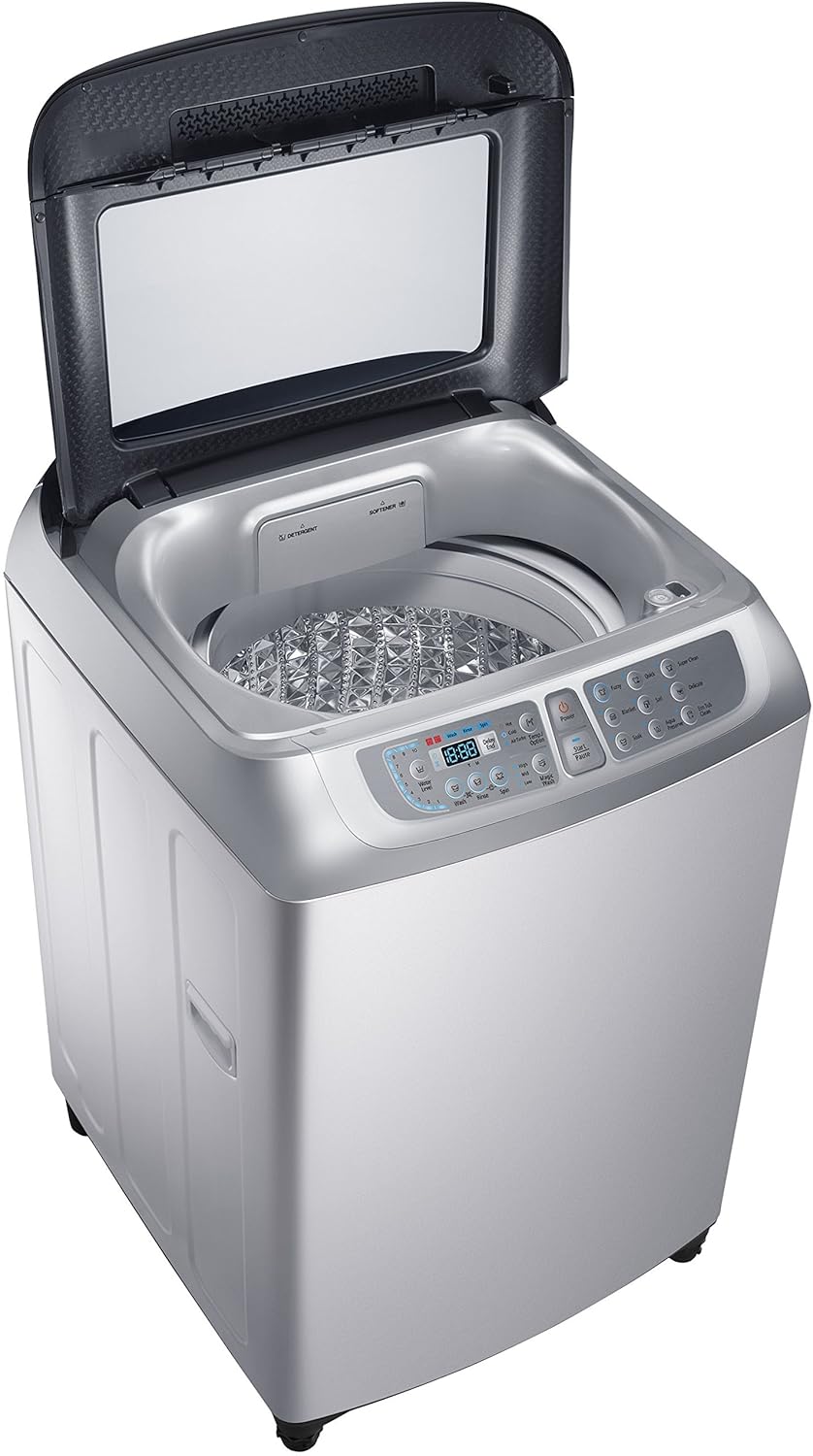
Figure 4.2: Top view of the washing machine with the lid open, showing the drum and detergent dispenser.
4.3 Wash Programs (Number of Programs: 9)
Select the appropriate program based on your laundry type and soil level:
- Fuzzy: Automatic program that detects load size and fabric type to optimize wash settings.
- Quick: For lightly soiled clothes requiring a fast wash cycle.
- Super Clean: For heavily soiled items requiring intensive cleaning.
- Blanket: Specialized cycle for washing blankets and bulky items.
- Jeans: Optimized for washing denim fabrics.
- Delicate: Gentle cycle for delicate garments.
- Soak: Pre-soak cycle for heavily stained items.
- Aqua Preserve: Designed to save water.
- Eco Tub Clean: For cleaning the washing machine tub (see Section 5.2).
- Tub Clean: Another option for tub cleaning.
4.4 Wash Options
Customize your wash cycle with these options:
- Temp. Selection: Adjust water temperature.
- Air Turbo: Activates the Air Turbo Drying System for faster drying.
- Magic Wash: Enhances washing performance.
- Delay End: Set a delayed end time for your wash cycle.
- Number of Water Level: Choose from 10 water levels.
- Wash: Select wash only.
- Rinse: Select rinse only.
- Spin: Select spin only.
4.5 Child Lock
The machine features a Child Lock function to prevent accidental operation by children. Refer to the control panel instructions for activation and deactivation.
5. Maintenance
Regular maintenance ensures the longevity and efficient operation of your washing machine.
5.1 Cleaning the Magic Filter
The Magic Filter collects lint and debris during the wash cycle. An indicator light will notify you when it needs cleaning. To clean:
- Locate the Magic Filter, typically inside the drum or near the top rim.
- Remove the filter by pulling it out.
- Open the filter and remove any accumulated lint and debris.
- Rinse the filter under running water.
- Reinsert the clean filter securely into its position.
5.2 Eco Drum Clean / Tub Clean
This feature helps maintain the cleanliness of the washing machine tub, preventing odor and residue buildup. An alarm will sound after every 40 loads to remind you to run this cycle.
- Ensure the drum is empty.
- Select the "Eco Drum Clean" or "Tub Clean" program on the control panel.
- Start the cycle. No detergent is needed for this cycle.
5.3 Exterior Cleaning
Wipe the exterior of the machine with a soft, damp cloth. Avoid abrasive cleaners or solvents.
6. Troubleshooting
This section provides solutions to common issues you might encounter. If the problem persists, contact customer support.
6.1 Machine Does Not Start
- Check if the power cord is securely plugged in.
- Ensure the door is fully closed.
- Verify that the water supply taps are open.
- Check if a program has been selected and the Start/Pause button pressed.
6.2 Excessive Vibration or Noise
- Ensure the machine is on a level surface. Adjust the leveling feet if necessary.
- Check if the laundry load is balanced inside the drum. Redistribute items if needed.
- Remove any shipping bolts if they were not removed during installation.
6.3 Water Leakage
- Check the water inlet hose connections for tightness.
- Ensure the drain hose is properly positioned and not blocked.
- Verify that the detergent dispenser is not overflowing due to excessive detergent.
6.4 Clothes Not Clean Enough
- Ensure you are using the correct amount of detergent for the load size and water hardness.
- Select an appropriate wash program for the soil level.
- Do not overload the machine.
- Clean the Magic Filter regularly.
7. Specifications
| Feature | Specification |
|---|---|
| Brand | Samsung |
| Model | WA11F5S4QTA/TL |
| Capacity | 11 Kilograms |
| Maximum Rotational Speed | 700 RPM |
| Installation Type | Free Standing |
| Form Factor | Top-Loading |
| Colour | Silver |
| Control Console | Fully Automatic |
| Access Location | Top-load |
| Door Orientation | Top-loading |
| Manufacturer | Samsung |
| Item Weight | 47 kg |
| Item Dimensions (LxWxH) | 74 x 66 x 105 Centimeters |
| Pulsator Type | Wobble |
| Magic Filter | Yes |
| Air Turbo Drying System | Yes |
| Diamond Drum | Yes |
| Stainless Steel Tub | Yes |
| Water Fall | Yes |
| Tempered Glass Window | Yes |
| Transparent Window | Yes |
| Control Panel Type | Inmold Digital Display |
| Door lock | Yes |
| Child lock | Yes |
| Auto Restart | Yes |
| Standby Zero Power | Yes |
| Tub Check | Yes |
8. Warranty and Support
Your Samsung WA11F5S4QTA/TL Top-loading Washing Machine comes with a 2-year warranty on the product.
For any service requests, technical support, or installation/demo inquiries, please contact Samsung customer support directly.
- Samsung Customer Support: 1800 40 7267864
- When contacting support, please provide the product's model name: WA11F5S4QTA/TL.


