Important Safety Information
Please read all safety instructions carefully before operating your air conditioner. Keep this manual for future reference.
- Ensure the unit is installed by a qualified technician.
- Do not insert fingers or objects into the air inlet/outlet.
- Do not operate the unit with wet hands.
- Disconnect power before cleaning or maintenance.
- Keep children away from the unit.
Product Overview
The Panasonic CS/CU-YC18PKY is a 1.5 Ton, 3 Star rated split air conditioner designed for efficient cooling and improved air quality. It features an odor-removing function and a Soft Dry Operation Mode to minimize humidity.
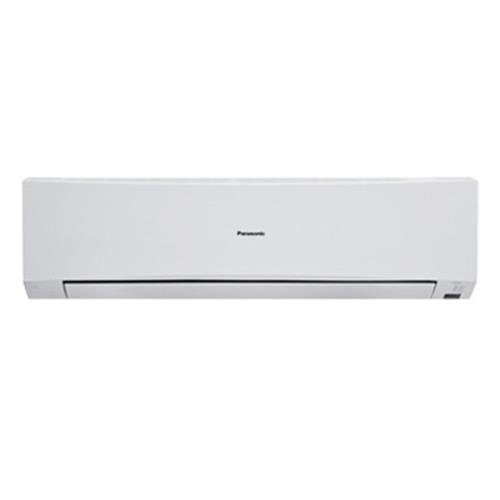
Figure 1: Indoor unit of the Panasonic CS/CU-YC18PKY Split AC. This unit houses the evaporator coil and fan, distributing cooled air into the room.
Setup and Installation
This air conditioner is a split system and requires professional installation. The package includes one main indoor unit and a warranty card. The outdoor unit (condenser) is typically installed outside the building, connected to the indoor unit via refrigerant lines and electrical wiring.
Pre-Installation Checks:
- Ensure the installation site is structurally sound to support the unit's weight.
- Verify proper electrical supply and grounding are available.
- Confirm adequate space for airflow around both indoor and outdoor units.
For detailed installation instructions, refer to the separate installation manual provided to your certified installer.
Operating Instructions
Your Panasonic CS/CU-YC18PKY AC is controlled by an LCD wireless remote control. Familiarize yourself with the remote's functions for optimal use.
Remote Control Functions:
- Power Button: Turns the unit ON/OFF.
- Mode Button: Cycles through operating modes: Auto, Cool, Dry, Fan.
- Temperature Adjustment: Up/Down arrows to set desired temperature.
- Fan Speed: Adjusts fan speed (Low, Medium, High, Auto).
- Swing Button: Controls vertical airflow direction (up and down).
- Horizontal Airflow: Manual adjustment for horizontal airflow direction.
- Timer Button: Sets the 24-hour ON/OFF real setting timer.
- Sleep Mode: Activates energy-saving sleep operation.
- Odor Removing Function: Engages the odor removal feature.
Operating Modes:
- Automatic Operation Mode (Cooling): The unit automatically selects the optimal cooling settings based on the room temperature.
- Soft Dry Operation Mode: Minimizes humidity while maintaining a continuous flow of cool air, ideal for humid conditions.
The unit also features an Auto Restart function, which automatically resumes operation with the previous settings after a power outage.
Maintenance
Regular maintenance ensures optimal performance and longevity of your air conditioner. Always disconnect power before performing any maintenance.
Cleaning the Air Filter:
- Open the front panel of the indoor unit. The panel is easily removable and washable.
- Carefully remove the anti-bacterial air filter.
- Clean the filter using a vacuum cleaner or wash it with water and a mild detergent.
- Rinse thoroughly and allow it to dry completely in a shaded area before re-installing.
- Re-install the dry filter and close the front panel.
Recommended cleaning frequency: Every two weeks, or more often depending on usage and air quality.
Cleaning the Unit Exterior:
Wipe the indoor unit's exterior with a soft, damp cloth. Do not use harsh chemicals, abrasives, or hot water, as this may damage the surface.
Troubleshooting
Before contacting service, check the following common issues:
| Problem | Possible Cause | Solution |
|---|---|---|
| Unit does not operate. | No power supply; Remote control batteries depleted. | Check circuit breaker; Replace remote control batteries. |
| Insufficient cooling. | Dirty air filter; Blocked air intake/outlet; Room too large. | Clean air filter; Remove obstructions; Ensure room size is appropriate for 1.5 Ton capacity. |
| Unusual noise. | Loose parts; Unit not level; Obstruction in fan. | Check for loose components; Ensure unit is level; Inspect for obstructions. If noise persists, contact service. |
| Water leakage. | Clogged drain pipe; Improper installation. | Check and clear drain pipe; Contact installer for inspection. |
If the problem persists after attempting these solutions, please contact authorized Panasonic service personnel.
Specifications
| Feature | Detail |
|---|---|
| Brand | Panasonic |
| Model | CS/CU-YC18PKY |
| Type | Split AC |
| Capacity | 1.5 Tons |
| Energy Efficiency Rating | 3 Star |
| Cooling Power | 5130 Watts |
| Seasonal Energy Efficiency Ratio (SEER) | 10.12 |
| Noise Level (Indoor Unit) | 41-45 Decibels |
| Compressor Type | Rotary |
| Moisture Removal | 2.8 Litres/hr |
| Special Features | Anti Bacterial Filter, Odor Removing Function, Soft Dry Operation Mode, Auto Restart, LCD Wireless Remote, 24-hour ON/OFF Timer, Sleep Mode, Up/Down Airflow Control |
| Dimensions (LxWxH) | 23.5 x 107 x 29 Centimeters |
| Included Components | 1 main unit, Warranty Card |
Warranty and Support
Your Panasonic CS/CU-YC18PKY Split AC comes with the following warranty:
- Product Warranty: 1 year from the date of purchase.
- Compressor Warranty: 4 years from the date of purchase.
Please retain your purchase receipt and the warranty card (included with the main unit) for any warranty claims. The warranty covers manufacturing defects under normal use conditions.
Customer Support:
For technical assistance, service requests, or warranty inquiries, please contact Panasonic customer support through their official website or the contact details provided on your warranty card.
Note: Unauthorized repairs or modifications may void your warranty.
Additional Resources
For further information, including detailed diagrams and advanced features, please visit the official Panasonic support website or refer to the full product manual if available.
No official product videos from the seller were identified for embedding in this manual.