
Inateck BCST-S (Model: 6957599311090)
Inateck Barcode Scanner Stand User Manual
Model: BCST-S (6957599311090)
Introduction
The Inateck BCST-S Barcode Scanner Stand is designed to provide a stable and adjustable platform for various Inateck barcode scanners, including models P6, BCST-50, BCST-60, and BCST-70. This stand enhances efficiency by allowing hands-free scanning, making it ideal for retail, logistics, and other environments where quick and continuous scanning is required. Constructed from robust industrial plastic, it is built for durability and features a flexible arm for optimal positioning.

Figure 1: Overview of the Inateck Barcode Scanner Stand.
Setup and Assembly
The Inateck BCST-S stand is designed for tool-free installation, ensuring a quick and easy setup process.
- Unpack Components: Carefully remove all components from the packaging. You should find the base, the flexible arm, and the scanner holder.
- Attach Flexible Arm to Base: Insert the threaded end of the flexible arm into the designated hole on the base. Secure it by tightening the wing nut from underneath the base. Ensure it is firmly attached but do not overtighten.
- Attach Scanner Holder: Slide the scanner holder onto the top end of the flexible arm. It should fit snugly.
- Positioning: Place the assembled stand on a stable, flat surface. The non-slip pads on the base will help keep it secure.

Figure 2: Tool-free assembly of the stand's base and flexible arm.
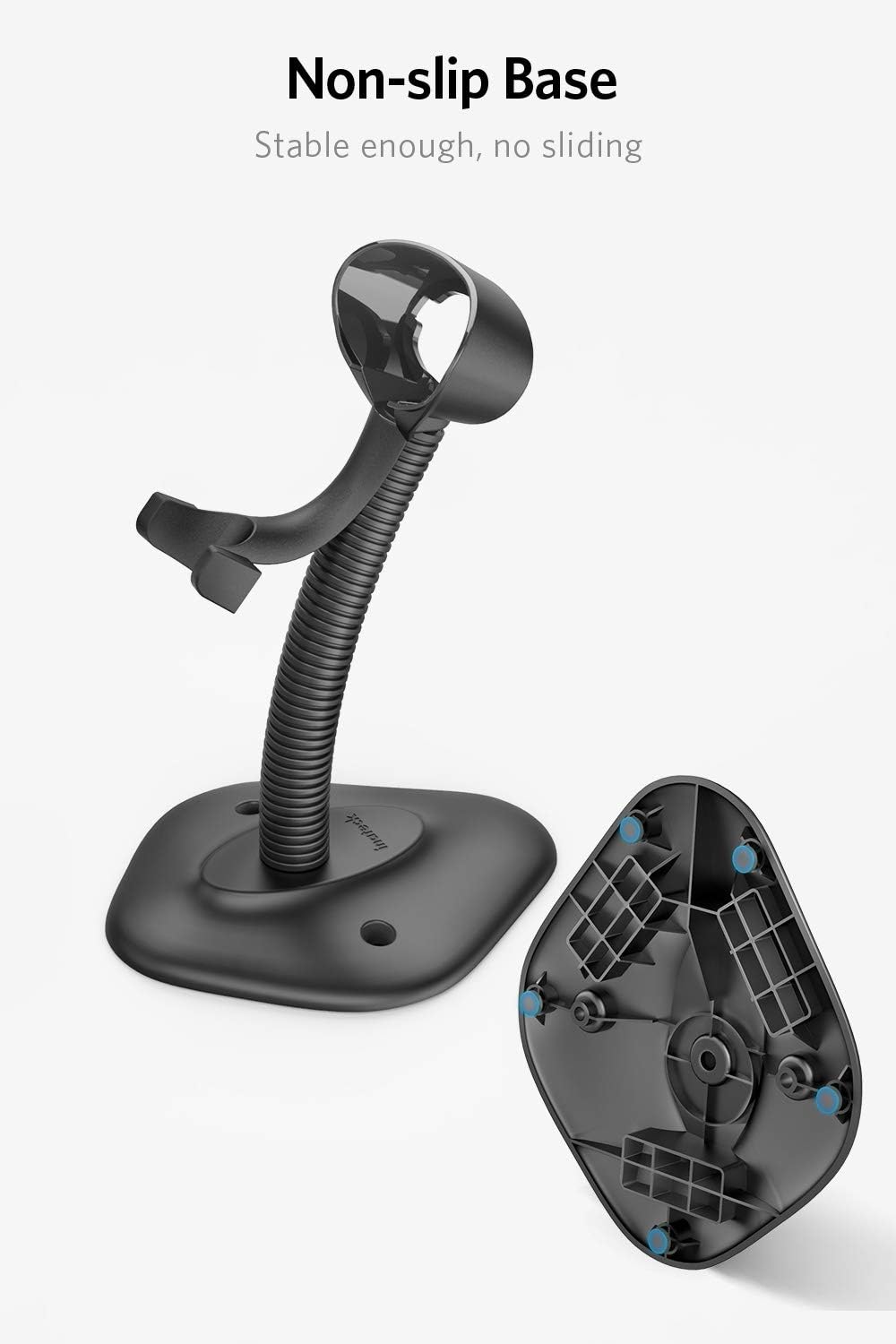
Figure 3: The non-slip base ensures stability during use.
Operating Instructions
Once assembled, the stand is ready for use with your compatible Inateck barcode scanner.
- Placing the Scanner: Gently place your Inateck barcode scanner into the holder. The holder is designed to securely cradle the scanner, allowing for hands-free operation.
- Adjusting Angle and Height: The flexible arm allows you to adjust the angle and height of the scanner to suit your specific scanning needs and ergonomic preferences. Bend the arm carefully to achieve the desired position.
- Compatibility: This stand is specifically designed for Inateck P6, BCST-50, BCST-60, and BCST-70 barcode scanners. While it may fit other models, it is recommended to verify dimensions for optimal fit and stability.

Figure 4: Adjust the flexible arm to set the optimal angle and height for your scanner.

Figure 5: Compatible Inateck barcode scanner models: P6, BCST-70, BCST-60, BCST-50, and BCST-31.

Figure 6: A barcode scanner securely placed in the stand for hands-free scanning.
Maintenance
To ensure the longevity and proper functioning of your Inateck Barcode Scanner Stand, follow these simple maintenance guidelines:
- Cleaning: Wipe the stand regularly with a soft, dry cloth to remove dust and debris. For stubborn marks, a slightly damp cloth can be used, followed by immediate drying. Avoid abrasive cleaners or solvents.
- Inspection: Periodically check all connections, especially the base and holder attachments, to ensure they remain secure. Tighten if necessary.
- Storage: If storing the stand for an extended period, disassemble it and store in a cool, dry place away from direct sunlight and extreme temperatures.
Troubleshooting
This section addresses common issues you might encounter with the barcode scanner stand.
| Problem | Possible Cause | Solution |
|---|---|---|
| Stand is unstable or wobbly. | Loose connection at the base or uneven surface. | Ensure the wing nut at the base is tightened securely. Place the stand on a flat, stable surface. Check if non-slip pads are intact. |
| Scanner does not fit securely in the holder. | Incompatible scanner model or incorrect placement. | Verify that your scanner is one of the compatible Inateck models (P6, BCST-50, BCST-60, BCST-70, BCST-31). Ensure the scanner is inserted correctly into the cradle. |
| Flexible arm does not hold position. | Arm is bent beyond its structural limit or internal wear. | Avoid excessive force when adjusting the arm. If the issue persists, contact Inateck customer support. |
Specifications
Key technical specifications for the Inateck Barcode Scanner Stand:
- Model: BCST-S
- Manufacturer Model Number: 6957599311090
- Material: Robust Industrial ABS Plastic
- Color: Barcode Scanner Stand (Black)
- Product Dimensions: Approximately 1 x 1 x 1 cm (base dimensions not explicitly stated, but overall compact)
- Item Weight: Approximately 236 grams
- Height: Approximately 25 cm
- Compatibility: Designed for Inateck P6, BCST-50, BCST-60, BCST-70, BCST-31 barcode scanners.

Figure 7: Detailed dimensions of the scanner holder for compatibility reference.
Warranty and Support
Inateck products are manufactured to high-quality standards. For information regarding warranty coverage, technical support, or any product-related inquiries, please refer to the official Inateck website or contact their customer service directly. Contact details are typically available on the product packaging or the official brand website.
You can visit the Inateck store on Amazon for more information: Inateck Store
Related documentsBCST-S (Model: 6957599311090)

Ask a question about this manual
Ask about setup, troubleshooting, compatibility, parts, safety, or missing instructions. Manuals+ will review the question and use this page’s manual context to help answer it.