
1. Introduction
The SilverStone RAVEN RV05B is a high-performance computer case designed with a revolutionary 90-degree motherboard mounting layout. This unique design, inherited from the original RAVEN RV01, optimizes airflow and thermal performance by utilizing the natural stack effect of heat convection. The RV05B eliminates traditional 5.25-inch drive bays to achieve a compact form factor without compromising on component compatibility or cooling efficiency.
Equipped with two Air Penetrator fans, the RV05B ensures excellent cooling and quiet operation. Its positive air pressure design aids in dust prevention, while features like externally removable filters and tool-less panels simplify maintenance and system building. This manual provides detailed instructions for setting up, operating, and maintaining your RV05B computer case.
2. Product Overview
Familiarize yourself with the key components and features of your SilverStone RAVEN RV05B computer case.

Figure 2.1: Angled view of the SilverStone RAVEN RV05B computer case, showcasing its distinctive front panel and overall structure.

Figure 2.2: Front view of the RV05B, highlighting the sleek, angular design and the RAVEN logo.

Figure 2.3: Top view of the RV05B, showing the top ventilation grilles and the SilverStone branding.

Figure 2.4: Internal view of the RV05B with the side panel removed, illustrating the 90-degree motherboard tray and the two large Air Penetrator fans at the bottom.

Figure 2.5: Rear view of the RV05B, highlighting the exhaust area and the removable filter for the power supply.
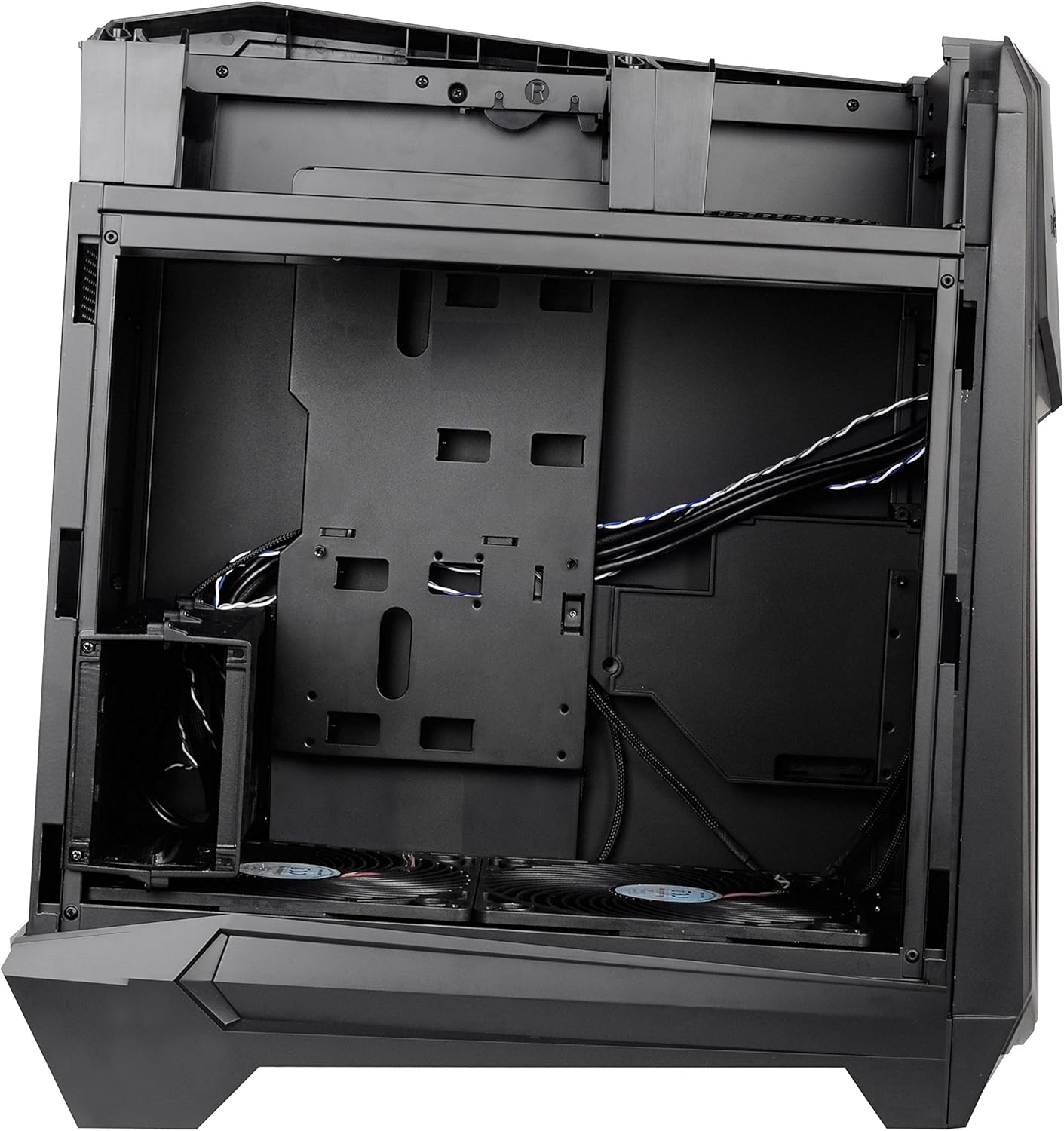
Figure 2.6: Internal view of the RV05B from the side, showing the cable management cutouts and mounting points for storage drives.

Figure 2.7: Internal view of the RV05B from the opposite side, providing a clearer look at the cable routing channels and the back of the motherboard tray.
3. Setup and Installation
3.1 Removing Side Panels
The RV05B features quick-release latches for fast side panel removal. Locate the latches at the rear of the case, typically at the top edge of each side panel. Press or slide the latch to release the panel, then gently pull it away from the chassis.
3.2 Motherboard Installation
The RV05B utilizes a 90-degree rotated motherboard mounting design. Install your SSI-CEB, ATX, or Micro-ATX motherboard onto the pre-installed standoffs. Ensure all screws are securely fastened. The rear I/O panel of the motherboard will face upwards when the case is in its upright position.
3.3 Power Supply Installation
The power supply unit (PSU) mounts at the bottom of the case. Slide the PSU into its designated bay from the rear of the case, ensuring the fan faces downwards towards the intake filter. Secure the PSU with screws from the exterior rear of the chassis. Note that PSUs longer than 160mm may interfere with the 3.5" drive bay.
3.4 Storage Drive Installation
The RV05B is designed without 5.25-inch drive bays. It supports 3.5-inch and 2.5-inch drives. Refer to the internal layout (Figure 2.6 and 2.7) for specific mounting locations. Typically, 3.5-inch drives are mounted in a cage near the PSU, while 2.5-inch drives can be mounted on the back of the motherboard tray or other designated spots. Use the provided screws and mounting hardware.
3.5 Graphics Card and Expansion Card Installation
Due to the 90-degree motherboard rotation, graphics cards and other expansion cards will be oriented vertically. Remove the necessary expansion slot covers from the top of the case. Insert your cards and secure them with screws or tool-less mechanisms. For optimal cooling, consider graphics cards that expel heat out the back.
3.6 Cable Management
The RV05B offers ample space and cutouts behind the motherboard tray for effective cable management. Route power cables and data cables through these cutouts to maintain a clean interior, which improves airflow and aesthetics. Use zip ties or Velcro straps to bundle cables neatly.
4. Operation
4.1 Powering On
Once all components are installed and connected, ensure the power supply switch is in the 'ON' position. Press the power button located on the front panel of the case to start your system.
4.2 Airflow and Cooling
The RV05B's 90-degree motherboard mounting and positive air pressure design are engineered for superior cooling. The two 180mm Air Penetrator fans at the bottom draw in cool air, which then rises naturally through the components and exits through the top. This 'stack effect' efficiently dissipates heat from the CPU and GPU.
4.3 Fan Speed Control
The included Air Penetrator fans feature three-speed switches. These switches are typically located near the fan connections or on a dedicated fan controller within the case. Adjust the fan speed according to your preference for cooling performance versus noise level.
5. Maintenance
5.1 Dust Filter Cleaning
The RV05B features externally removable dust filters, primarily at the front and bottom intake areas. Regular cleaning of these filters is crucial for maintaining optimal airflow and preventing dust buildup inside the case. To clean, simply slide out the filters, brush off accumulated dust, or rinse with water if necessary (ensure they are completely dry before reinstallation).
5.2 Interior Cleaning
Periodically, remove the side panels and use compressed air to clear dust from internal components such as CPU coolers, GPU heatsinks, and power supply fans. Ensure the system is powered off and unplugged before performing any interior cleaning.
6. Troubleshooting
This section provides general guidance for common issues related to computer cases. For specific component-related issues, refer to the respective component manuals.
6.1 System Not Powering On
- Check all power connections: Ensure the PSU is properly connected to the wall outlet and the motherboard (24-pin and CPU power).
- Verify front panel connectors: Confirm that the power button and other front panel headers are correctly connected to the motherboard.
- Test PSU: If possible, test the power supply independently or with another system.
6.2 Overheating Issues
- Check fan operation: Ensure all case fans and CPU/GPU fans are spinning correctly.
- Clean dust filters: Clogged filters can severely restrict airflow.
- Verify fan orientation: Ensure intake fans are drawing air in and exhaust fans are pushing air out.
- Improve cable management: Poor cable routing can obstruct airflow.
6.3 Excessive Noise
- Identify source: Determine if the noise is coming from case fans, CPU cooler, GPU, or PSU.
- Check for obstructions: Ensure no cables are hitting fan blades.
- Adjust fan speeds: Use the fan speed switches or motherboard fan control software to reduce fan RPMs.
- Tighten screws: Loose components or side panels can cause vibrations.
7. Specifications
| Feature | Specification |
|---|---|
| Model Name | RV05B (CS-RV05B) |
| Motherboard Compatibility | SSI-CEB, ATX, Micro-ATX |
| Case Type | Full Tower |
| Material | Alloy Steel, Plastic |
| Dimensions (LxWxH) | 22 x 12 x 24 inches (approx. 55.88 x 30.48 x 60.96 cm) |
| Item Weight | 19 pounds (approx. 8.62 kg) |
| Cooling Method | Air (Positive Air Pressure Design) |
| Included Fans | 2 x 180mm Air Penetrator Fans (with 3-speed switches) |
| Power Supply Mounting | Bottom Mount |
| USB 3.0 Ports | 2 |
| Audio-out Ports | 1 |
| 5.25" Drive Bays | None |
| Liquid Cooling Support | Various radiator sizes supported |
8. Warranty and Support
For warranty information and technical support, please visit the official SilverStone website or contact their customer service department. Keep your proof of purchase for warranty claims.
Manufacturer: SilverStone
Website: www.silverstonetek.com


