
1. Introduction
Thank you for choosing the Divoom BLUETUNE Solo V3 Portable Bluetooth Speaker. This manual provides essential information for the safe and efficient use of your device. Please read it thoroughly before operation and retain it for future reference.
2. Package Contents
Upon unpacking, please ensure all items listed below are present and in good condition:
- Divoom BLUETUNE Solo V3 Portable Bluetooth Speaker
- USB Charging Cable
- Protective Carrying Pouch
- User Manual
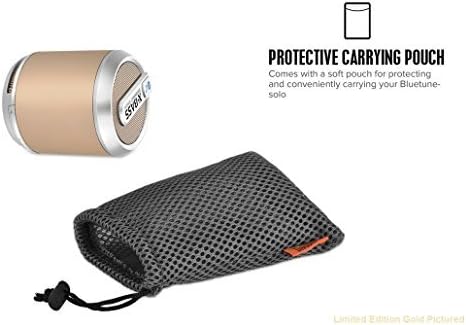
Image: The Divoom BLUETUNE Solo V3 speaker shown alongside its protective carrying pouch. The speaker is cylindrical with a gold-colored body and silver accents, featuring an 'X-BASS' label. The pouch is a black mesh drawstring bag designed for portability and protection.
3. Setup
3.1 Charging the Speaker
- Connect the small end of the USB charging cable to the charging port on the speaker.
- Connect the large end of the USB charging cable to a USB power adapter (not included) or a computer's USB port.
- The charging indicator light will illuminate.
- Charging typically takes approximately 2 hours for a full charge.
- Once fully charged, the indicator light may change or turn off, depending on the model.
3.2 Powering On/Off
- To power on: Press and hold the power button for a few seconds until you hear an audible prompt or see an indicator light.
- To power off: Press and hold the power button again for a few seconds until the device powers down.
3.3 Bluetooth Pairing
- Ensure the speaker is powered on and in pairing mode (indicated by a flashing LED light, typically blue).
- On your mobile device (smartphone, tablet, laptop), enable Bluetooth.
- Search for available Bluetooth devices.
- Select "BLUETUNE Solo V3" from the list of devices.
- Once paired, the speaker will provide an audible confirmation, and the LED light will typically become solid.
- The speaker will automatically attempt to reconnect to the last paired device when powered on.
4. Operating Instructions
4.1 Audio Playback
- After successful Bluetooth pairing, you can play audio from your connected device.
- Use your connected device to control playback (play/pause, skip tracks) and volume.
- Some speakers may have integrated volume controls; refer to the device's physical buttons if available.
4.2 Answering Calls
The BLUETUNE Solo V3 features a built-in microphone, allowing you to use it for hands-free calls.
- When a call comes in, the speaker may ring or pause audio playback.
- Press the designated call answer button (if available on the speaker) or answer the call from your connected phone.
- Speak towards the speaker for the microphone to pick up your voice.
- To end a call, press the call button again or end it from your phone.
5. Maintenance
5.1 Cleaning
- Wipe the speaker with a soft, dry, lint-free cloth.
- Do not use abrasive cleaners, alcohol, benzene, or other chemical solvents, as these may damage the casing or finish.
5.2 Battery Care
- To prolong battery life, avoid fully discharging the battery frequently.
- Charge the speaker regularly, even if not in use for extended periods.
- Store the speaker in a cool, dry place away from extreme temperatures.
6. Troubleshooting
If you encounter issues with your BLUETUNE Solo V3, please refer to the following common solutions:
| Problem | Possible Solution |
|---|---|
| Speaker does not power on | Ensure the battery is charged. Connect to a power source and try again. |
| Cannot pair via Bluetooth | Ensure the speaker is in pairing mode. Turn off and on Bluetooth on your device. Move closer to the speaker. Clear previous Bluetooth connections on your device. |
| No sound or low volume | Check volume levels on both the speaker and your connected device. Ensure the speaker is properly paired. |
| Poor sound quality | Move the speaker closer to your device to reduce interference. Ensure there are no obstructions between the devices. |
7. Specifications
- Brand: Divoom
- Model: BLUETUNE Solo V3
- Connectivity Technology: Bluetooth
- Speaker Type: Loud Bass Driven Speaker
- Special Feature: Built-in Microphone
- Battery Average Life: 8 Hours
- Battery Charge Time: Approximately 2 Hours
- Woofer Diameter: 40 Millimeters
- Item Weight: 8 Ounces
- Color: White
8. Warranty and Support
8.1 Warranty Information
Divoom offers a limited one-year warranty that covers manufacturer defects at the discretion of the manufacturer. Please retain your proof of purchase for warranty claims.
8.2 Customer Support
For further assistance, technical support, or warranty inquiries, please visit the official Divoom website or contact their customer service department. Refer to the product packaging or Divoom's official website for the most current contact information.


