
Introduction
The Leviton 515PV-LIT is a grounding lighted plug end replacement designed for various indoor applications. This device features a clear body with a green neon light that illuminates when power is flowing through the cord, providing a visual indication of active power. It is engineered for durability and ease of installation, featuring brass plug blades and connector contacts for maximum conductivity.
Key features of the 515PV-LIT plug end include:
- Fast and easy assembly design.
- Suitable for replacing plugs on tools, appliances, and extension cords.
- Integrated green neon light to indicate power flow.
- Automatic cord grip adjustment for 18-12 AWG wires.
- Designed for indoor use only.
Important Safety Instructions
Read and understand all instructions before installing or using this product. Failure to follow these instructions may result in electric shock, fire, or serious injury.
- ALWAYS disconnect power at the circuit breaker or fuse box before working with electrical wiring.
- This product is for indoor use only. Do not expose to moisture or use in wet locations.
- Ensure the replacement plug is compatible with the appliance or cord's voltage and amperage ratings. This plug is rated for 15 Amps, 125 Volts.
- Use appropriate personal protective equipment, such as safety glasses and insulated gloves.
- If you are unsure about any part of the installation process, consult a qualified electrician.
- Ensure all wire connections are secure and properly insulated.
- Do not use if the plug or cord is damaged.
Setup and Installation
This section outlines the steps for replacing an existing plug with the Leviton 515PV-LIT. Ensure power is disconnected before proceeding.
Tools Required:
- Screwdriver (Phillips and/or flathead, depending on screw type)
- Wire strippers
- Utility knife (optional, for outer jacket)
Installation Steps:
- Prepare the Cord: Cut off the old plug. Carefully strip the outer jacket of the cord back approximately 1 to 1.5 inches to expose the insulated inner wires (typically black, white, and green/bare copper). Be careful not to nick the insulation of the inner wires.
- Strip Inner Wires: Strip approximately 1/2 inch of insulation from the end of each inner wire.
- Disassemble the Plug: Unscrew the housing of the Leviton 515PV-LIT plug to access the internal terminals.
- Insert Cord: Thread the prepared cord through the cord grip opening at the back of the plug housing.
- Connect Wires: Connect the wires to the corresponding screw terminals. Twist the stranded wire ends tightly before inserting them under the screw terminals for a secure connection.
- Connect the BLACK (hot) wire to the BRASS/GOLD screw terminal.
- Connect the WHITE (neutral) wire to the SILVER screw terminal.
- Connect the GREEN or bare copper (ground) wire to the GREEN screw terminal.
- Secure Cord Grip: The built-in cord grip automatically adjusts for 18-12 AWG wires. Ensure the cord is firmly seated in the grip to prevent strain on the wire connections.
- Reassemble the Plug: Carefully reassemble the plug housing, ensuring all components are properly aligned and screws are tightened securely.
- Test: Once assembled, restore power and test the plug. The green neon light should illuminate when power is present.
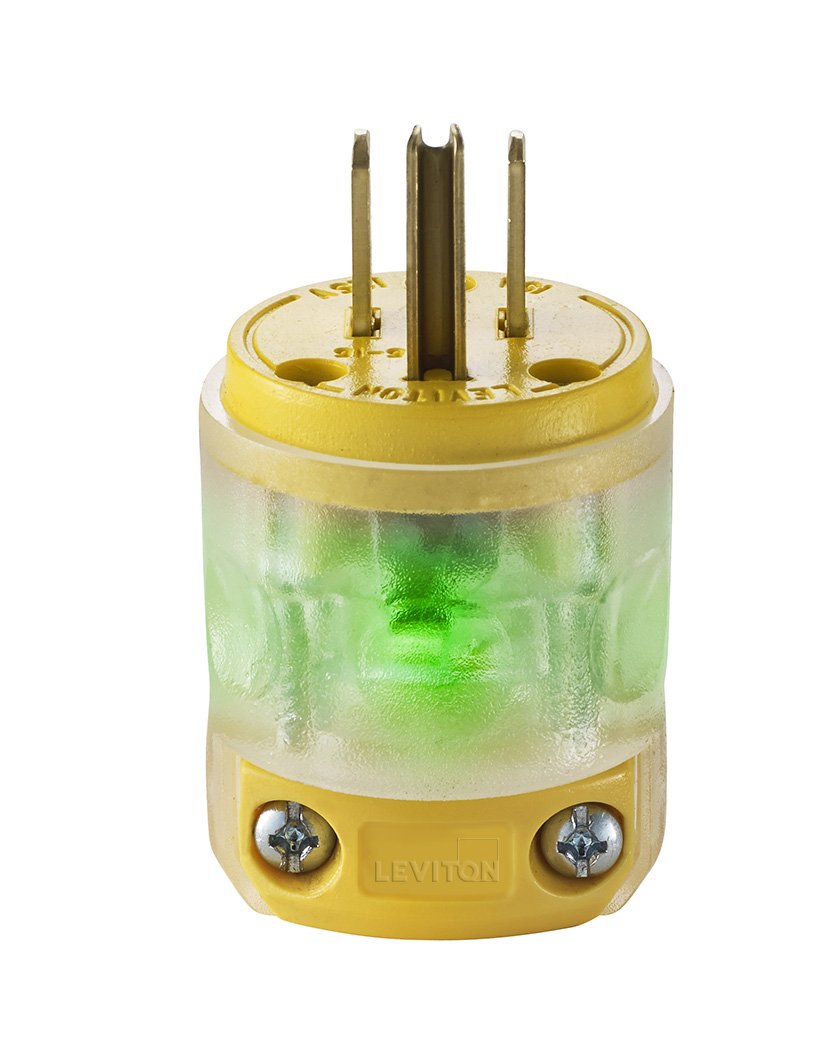
Figure 1: Leviton 515PV-LIT Grounding Lighted Plug End Replacement. This image shows the yellow and clear body of the plug, with the three prongs visible at the top and the screw terminals for wiring at the base. The clear section highlights the internal components and the green neon light when active.
Operation
The Leviton 515PV-LIT plug operates like any standard grounding plug. Its unique feature is the integrated green neon light. When the plug is properly connected to a live electrical outlet and power is flowing through the circuit, the green light within the clear body of the plug will illuminate. This provides a quick visual confirmation that the connected device is receiving power.
Care and Maintenance
To ensure the longevity and safe operation of your Leviton 515PV-LIT plug, follow these simple maintenance guidelines:
- Regular Inspection: Periodically inspect the plug and the connected cord for any signs of damage, such as cracks, fraying, or discoloration. If any damage is observed, discontinue use and replace the plug or cord.
- Cleaning: Clean the exterior of the plug with a dry, soft cloth. Do not use liquid cleaners or solvents, as these can damage the plastic or internal components.
- Storage: When not in use, store the plug and cord in a dry, clean environment, away from extreme temperatures and direct sunlight.
- Indoor Use Only: Always remember that this plug is designed for indoor use. Exposure to outdoor elements can compromise its safety and functionality.
Troubleshooting
This section addresses common issues you might encounter with your Leviton 515PV-LIT plug.
| Problem | Possible Cause | Solution |
|---|---|---|
| Green light does not illuminate when plugged in. |
|
|
| Plug feels loose in the outlet. |
|
|
| Plug or cord gets hot during use. |
|
|
Product Specifications
| Model Number | 515PV-LIT |
| Brand | Leviton |
| Amperage | 15 Amps |
| Voltage | 125 Volts |
| Number of Poles | 2 |
| Number of Wires | 3 |
| Plug Format | Type B |
| Material | Polyvinyl Chloride (PVC) |
| Color | Yellow |
| Product Dimensions | 1.54 x 1.5 x 3 inches |
| Item Weight | 0.32 ounces |
| Specification Met | NEMA, UL |
| Cord Grip Compatibility | 18-12 AWG |
Warranty and Customer Support
Leviton products are manufactured to high-quality standards and are typically backed by a manufacturer's warranty. For specific warranty details regarding your 515PV-LIT Grounding Lighted Plug End Replacement, please refer to the documentation included with your purchase or visit the official Leviton website.
If you require technical assistance, have questions about installation, or need to report a defective product, please contact Leviton Customer Support directly. Contact information can usually be found on the Leviton website or product packaging.


